
A rich-text Markdown editor you can drop into any PHP, Python, or HTML page with one <script> tag
MIT Licensed · No API key · No account · No npm · No build step · Self-host or CDN
<!-- Include the editor with just a single line of code: -->
<script type="module" src="https://cdn.jsdelivr.net/npm/@freedomware/traven@latest/dist/traven.js"></script>




Live Demos • FAQ • Compare • Quick Start • Cheat Sheet • API • Documentation
Traven is a self-contained, embeddable Markdown editor that renders your content live as you type. It has the writing experience of a desktop editor, but in a single <script> tag you can drop into any web page.
The editor is framework-agnostic. It works whether you are using a plain HTML file, a PHP template, or a complex React application. It also respects your independence: Traven doesn't rely on any frameworks, and doesn't require an API key or setting up an account. It is open-source, MIT licensed, and outputs pure Markdown.
Traven is for developers building CMS systems, blog platforms, administrative dashboards, or any kind of content forms that need an editor with these requirements:
- Clean Markdown output: Content remains portable, readable, and formatted as raw Markdown.
- Seamless writing experience: An inline editing experience rather than an enforced, divided split-pane view.
- Easy integration: An editor that can be fully integrated and styled in minutes, adapting to the layout and theme of an existing project.

Traven is a WYSIWYM (What You See Is What You Mean) editor. This means it hides Markdown syntax when you are not editing it, showing clean, styled text instead.
Type **bold** and the asterisks quietly step aside, leaving only the bold text visible. Move your cursor back inside the word, and the syntax reappears so you can edit it. The underlying document is Markdown.
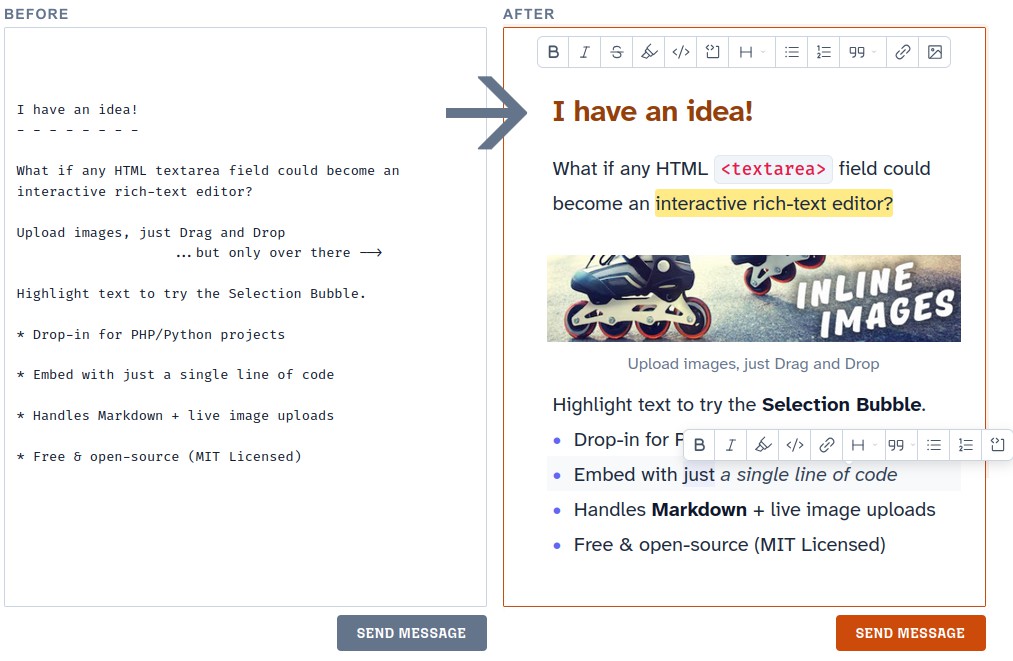
When evaluating the landscape of browser-based editors for a Markdown-first editor with the look and feel of Typora and Obsidian, but for embedding and using in a web browser, each category had trade-offs:
- WYSIWYG Heavyweights: Editors like TinyMCE and CKEditor want an API key, emit HTML, and make you serialize that HTML back to Markdown lossily.
- Classic Split-Panes: Tools like EasyMDE use the legacy CodeMirror 5 engine and a split-pane UX.
- Framework Editors: ProseMirror, Lexical, and TipTap are frameworks, aren't Markdown-native, and are also not built to just quickly embed.
- AST Roundtrip Editors: Even editors like Milkdown parse Markdown into an HTML AST and back, in a roundtrip that can be brittle and cause spacing artifacts.
Traven Editor doesn't have these constraints.
- Dynamic Toolbars: Choose from floating, hybrid, or static toolbar layouts, including formatting bubbles and gutter insert menus.
- Math & Diagrams: Built-in, lazy-loaded support for rendering LaTeX math equations and Mermaid diagrams.
- Image Uploads: Optimistic image uploads with drag-and-drop support. Audio and video supported, too.
- Custom Shortcodes: Extend standard Markdown with custom, interactive WYSIWYM widgets.
- Bidirectional Sync: Support for split-screen layouts where the raw Markdown and the visual editor stay in sync.
- Vim Mode: Built-in Vim emulation for power users.
For a complete list of features, see the Key Features Documentation.
The fastest way to get Traven running is by dropping the custom HTML element into your page.
<!DOCTYPE html>
<html lang="en">
<head>
  <meta charset="UTF-8">
  <title>Quick Start test drive of the editor</title>
</head>
<body>

  <!-- The editor acts just like a standard form input -->
  <form action="/save" method="POST">
    <traven-editor name="content" toolbar># Hello Traven</traven-editor>
    <button type="submit">Save</button>
  </form>

  <!-- Load the script anywhere in your page -->
  <script type="module" src="https://cdn.jsdelivr.net/npm/@freedomware/traven@latest/dist/traven.js"></script>

</body>
</html>
For advanced setups, you can also instantiate Traven programmatically via new TravenEditor(). See how.
Traven is modular and customizable. Learn more about advanced configurations, theming, and frameworks:
- Quick Start — Step-by-step guides for adding Traven to PHP forms and HTML pages.
- Cheat Sheet — A quick reference for every
<traven-editor>attribute and configuration option. - Common Configurations — Ready-made recipes for common use cases (e.g., minimal comment boxes, CMS admin panels).
- Customization & Styling — Learn how to swap skins, override selectors, and build custom themes.
- Framework Wrappers — Official wrappers and integration guides for React, Vue, and Svelte.
- API Reference — The complete list of constructor options, public methods, and events.

|

|

|

|

|

|

|

|
Traven leverages CodeMirror 6 (the engine Obsidian uses) and the Web Components standard.
- Virtual Viewport Rendering: CM6 only mounts the visible portion of the document, so Traven handles 10,000+ line files without cursor stutter.
- Form-Associated Custom Element: Traven registers with the browser's form submission API via
ElementInternals. Standard<form method="POST">works without hidden textarea shims. - CSS Framework Isolation: All styling is scoped. Traven coexists with Tailwind, Bootstrap, or custom CSS without breaking the host page.
- Single-Tag Deployment: Drop Traven into plain HTML, a PHP template, or a Django form using a single
<traven-editor>element and CDN script.
"B. Traven" was the self-chosen nym of the privacy-first author behind The Treasure of the Sierra Madre, who spent his career proving that the work outlasts its author, communicating with publishers pseudonymously and letting his writing speak for itself. It is also now the name of this framework-agnostic, open-source editor meant to be embedded and stay quietly out of the limelight.
Open-source, licensed under the MIT License.