
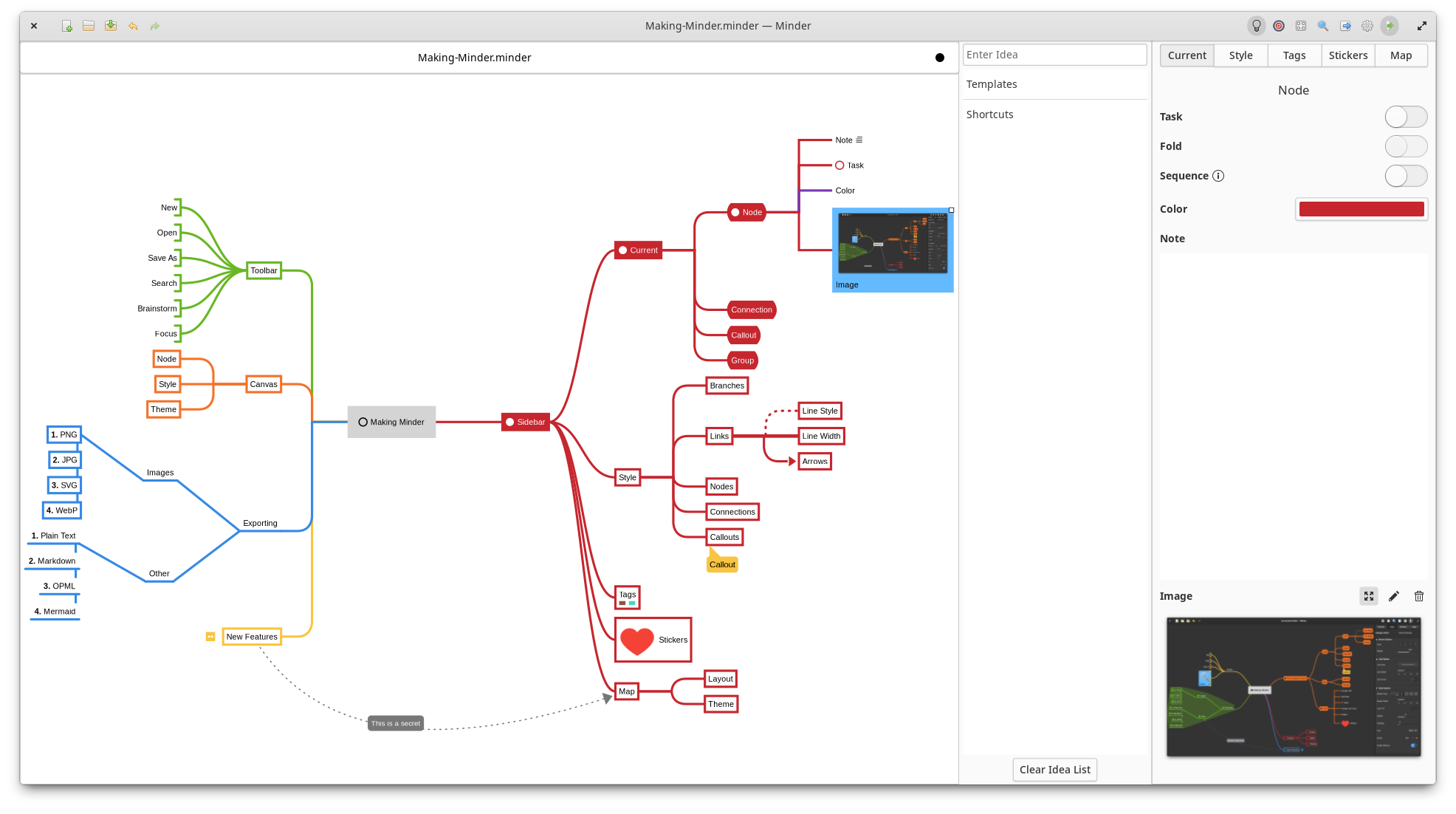
Use the power of mind-mapping to make your ideas come to life.
- Quickly create visual mind-maps using the keyboard and automatic layout.
- Choose from many tree layout choices.
- Support for Markdown formatting.
- Support for insertion of Unicode characters.
- Typeset inline LaTeX expressions to scalable SVG using
$$...$$delimiters. - Add notes, tasks, and images to your nodes.
- Add node-to-node connections with optional text and notes.
- Stylize nodes, callouts, links and connections to add more meaning and improve readability.
- Save and reuse style settings within and across open mindmaps.
- Add stickers, tags, callouts and node groups to call out and visibly organize information.
- Quick search of node and connection titles and notes, including filtering options.
- Zoom in or enable focus mode to focus on certain ideas or zoom out to see the bigger picture.
- Enter focus mode to better view and understand portions of the map.
- Quickly brainstorm ideas with the brainstorming interface and worry about where those ideas belong in the mind map later.
- Unlimited undo/redo of any change.
- Automatically and manual saving supported.
- Colorized node branches.
- Open multiple mindmaps with the use of tabs.
- Built-in and customizable theming.
- Gorgeous animations.
- Import from OPML, FreeMind, Freeplane, PlainText/Markdown (formatted), Mermaid (mindmap), Outliner, Portable Minder, filesystem and XMind formats.
- Export to CSV, FreeMind, Freeplane, JPEG, BMP, SVG, WebP, Markdown, Mermaid, Mermaid Mindmap, OPML, Org-Mode, Outliner, PDF, PNG, PlainText, filesystem, XMind and yEd formats.
- Printer support.
You will need the following dependencies to build Minder:
- ninja-build
- python3-pip
- python3-setuptools
- meson
- valac
- debhelper
- libcairo2-dev
- libgranite-7-dev
- libgtk-4-dev
- libxml2-dev
- libgee-0.8-dev
- libarchive-dev
- libgtksourceview-5-dev
- libmarkdown2-dev
- librsvg2-dev
- libjson-glib-dev
- libwebp-dev
- webp-pixbuf-loader
- A LaTeX installation providing
latex,amsmath,amssymbanddvisvgm
To typeset a formula in a node, connection title, or callout, surround it with
$$ delimiters. Formulas can be mixed with ordinary text and more than one can
be used in a text value. For example:
This is a formula $$\frac{-b \pm \sqrt{b^2 - 4ac}}{2a}$$Minder displays the source while it is being edited. When editing finishes, ordinary and Markdown-formatted text remains native Pango text and each formula is drawn as an inline scalable SVG. If the LaTeX tools are unavailable or an expression is invalid, Minder leaves that source visible.
If the optional formulaocr-offline command is installed, pasting a formula
image with Ctrl+Shift+V converts it locally to editable $$...$$ source
and then renders it as SVG. Ordinary Ctrl+V keeps its usual behavior,
including pasting clipboard images as images. Recognition is asynchronous and
does not require an internet connection. Set MINDER_FORMULA_OCR to select a
different local recognizer executable.
To install, run sudo ./app install and then run the application from your application launcher or from
the command-line with ./app run. If you want to debug with gdb using this build, run ./app debug.
Alternatively, you can install the elementary OS Flatpak using ./app elementary or the Flathub Flatpak using ./app flathub. Once the Flatpak has been built, it can be run using ./app run-flatpak. To make this work, make sure that flatpak and flatpak-builder are installed on your system along with the required Sdk and Platform flatpaks.
Minder is available as a Flatpak (recommended) via Flathub and elementary OS AppCenter.
You can install the Flathub flatpak from:
https://flathub.org/apps/com.github.phase1geo.minder
Search for "Minder" in AppCenter and install from there.
The following distributions have Minder available in their own packaging formats. These versions may not be the latest versions of Minder, so install these at your own discretion. The Flatpak versions of Minder are officially supported by the developers of Minder.
Minder is packaged in Arch Linux, install it with pacman:
$ sudo pacman -S minder
Minder is packaged in Void Linux, install it with xbps-install:
$ sudo xbps-install Minder
For Fedora users, install the RPM package with:
$ sudo dnf install minder
Debian/Ubuntu package is also available:
$ sudo apt install minder
Minder documentation can be found here.