Self-hosted orchestrator for Claude Code agents. Drive ideas through a role-gated SDLC — plan → build → test → release — with per-agent sandboxing, live run streaming, and markdown-on-disk as the source of truth. Single Go binary.
📺 Watch the 5-minute walkthrough — set up kaos-control, add a project, and build a website end-to-end.
🌐 kaos-control.io · 📦 Releases · 📄 AGPLv3
Status: v0.1.x — actively developed, breaking changes possible before 1.0. Working releases ship from this repo's own lifecycle (dogfooded).
Claude Code is brilliant until you want to run it unattended on real work. The choices today are bad: grant blanket permissions with --dangerously-skip-permissions and hope, or babysit every tool call. Either way, three things stay broken:
- No structure around the agent. Where did this ticket come from? What plan is it executing? What's the acceptance test? The agent writes code; the why lives in your head or a Notion doc that drifts.
- No sandbox you can audit. Bypass mode is all-or-nothing. There's no per-agent allowlist, no record of which tool calls were made on which artefact.
- No cost or privacy lever. Every prompt is your architecture leaving your machine, and the token bill arrives at the end of the month with no breakdown of what spent it.
kaos-control gives you a middle path:
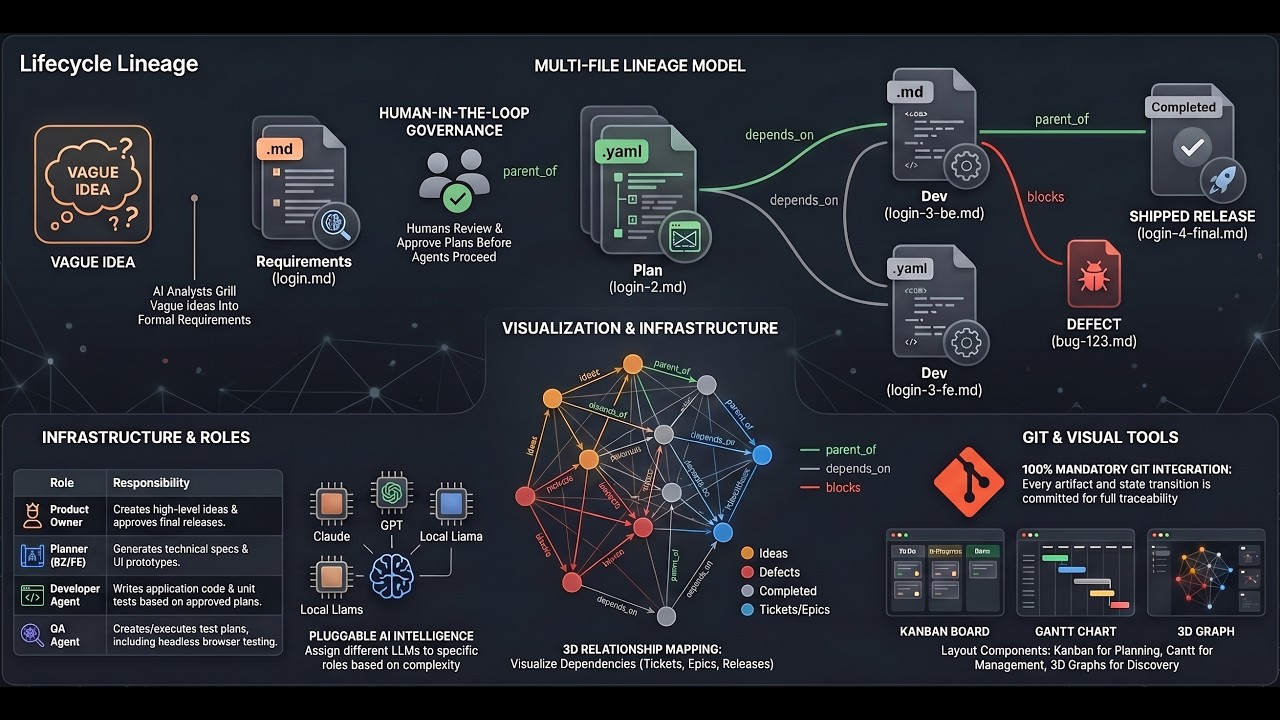
- Structured artefacts as the unit of work — every idea becomes a markdown file with YAML frontmatter, walks a configurable lifecycle (
ideas → requirements → plans → tests → releases), and carries a lineage slug so every line of shipped code traces back to the ask. - A mediated Claude driver that routes every tool call through a
PreToolUsehook, checked against per-agent path and bash allow/deny lists. Hard sandbox, full audit trail, no bypass mode required. - Per-role model assignment — Opus where thinking quality matters, Haiku for QA, local Ollama for code that should never leave your machine. Token spend logged per run.
Single Go binary with the SPA embedded. Self-hosted. Your artefacts live in your git repo. Pull the network cable and the workflow keeps going.
- Lifecycle directory (
lifecycle/) — markdown files with YAML frontmatter, organised by stage (ideas,requirements,backend-plans,frontend-plans,test-plans,tests,prototypes,defects,releases,sprints). - Lineage tracking — every artefact in a chain shares a slug and carries a monotonic index across stages. Every deployed line traces back to the original idea.
- Workflow state machine — role-gated transitions (e.g. only
approvercan move a ticket fromplanningtoin-development); plan-completion gates. - Two Claude drivers — pick
claude-code-clifor speed on a trusted machine, orclaude-mediatedfor a hard sandbox with audited tool calls (mandatory in Claude Enterprise environments). - Pluggable agents —
claude-code-cli,claude-mediated,ollama, plus ashell-stubfor test scaffolding. Bound to roles, sandboxed write paths, per-agent permission policy on the mediated driver. - DevOps pipelines — declarative YAML in
lifecycle/devops/(build, deploy, release). Triggered from the UI; per-step output streams to the browser over WebSocket and persists to~/.kaos-control/devops/<project>/. - Web UI — 3D and 2D graph views, Kanban, Gantt, roadmap, artefact editor with markdown preview, agent run dialog with live progress, DevOps page with live pipeline runs, parse-error view, project config editor.
- Distribution — one Go binary (~250 MB) with the frontend embedded. macOS (Intel + ARM), Linux (x86-64 + arm64), Windows (x86-64).
- Lead developers introducing agents into a real team workflow without giving up code review, tests, or release discipline.
- CTOs and tech leaders who want to approve documents rather than tinker with an IDE — the discipline is encoded in
CLAUDE.mdand inherited per project. - Founders running a one-person dev shop who need structure to track what's built and plan what's next.
- Product owners who want vague ideas captured faithfully, traceable through to release.
If your reaction to "I unleashed Claude Code on the repo overnight" is "…and what exactly did it do?" — this is for you.
- Backend: Go 1.25,
chi,goldmark,modernc.org/sqlite(pure-Go),go-git,coder/websocket,fsnotify. Local-model agents talk to Ollama over plainnet/http— no extra library dependency. - Frontend: Vue 3, Vite 6, TypeScript, Pinia,
markdown-it,3d-force-graph+ three.js, Cytoscape.js + fcose, CodeMirror 6.
kaos-control ships two Claude drivers, picked per-agent in lifecycle/config.yaml via the driver: field:
claude-code-cli— runsclaude --dangerously-skip-permissions -p ...as a headless subprocess. Fast and simple, ideal for personal use on a trusted machine. Requires Claude to be in bypass-permissions mode on every machine that runs kaos-control (one-time setup, below).claude-mediated— runsclaudein default permission mode and routes every tool call through kaos-control'sPreToolUsehook for allow/deny against per-agent path and bash allow/deny lists. Mandatory in environments where bypass mode is blocked (e.g. Claude Enterprise) or when you want a hard sandbox and an audit trail. No first-machine setup required — kaos-control configures the hooks per run.
Skip this section if every agent in your
lifecycle/config.yamlusesclaude-mediated.
kaos-control runs claude as a headless subprocess — there is no human at the terminal to approve individual tool calls. Without bypass-permissions mode, every agent run will stall with a message like "I need write permission to create the file" and produce no work.
Before your first agent run, on every machine that runs kaos-control:
-
Run
claudeinteractively at least once and accept the bypass-permissions warning. This is a one-time step that Anthropic requires per machine and per user — until you do it, the--dangerously-skip-permissionsflag kaos-control passes is silently ignored.claudeAt the first prompt, type any short instruction (e.g.
hello). Claude will show a one-time warning about bypass mode and ask you to accept. Accept it. You can quit straight after. -
Check no settings file is overriding it. If you have a
~/.claude/settings.json(or a project-local.claude/settings.json) with apermissions.defaultModeother thanbypassPermissions, that overrides the CLI flag. Either remove the key or set it tobypassPermissions. -
Smoke test. From any directory, run:
claude --dangerously-skip-permissions -p "list the files here" --output-format stream-json | head -20If you see a
Bashtool call complete successfully (not appear in apermission_denialsblock), you're set.
kaos-control detects an unconfigured bypass mode within the init_event_timeout_seconds window (default 10s) and fails the run with a clear precheck_failure reason plus a remediation list — no more silent stalls. Tracked under the agent-permission-precheck lineage in this project's lifecycle (shipped in v0.1.2).
Pre-built single-binary archives are published on GitHub Releases for macOS (Intel + Apple Silicon), Linux (x86-64 + arm64), and Windows (x86-64). Each archive ships the kaos-control binary alongside this README, LICENSE, and CONTRIBUTING.
This is the recommended path for most users. If you want to build from source instead, skip ahead to Install from source.
Pick the build for your OS and CPU architecture from the Releases page, or from a terminal — replace 0.1.2 with the version you want:
VERSION=0.1.2
BASE=https://github.com/kcsinclair/kaos-control/releases/download/v${VERSION}

# Pick ONE of the following:
curl -L -o kaos-control.zip "$BASE/kaos-control-${VERSION}-darwin-arm64.zip"    # macOS, Apple Silicon
curl -L -o kaos-control.zip "$BASE/kaos-control-${VERSION}-darwin-amd64.zip"    # macOS, Intel
curl -L -o kaos-control.zip "$BASE/kaos-control-${VERSION}-linux-amd64.zip"     # Linux, x86-64
curl -L -o kaos-control.zip "$BASE/kaos-control-${VERSION}-linux-arm64.zip"     # Linux, arm64
curl -L -o kaos-control.zip "$BASE/kaos-control-${VERSION}-windows-amd64.zip" # Windows, x86-64Each release publishes a SHA256SUMS file alongside the archives.
curl -L -o SHA256SUMS "$BASE/SHA256SUMS"

# macOS
shasum -a 256 -c SHA256SUMS --ignore-missing

# Linux
sha256sum -c SHA256SUMS --ignore-missing
Each line that matches a file you downloaded should print OK. If any line says FAILED, do not run the binary — re-download the archive.
The archive extracts to a versioned kaos-control-<VERSION>/ directory containing the binary plus the docs — e.g. kaos-control-0.1.2/:
unzip kaos-control.zip
cd kaos-control-${VERSION}
Two releases unzipped side-by-side won't collide because each gets its own versioned directory.
To quickly get started, just run it from the unzipped directory:
./kaos-controlTo make kaos-control runnable from anywhere, move it onto your PATH:
# macOS / Linux
sudo mv ./kaos-control /usr/local/bin/
On Windows, copy kaos-control.exe into a directory that's on your %PATH%, or invoke it by its full path.
The macOS builds are not yet code-signed, so the first time you run the binary macOS will refuse with a "cannot be opened because Apple cannot check it for malicious software" message. Strip the quarantine attribute once and you won't see the dialog again:
xattr -d com.apple.quarantine /usr/local/bin/kaos-controlLinux and Windows have no equivalent step.
From here on the bootstrap path is the same whether you built from source or downloaded a release:
- First run — kaos-control writes
~/.kaos-control/config.yaml, starts on:8042, and waits for you to create the first user. - Bootstrap a project — register a directory on disk as a project so it appears in the picker.
- Use it — what the SPA looks like once you're in.
If you plan to run agents, the Claude Code permissions section above is required reading — especially if any of your agents use the claude-code-cli driver. The mediated driver is plug-and-play; the CLI driver needs a one-time bypass-mode setup per machine.
| Version | Why | |
|---|---|---|
| Go | 1.25+ | Builds the server binary. |
| Node.js | 20 LTS+ | Builds the embedded SPA. See install steps below. |
| pnpm | 9+ | The frontend's package manager. See install steps below. |
| Git | 2.30+ | The server commits artifact changes to your project's git repo. |
| Claude Code CLI (optional) | — | Required only if you want to run agents. npm install -g @anthropic-ai/claude-code then claude auth login. |
Pick one:
-
macOS (Homebrew) —
brew install node -
macOS / Linux (nvm) — install nvm, then:
nvm install --lts
nvm use --lts
-
Linux (apt) — Debian/Ubuntu ships an old version; use NodeSource:
curl -fsSL https://deb.nodesource.com/setup_20.x | sudo -E bash - sudo apt-get install -y nodejs -
Windows — download the LTS installer from nodejs.org, or
winget install OpenJS.NodeJS.LTS.
Verify: node --version should print v20.x or higher.
The recommended way is corepack, which ships with Node ≥16.10:
corepack enable
corepack prepare pnpm@latest --activate
That installs pnpm globally and pins it for this project.
Alternatives:
- macOS (Homebrew) —
brew install pnpm - standalone script —
curl -fsSL https://get.pnpm.io/install.sh | sh - - npm —
npm install -g pnpm
Verify: pnpm --version should print 9.x or higher.
On Windows, develop from WSL and clone this repository into the Linux filesystem, not a Windows-mounted drive. For example, use a path like ~/src/kaos-control or /workspaces/kaos-control, and avoid /mnt/c/....
Keeping the repo off the Windows drive prevents common file-watching, permissions, symlink, and dependency install issues with Go, Node.js, Vite, and pnpm.
VS Code dev container setup is documented in .devcontainer/README.md. The container post-create hook installs project tooling and bootstraps a minimal ~/.kaos-control config that registers this workspace as a project.
git clone https://github.com/kcsinclair/kaos-control.git
cd kaos-control
make all          # builds web/dist + ./dist/kaos-control
The Go binary embeds the SPA via embed.FS, so ./dist/kaos-control is a single self-contained executable.
./dist/kaos-controlOn first launch, kaos-control writes a default ~/.kaos-control/config.yaml and starts listening on :8042. Open http://localhost:8042.
The contents of the config file are:
server:
    listen: :8042
    tls:
        enabled: false
        cert_file: ""
        key_file: ""
auth:
    method: local
    session_ttl: 24h0m0s
projects_dir: /Users/you/.kaos-control/projects
limits:
    max_concurrent_agents: 4
    max_concurrent_scheduler_jobs: 2
    scheduler_run_retention_days: 90
data_dir: /Users/you/.kaos-control/data
agent:
    init_event_timeout_seconds: 10
    require_bypass_permissions: true
The agent: block controls the agent-permission-precheck behaviour described earlier — leave the defaults unless you need to extend the init-event grace window or you're using only the claude-mediated driver and want to disable the bypass-mode requirement.
The first user can be created without authentication (bootstrap):
echo STRONGPASSWORD | ./dist/kaos-control auth create-user -admin -email YOUR_EMAIL -name "YOUR NAME" -password-stdinThe fastest path is the CLI scaffolder:
cd /path/to/your/project        # any directory; an existing git repo or a fresh one
/path/to/dist/kaos-control init -owner-email YOUR_EMAIL  # creates lifecycle/, lifecycle/config.yaml, CLAUDE.md
kaos-control init creates the standard lifecycle/ directory tree (ideas/, requirements/, backend-plans/, frontend-plans/, test-plans/, tests/, defects/, releases/, sprints/, prototypes/), a skeleton lifecycle/config.yaml with the standard role and agent definitions, and a CLAUDE.md to guide agent runs in this project.
Then register the project with kaos-control:
mkdir -p ~/.kaos-control/projects
cat > ~/.kaos-control/projects/myproject.yaml <<EOF
name: myproject
path: /path/to/your/project
description: <one-line description>
owner: you@example.com
EOF
Restart the server (or wait for it to pick up the new entry on the next scan) and the project will appear in the picker.
- Open http://localhost:8042, sign in, choose your project.
- Create an idea, work it through
clarifying → planning → in-development → in-qa → approved → done. - Configure agents per-role in
<project>/lifecycle/config.yamlto have them produce the next artifact in the lineage. - Wire DevOps pipelines into
<project>/lifecycle/devops/*.yamlto trigger build/test/release from the UI.
| Path | Purpose |
|---|---|
~/.kaos-control/config.yaml |
App-level config (server, auth, agents, ollama) |
~/.kaos-control/projects/*.yaml |
One file per registered project |
~/.kaos-control/data/<project>/index.db |
Per-project SQLite cache (rebuilt from disk on startup) |
~/.kaos-control/data/<project>/runs/<run_id>.log |
Per-agent-run log (header, streamed events, summary footer) |
~/.kaos-control/devops/<project>/<run_id>.log |
DevOps pipeline run logs |
<project>/lifecycle/config.yaml |
Per-project: roles, agents, plan gates, dashboard tracked types |
<project>/lifecycle/devops/*.yaml |
DevOps pipeline definitions for this project |
<project>/lifecycle/{ideas,requirements,…}/ |
Artifacts (markdown + YAML frontmatter) |
cmd/kaos-control/   Go binary entry point
internal/           Backend packages (agent, artifact, http, index, …)
web/                Vue 3 SPA (built into web/dist/, embedded by Go)
lifecycle/          This project's own artifacts (the meta-bootstrap)
tests/              Integration test code
plans/              Project plan + per-change implementation plans
- kaos-control.io — project site with screenshots, architecture diagrams, and the full pitch.
- CLAUDE.md — guidance for Claude Code agents working in this repo (commit conventions, lineage rules, build commands).
- lifecycle/requirements/Innovation Maker - Making Releases from Ideas-1.md — authoritative product spec.
- plans/PROJECT_PLAN.md — living state-of-the-project document.
GNU AGPLv3 — copyleft with a network-use clause. If you run a modified version of kaos-control as a network service, you must publish your modifications under the same licence.
Commercial licences for organisations that cannot accept AGPL terms may be available on request — open an issue to start the conversation.
Contributions are welcome. The project uses the Developer Certificate of Origin — sign off on every commit with git commit -s. See CONTRIBUTING.md for the full workflow.