Execute tasks at the speed of thought.
1st Place in AWS track at KingHacks 2026
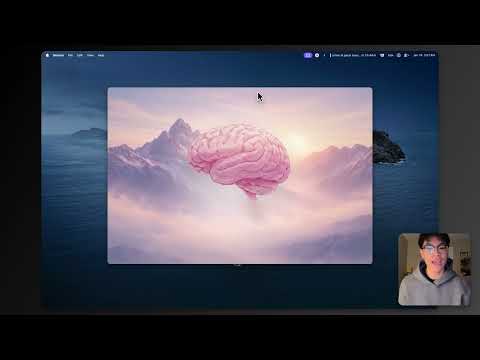
You're deep in flow state working on something. Then a thought crosses your mind—"I need to email Sarah back" or "I should check on that deploy by 3pm."
It's not urgent. But it's there, taking up mental space.
Your options aren't great: break your focus to click through some app's UI, type it out, categorize it, hit save. Or try to hold it in your head and inevitably forget...
This is what we think: for short time-horizon tasks, the bottleneck isn't your mind, but rather the interface. You can think "remind me to call mom tomorrow" in half a second. Actually capturing that in any existing tool? That's 30 seconds of context-switching...
The advencement of agentic tool use enables a new paradigm. We don't need to click through cluttered UIs or fight with input fields. We can just speak, and have something intelligent figure out what we meant and where it should go.
Second Brain is voice-to-action with near-zero friction. Stay in flow. Let the system handle the rest.
- Trigger — Global hotkey brings up a minimal overlay (no app switching)
- Speak — Say what's on your mind naturally: "Email Sarah that I'll be 10 minutes late to standup"
- Process — Real-time transcription → AI interpretation → Structured action
- Execute — The action happens. Email sent. Calendar event created. Reminder set. You're already back to work.
This isn't just note-taking. Second Brain actually does things:
- Send Emails — "I should email Mark that the deploy is done" → Gmail sends it
- Draft Emails — "Draft an email to John about the proposal" → Sits in your drafts for review
- Create Calendar Events — "Schedule a meeting with design team Thursday at 2pm" → Shows up in Google Calendar with attendees
- Set Reminders — "I need to call mom tomorrow at 6" → Apple Reminders triggers at the right time
- TODOs — Action items you'll get to later ("I need to review the PR")
- Notes — Pure information capture ("idea: what if we switched to Azure?")
Once captured, everything lives in a simple dashboard. Cards are easy to edit, complete, or delete. But we also wanted something different—a way to just see the shape of your day without reading through lists.
Mind Map View: A 3D brain sits at the center, with all your nodes floating around it. It's a quieter way to reflect on what's on your plate. Less like a todo app, more like checking in with yourself. The idea is that interacting with your tasks shouldn't feel like more screen time—it should feel simple, almost calming. We want the interface to get out of the way.
We needed a desktop app that could register global hotkeys, overlay on top of other windows, and access the microphone without browser permission prompts every time. Electron gives us all of that while staying cross-platform. The overlay is intentionally minimal—a waveform visualization and transcript, nothing more.
We built this for the AWS track at KingHacks 2026 and we're fortunate to get first place along with $1000 AWS credits. Serverless made sense for a hackathon—no servers to manage, scales to zero when idle, and let us focus on the product instead of infra. Lambda handles all the business logic, DynamoDB stores nodes and OAuth tokens.
Bedrock gives us managed access to Claude (or others models) without dealing with API keys or rate limits at the infra level. We use the Converse API with tool use to enable structued tool use (create_reminder_node, create_todo_node, etc.) with validated parameters.
Real-time transcription directly from the Electron app. We stream audio chunks as you speak and get transcript updates back within ~200ms. Local recording is buffered untill the websocked with transcribe is established.
Three-layer auth architecture:
- Cognito User Pool — App login, JWT tokens for API access
- Cognito Identity Pool — Temporary AWS credentials so the Electron app can stream directly to Transcribe (no backend proxy needed)
- Google OAuth with PKCE — For Gmail/Calendar integrations. PKCE means no client secret stored on-device, which is the right way to do OAuth in desktop apps.
- Main table — User nodes, partitioned by user ID and sorted by day + node ID. Efficient queries for "show me today's tasks."
- Integrations table — OAuth refresh tokens, isolated from core data. Tokens are encrypted and auto-expire via TTL.
┌─────────────────────────────────────────────────────────────────┐
│                        ELECTRON APP                             │
│  ┌──────────┐  ┌──────────────┐  ┌────────────────────────┐     │
│  │  Hotkey  │→ │  Microphone  │→ │  AWS Transcribe        │     │
│  │  Overlay │  │  Capture     │  │  (streaming via        │     │
│  └──────────┘  └──────────────┘  │   Cognito Identity)    │     │
│                                  └───────────┬────────────┘     │
│                                               │                 │
│                                               ▼                 │
│                                        Transcript               │
└─────────────────────────────────────────────┬───────────────────┘
                                              │
                                              ▼
┌─────────────────────────────────────────────────────────────────┐
│                      AWS BACKEND                                │
│  ┌─────────────┐    ┌─────────────────────────────────────┐     │
│  │ API Gateway │ →  │ Lambda: /ingest                     │     │
│  │ + Cognito   │    │   → Bedrock (Claude + Tool Use)     │     │
│  │ Authorizer  │    │   → Validate & structure node       │     │
│  └─────────────┘    │   → Store in DynamoDB               │     │
│                     └─────────────────────────────────────┘     │
│                                                                 │
│  ┌─────────────────────────────────────────────────────────┐    │
│  │ Lambda: /actions/execute                                │    │
│  │   → Gmail API (send emails, create drafts)              │    │
│  │   → Google Calendar API (create events w/ attendees)    │    │
│  └─────────────────────────────────────────────────────────┘    │
│                                                                 │
│  ┌──────────────┐         ┌────────────────────┐                │
│  │  DynamoDB    │         │  DynamoDB          │                │
│  │  (nodes)     │         │  (integrations)    │                │
│  └──────────────┘         └────────────────────┘                │
└─────────────────────────────────────────────────────────────────┘

┌─────────────────────────────────────────────────────────────────┐
│                     LOCAL (Electron)                            │
│  ┌─────────────────────────────────────────────────────────┐    │
│  │ Apple Reminders (via AppleScript)                       │    │
│  └─────────────────────────────────────────────────────────┘    │
└─────────────────────────────────────────────────────────────────┘
Parsing natural language time ("tomorrow afternoon", "3pm", "in two hours") is tricky. We keep everything in the user's local timezone throughout the pipeline to avoid conversion bugs. When the AI extracts a time expression, we resolve it against the user's current time and flag anything ambiguous so it can be clarified later.
Rather than prompting the model to return JSON and hoping for the best, we use Bedrock's tool use API. The model calls defined tools (create_reminder_node, create_todo_node, etc.) with typed parameters, and we validate those parameters against a schema before storing anything.
If the AI call fails or returns something we can't parse, we create a simple note with the raw transcript. The thought is still captured—it just needs to be sorted manually.
Every card in the dashboard is editable inline. If the AI misinterpreted something, you can fix it quickly without re-recording.
Each node stores quotes from the original transcript that support the interpretation. This helps with debugging and lets users see why the AI categorized something the way it did.
Users can refer to people by name rather than email address. We maintain a rolodex of contacts so you can say "email Sarah about the meeting" instead of needing to remember sarah@company.com. The AI resolves names to the right contact info when executing actions.
Things we're thinking about for the future:
- Stability — Smoothing out rough edges from the hackathon build
- More integrations — Additional services, richer dashboard
- Longer time horizons — Handling tasks returning more compute / reasoning
- Learning over time — The agent improving as it sees more of your patterns and corrections
- Collaboration — Ways for Second Brain users to share context or delegate to each other
- Transcription mode — Sometimes you just want to dictate without triggering an action
- Node.js 18+
- AWS CLI configured with credentials
- AWS SAM CLI
- Google Cloud project with OAuth credentials (for Gmail/Calendar)
cd backend
sam build
sam deploy --guidedcd frontend
npm install
# Copy auth.config.example.json to auth.config.json and fill in your values
npm startBuilt by a team of four at KingHacks 2026.