



Quick Start | Features | Components | Usage Modes | Examples | Related
Note This project was previously hosted at
github.com/sveltinio/prompti. The repository has been transferred togithub.com/indaco/promptiunder the same maintainer.
prompti is a collection of interactive TUI prompt components for Go CLI applications, built on the Charm ecosystem (bubbletea, bubbles, lipgloss).
Requires Go 1.25 or higher.
go get github.com/indaco/prompti@latestpackage main
import (
"fmt"
"log"
"github.com/indaco/prompti/input"
)
func main() {
result, err := input.Run(&input.Config{
Message: "What's the name of your project?",
Placeholder: "my-awesome-project",
})
if err != nil {
log.Fatal(err)
}
fmt.Println("Project:", result)
}Components - Input, Choose, Confirm (dialog + inline), Detail, ProgressBar
Styling - Full Lipgloss v2 style overrides with adaptive light/dark theme
Validation - Built-in rules for alphanumeric, digits, integers, floats, email, URL - plus custom ValidateFunc
Integration - huh.Field adapters for multi-step forms
Accessibility - Every huh.Field adapter implements RunAccessible for screen reader support
Error Handling - Typed sentinel errors (ErrCancelled, ErrEmpty) for clean control flow
| Component | Description | Returns | huh.Field |
|---|---|---|---|
input |
Single-line text entry with optional validation | string, error |
Yes |
choose |
Single-select list from a set of items | string, error |
Yes |
confirm |
Yes/no prompt - dialog box or inline toggle | bool, error |
Yes |
detail |
Collapsible detail/summary section | bool, error |
Yes |
progressbar |
Animated progress meter over a list of items | error |
No |
Preview
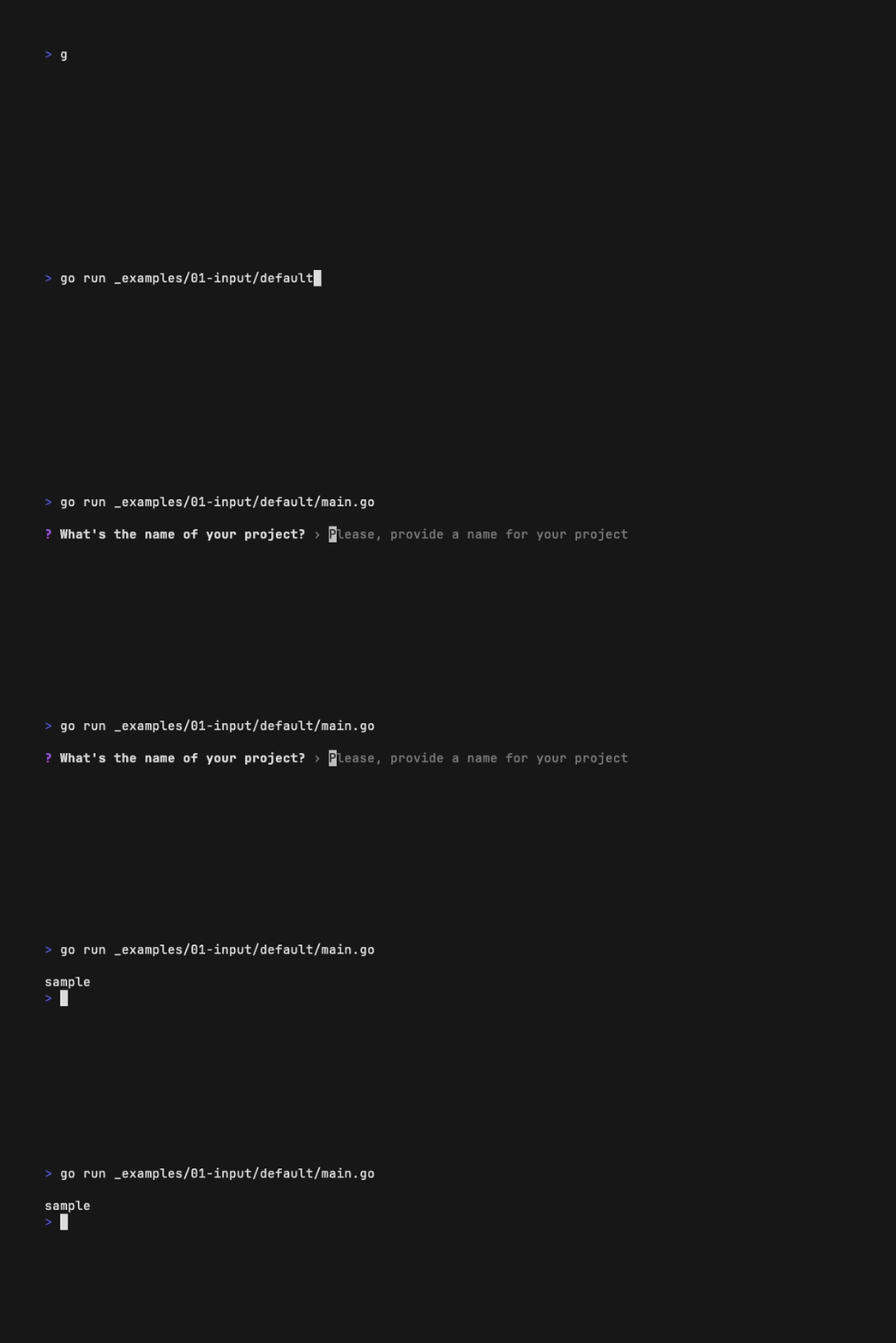
Single-line text entry. Returns the entered string, or ErrCancelled / ErrEmpty.
| Field | Type | Description |
|---|---|---|
Message |
string |
Prompt label shown above the input |
Placeholder |
string |
Ghost text when empty |
Initial |
string |
Pre-filled default value |
ErrorMsg |
string |
Message shown on validation failure |
Password |
bool |
Mask input characters |
ValidateFunc |
ValidateFunc |
Custom validation function |
Styles |
Styles |
Override default appearance |
result, err := input.Run(&input.Config{
    Message:     "What's the name of your project?",
    Placeholder: "Please, provide a name for your project",
    ErrorMsg:    "Project name is mandatory",
})result, err := input.Run(&input.Config{
Message: "What's your lucky number?",
Placeholder: "Please, tell me your lucky number",
Initial: "23",
ErrorMsg: "Cannot be blank",
ValidateFunc: input.ValidateInteger,
})result, err := input.Run(&input.Config{
Message: "What's your email address?",
Placeholder: "Please, provide an email address",
ErrorMsg: "Email is mandatory",
ValidateFunc: input.ValidateEmail,
})result, err := input.Run(&input.Config{
Message: "What's your password?",
Placeholder: "Please, provide your password",
ErrorMsg: "Password is mandatory",
Password: true,
})Custom styles
result, err := input.Run(&input.Config{
    Message:     "What's the name of your project?",
    Placeholder: "Please, provide a name for your project",
    ErrorMsg:    "Project name is mandatory",
    Styles: input.Styles{
        PrefixIcon:      "*",
        PrefixIconColor: compat.AdaptiveColor{Light: lipgloss.Color("#ef4444"), Dark: lipgloss.Color("#ef4444")},
        PlaceholderStyle: lipgloss.NewStyle().
            Background(compat.AdaptiveColor{Light: lipgloss.Color("#3b82f6"), Dark: lipgloss.Color("#3b82f6")}).
            Foreground(compat.AdaptiveColor{Light: lipgloss.Color("#fde68a"), Dark: lipgloss.Color("#fffbeb")}),
    },
})Preview

Single-select list for browsing and picking from a set of items.
| Field | Type | Description |
|---|---|---|
Title |
string |
Prompt label above the list |
ListHeight |
int |
Max visible items (auto-calculated if 0) |
DefaultWidth |
int |
List width |
ErrorMsg |
string |
Message shown when no selection is made |
ShowHelp |
bool |
Display help text |
ShowStatusBar |
bool |
Display status bar |
EnableFiltering |
bool |
Allow filtering items (requires ShowHelp) |
Styles |
Styles |
Override default appearance |
entries := []choose.Item{
    {Name: "pizza", Desc: "It's always pizza time!"},
    {Name: "kebab", Desc: "I feel turkish today, kebab!"},
    {Name: "carbonara", Desc: "Carbonara, NO cream, please!"},
}

result, err := choose.Run(&choose.Config{
    Title:    "What do you wanna eat tonight?",
    ErrorMsg: "Please, select your meal.",
}, entries)
Custom styles
var (
    amber  = compat.AdaptiveColor{Light: lipgloss.Color("#f59e0b"), Dark: lipgloss.Color("#fbbf24")}
    purple = compat.AdaptiveColor{Light: lipgloss.Color("#7e22ce"), Dark: lipgloss.Color("#a855f7")}
    green  = compat.AdaptiveColor{Light: lipgloss.Color("#166534"), Dark: lipgloss.Color("#22c55e")}
)

entries := []choose.Item{
    {Name: "pizza", Desc: "It's always pizza time!"},
    {Name: "kebab", Desc: "I feel turkish today, kebab!"},
    {Name: "carbonara", Desc: "Carbonara, NO cream, please!"},
}

result, err := choose.Run(&choose.Config{
    Title:    "What do you wanna eat tonight?",
    ErrorMsg: "Please, select your meal.",
    ShowHelp: true,
    Styles: choose.Styles{
        PrefixIcon:        "★",
        TitleStyle:        lipgloss.NewStyle().Background(green).Foreground(purple).Padding(0, 1),
        TitleBarStyle:     lipgloss.NewStyle(),
        ItemIcon:          "#",
        ItemStyle:         lipgloss.NewStyle().Foreground(amber),
        SelectedItemStyle: lipgloss.NewStyle().Foreground(purple),
    },
}, entries)Preview
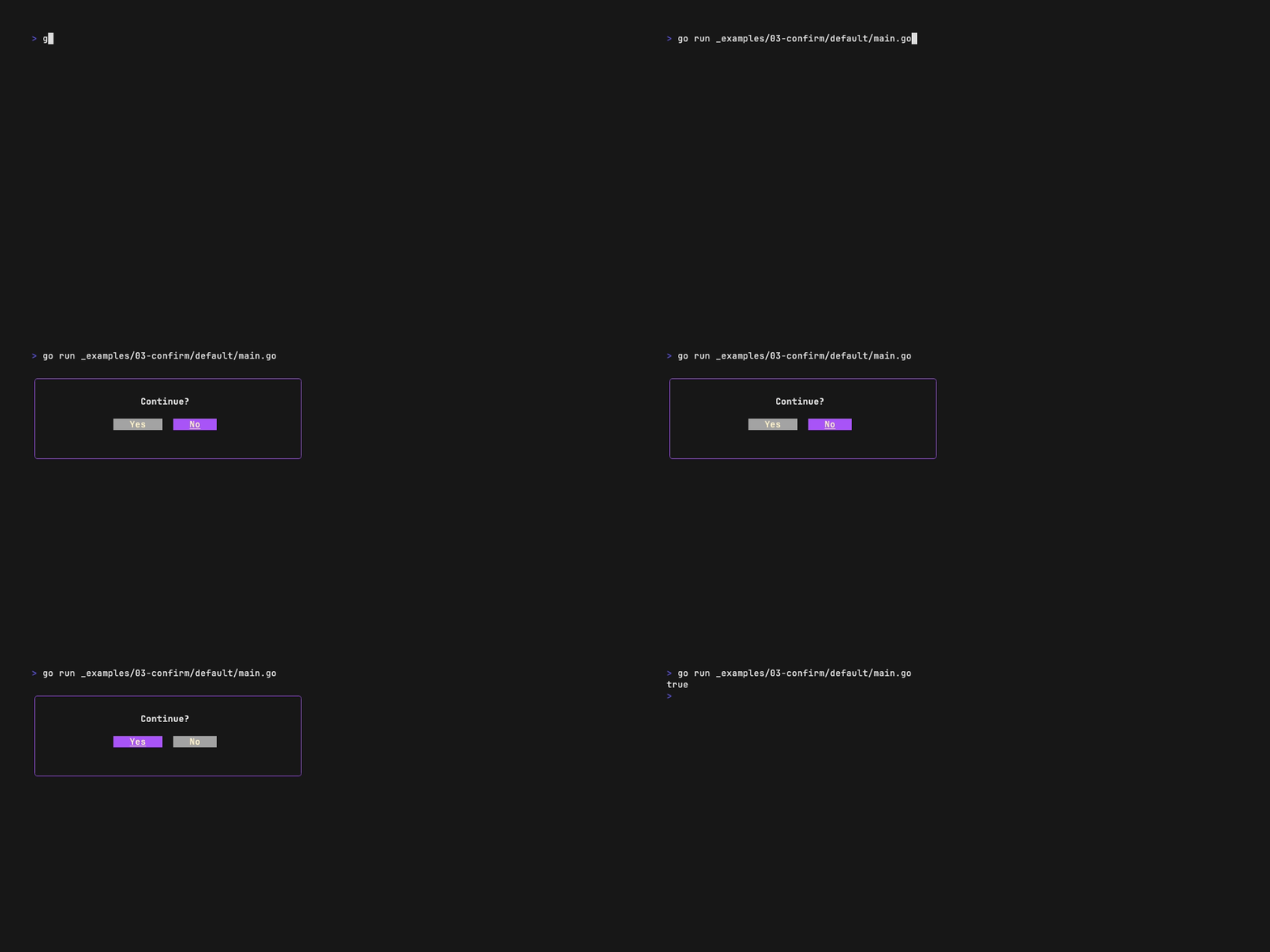
Yes/no confirmation prompt with two visual modes:
ModeDialog(default) - a bordered dialog box with an optional message bodyModeInline- a compact single-line toggle with cursor and divider
| Field | Type | Description |
|---|---|---|
Mode |
Mode |
ModeDialog (default) or ModeInline |
Message |
string |
Body text inside the dialog border (dialog only) |
Question |
string |
Prompt text shown to the user |
OkButtonLabel |
string |
Affirmative option label (default "Yes") |
CancelButtonLabel |
string |
Negative option label (default "No") |
Cursor |
string |
Cursor character before toggle options (inline only, default ">") |
Divider |
string |
Separator between toggle options (inline only, default "/") |
Styles |
Styles |
Override default appearance |
result, err := confirm.Run(&confirm.Config{Question: "Continue?"})Preview
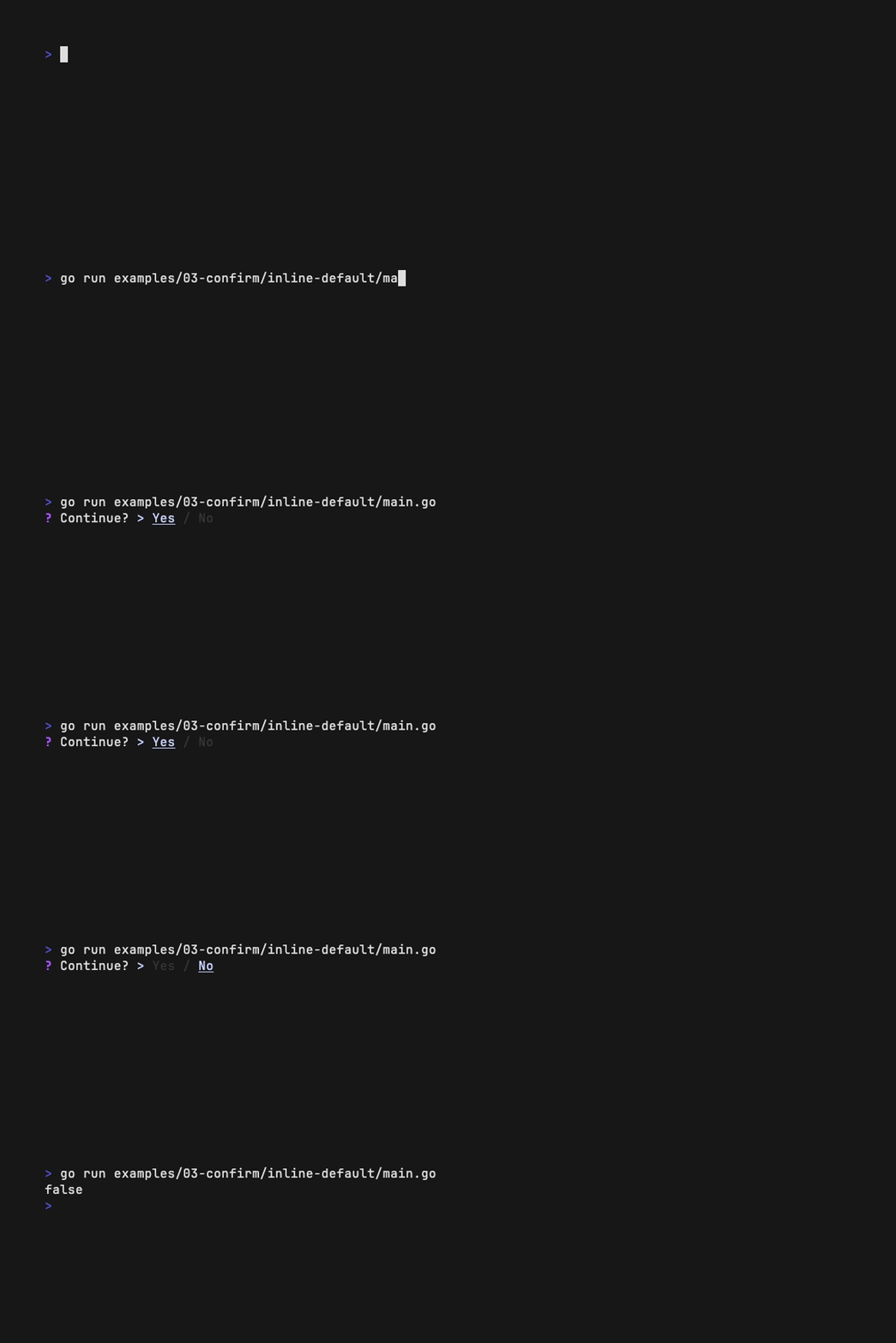
result, err := confirm.Run(&confirm.Config{
    Mode:     confirm.ModeInline,
    Question: "Continue?",
})
Dialog mode - custom styles
var (
    cyan  = compat.AdaptiveColor{Light: lipgloss.Color("#4f46e5"), Dark: lipgloss.Color("#c7d2fe")}
    green = compat.AdaptiveColor{Light: lipgloss.Color("#166534"), Dark: lipgloss.Color("#22c55e")}
)

infoText := `Lorem ipsum dolor sit amet,
consectetur adipiscing elit %s...`

Green   := lipgloss.NewStyle().Foreground(green).Render
message := fmt.Sprintf(infoText, Green("elit"))

result, err := confirm.Run(&confirm.Config{
    Message:  message,
    Question: "Continue?",
    Styles: confirm.Styles{
        Width:       60,
        BorderColor: cyan,
    },
})
Inline mode - custom styles
var (
    cyan  = compat.AdaptiveColor{Light: lipgloss.Color("#4f46e5"), Dark: lipgloss.Color("#c7d2fe")}
    green = compat.AdaptiveColor{Light: lipgloss.Color("#166534"), Dark: lipgloss.Color("#22c55e")}
    red   = compat.AdaptiveColor{Light: lipgloss.Color("#ef4444"), Dark: lipgloss.Color("#ef4444")}
)

result, err := confirm.Run(&confirm.Config{
    Mode:              confirm.ModeInline,
    Question:          "How do you feel?",
    OkButtonLabel:     "I'm super ok",
    CancelButtonLabel: "Next question, please!",
    Divider:           "|",
    Styles: confirm.Styles{
        PrefixIcon:        "★",
        PrefixIconColor:   red,
        DialogStyle:       lipgloss.NewStyle().Margin(1, 0),
        ButtonStyle:       lipgloss.NewStyle().Bold(true).Foreground(cyan),
        ActiveButtonStyle: lipgloss.NewStyle().Foreground(green),
    },
})Preview
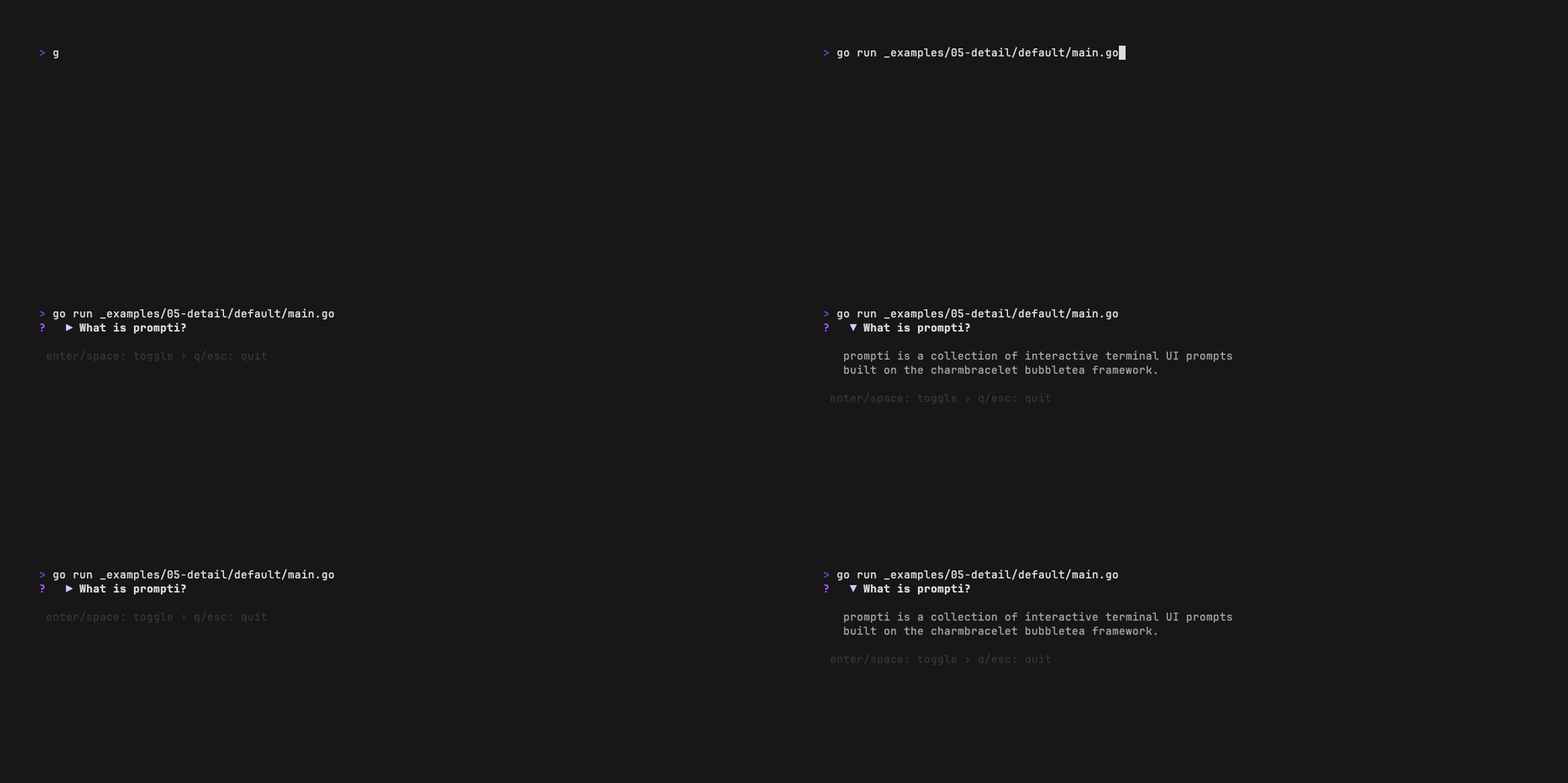
Collapsible detail/summary section, similar to the HTML <details> element. Displays a summary line with an expand/collapse indicator and toggles content visibility on user interaction.
| Field | Type | Description |
|---|---|---|
Summary |
string |
The always-visible summary line |
Content |
string |
Collapsible content (supports multiline) |
CollapsedIndicator |
string |
Indicator when collapsed (default "▶") |
ExpandedIndicator |
string |
Indicator when expanded (default "▼") |
Styles |
Styles |
Override default appearance |
expanded, err := detail.Run(&detail.Config{
    Summary: "What is prompti?",
    Content: "prompti is a collection of interactive terminal UI prompts\nbuilt on the charmbracelet bubbletea framework.",
})expanded, err := detail.Run(&detail.Config{
Summary: "Configuration Options",
Content: "verbose: true\nlog_level: debug\nmax_retries: 3",
CollapsedIndicator: "[+]",
ExpandedIndicator: "[-]",
})expanded, err := detail.Run(&detail.Config{
Summary: "Error Details",
Content: `Status: 503 Service Unavailable
Endpoint: /api/v1/users
Trace ID: abc-123-def-456
The upstream service did not respond within
the configured timeout of 30 seconds.
Suggested actions:
1. Check service health dashboard
2. Verify network connectivity
3. Review recent deployments`,
})Custom styles
var (
    cyan   = compat.AdaptiveColor{Light: lipgloss.Color("#4f46e5"), Dark: lipgloss.Color("#c7d2fe")}
    green  = compat.AdaptiveColor{Light: lipgloss.Color("#166534"), Dark: lipgloss.Color("#22c55e")}
    red    = compat.AdaptiveColor{Light: lipgloss.Color("#ef4444"), Dark: lipgloss.Color("#ef4444")}
    purple = compat.AdaptiveColor{Light: lipgloss.Color("#7e22ce"), Dark: lipgloss.Color("#a855f7")}
)

expanded, err := detail.Run(&detail.Config{
    Summary: "Release Notes v0.3.0",
    Content: "- Added detail/summary component\n- Improved theme system\n- Bug fixes and performance improvements",
    Styles: detail.Styles{
        PrefixIcon:      "★",
        PrefixIconColor: red,
        SummaryStyle:    lipgloss.NewStyle().Bold(true).Foreground(purple).PaddingRight(1),
        IndicatorStyle:  lipgloss.NewStyle().Foreground(green).PaddingRight(1),
        ContentStyle:    lipgloss.NewStyle().Foreground(cyan).PaddingLeft(3).MarginTop(1),
        DialogStyle:     lipgloss.NewStyle().Margin(1, 0),
    },
})Preview

Animated progress meter that iterates over a list of items. Standalone-only - does not support huh.Field integration.
| Field | Type | Description |
|---|---|---|
Items |
[]string |
List of items to process |
OnProgressCmd |
func(string) tea.Cmd |
Custom command per item (default: simulated delay) |
OnProgressMsg |
string |
Label shown during progress |
OnCompletedMsg |
string |
Label shown on completion (default "Done!") |
RunConcurrently |
bool |
Process items concurrently via tea.Batch |
Styles |
Styles |
Override default appearance |
fruits := []string{"apple", "banana", "orange", "grapes", "strawberry", "mango", "kiwi", "pear", "cherry"}

err := progressbar.Run(&progressbar.Config{Items: fruits})fruits := []string{"apple", "banana", "orange", "grapes", "strawberry", "mango", "kiwi", "pear", "cherry"}
err := progressbar.Run(&progressbar.Config{
Items: fruits,
RunConcurrently: true,
})Custom styles
fruits := []string{"apple", "banana", "orange", "grapes", "strawberry", "mango", "kiwi", "pear", "cherry"}

err := progressbar.Run(&progressbar.Config{
    Items:         fruits,
    OnProgressMsg: "Eating:",
    Styles: progressbar.Styles{
        CurrentItemStyle: lipgloss.NewStyle().Foreground(lipgloss.Color("411")),
        ShowLabel:        true,
        GradientFrom:     lipgloss.Color("#FF7CCB"),
        GradientTo:       lipgloss.Color("#FDFF8C"),
    },
})Every prompti component can be used in two ways:
Call Run() directly for single-prompt use cases. This starts its own bubbletea program and returns the result:
result, err := input.Run(&input.Config{
    Message: "Project name?",
})Use NewField() to create a huh.Field adapter that plugs into multi-step forms:
var name string
var confirmed bool

form := huh.NewForm(
    huh.NewGroup(
        input.NewField(&input.Config{
            Message: "Project name?",
        }, &name),
        confirm.NewField(&confirm.Config{
            Question: "Create it?",
        }, &confirmed),
    ),
)

err := form.Run()
Form components (input, choose, confirm, detail) support both modes. Feedback components like progressbar are standalone-only.
Complete runnable examples for every component and mode are available in the examples directory:
| Directory | Description |
|---|---|
01-input |
Text input with validation, password, custom styles |
02-choose |
Single-select list with custom styles |
03-confirm |
Dialog and inline confirm modes |
04-detail |
Collapsible detail/summary sections |
05-progressbar |
Progress bar with sequential and concurrent modes |
06-huh-form |
Multi-group form using huh.Field adapters |
- bubbletea - the underlying TUI framework
- huh - form library from Charm (prompti provides
huh.Fieldadapters) - lipgloss - style engine used for all visual customization
This project is licensed under the MIT License - see the LICENSE file for details.
Made with Charm.