Integrates HPE Nimble Storage with Proxmox VE over iSCSI. Manages volumes via the Nimble REST API and presents them as QEMU VM disks and LXC container root volumes (rootdir, raw block) with optional multipath.
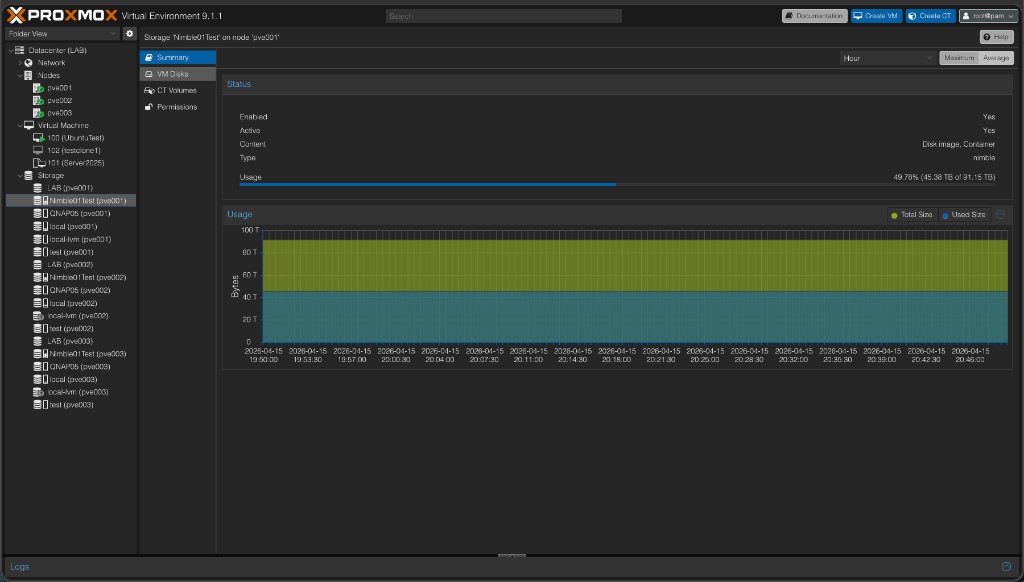
Once Nimble storage is added, it shows up under Datacenter → Storage like any other datastore: type nimble, content types you configured, usage from the array pool, and a Summary view with capacity over time.
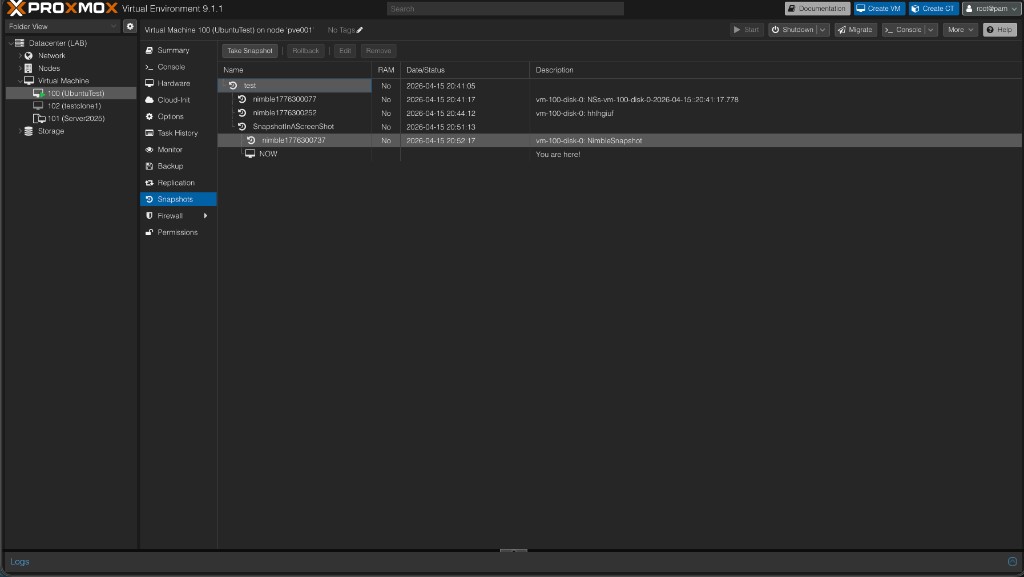
Array-created snapshots sync into the Proxmox VM snapshot tree as nimble* entries — visible alongside PVE snapshots with per-disk descriptions (volume: snapshot name):
Screenshots: More UI examples (VM Disks, snapshot dialogs, live migration, HPE Nimble volume list) are in docs/images/ — see the index docs/images/README.md. All figures are embedded in the step-by-step setup guide.
- Proxmox VE 8.2+
- HPE Nimble array reachable on port 5392 (REST API)
open-iscsiinstalled on each node with an IQN in/etc/iscsi/initiatorname.iscsi
Co-installation with other storage plugins (e.g. pve-purestorage-plugin): PVE registers every storage plugin's config properties in one global namespace and refuses to start its daemons if two plugins declare the same property name — even with identical definitions. Since v0.0.25 all of this plugin's config options use
nimble_-prefixed names (nimble_address,nimble_vnprefix, …), which cannot collide with any other plugin. The old generic spellings (address,check_ssl, …) are still accepted for existing configs, but the plugin only declares them when no other installed plugin claims the name — so a node with both this plugin and the Pure plugin installed starts reliably, regardless of load order. Existingstorage.cfgentries keep working unchanged; see Upgrading from v0.0.24 or earlier below.
Scripted install (recommended) — sets up the APT repo, installs dependencies, restarts PVE services, and can install on every cluster node at once:
# Single node
curl -fsSL https://raw.githubusercontent.com/brngates98/pve-nimble-plugin/main/scripts/install-pve-nimble-plugin.sh | sudo bash

# All cluster nodes at once (dry-run first to validate, then install)
curl -fsSL https://raw.githubusercontent.com/brngates98/pve-nimble-plugin/main/scripts/install-pve-nimble-plugin.sh | sudo bash -s -- --all-nodes --dry-run
curl -fsSL https://raw.githubusercontent.com/brngates98/pve-nimble-plugin/main/scripts/install-pve-nimble-plugin.sh | sudo bash -s -- --all-nodes
Other options: --yes (non-interactive), --version X.Y.Z (pin a release), --codename SUITE (default bookworm).
Manual APT
echo "deb [trusted=yes] https://brngates98.github.io/pve-nimble-plugin bookworm main" \
  | sudo tee /etc/apt/sources.list.d/pve-nimble-plugin.list
sudo apt update && sudo apt install libpve-storage-nimble-perl
To upgrade: sudo apt update && sudo apt upgrade libpve-storage-nimble-perl
Download .deb — grab a specific release from the releases page:
sudo apt install ./libpve-storage-nimble-perl_<version>-1_all.debCluster: The plugin must be installed on every node. Storage config syncs via corosync, but the plugin file does not.
No need to pre-create an initiator group — the plugin creates one automatically from this node's IQN.
pvesm add nimble <storage_id> \
  --nimble_address https://<nimble_ip_or_fqdn> \
  --username <user> \
  --password '<password>' \
  --content images,rootdir
Use images only if you do not want LXC root disks on this store. Then in the Proxmox UI: Datacenter → Storage — your Nimble storage appears. Create a VM or container with storage on this pool.
| Option | Required | Description |
|---|---|---|
nimble_address |
Yes | Nimble management URL, e.g. https://nimble.example.com. Port 5392 is used by default. |
port |
No | Nimble management API port if not the default 5392. |
username |
Yes | Nimble REST API username |
password |
Yes | API password. Stored in /etc/pve/priv/storage/<storeid>.pw (root-only, cluster-replicated) — not in storage.cfg (v0.0.24+). Change it with pvesm set <id> --password ... or the GUI, not by editing files. Older configs with a password line in storage.cfg keep working; the line becomes stale (and is ignored) after the first password change. |
nimble_initiator_group |
No | Existing Nimble initiator group name shared by all cluster nodes. If omitted, the plugin auto-creates a per-node group pve-<nodename> using this node's IQN. |
nimble_auto_iscsi_discovery |
No | Default yes. Runs iSCSI discovery and login when storage activates. Set to no to disable. |
nimble_iscsi_discovery_ips |
No | Extra discovery portals (comma-separated) beyond what the Nimble subnets API returns. |
nimble_vnprefix |
No | Prefix added to all volume names on the array |
nimble_pool_name |
No | Nimble pool for new volumes |
nimble_volume_collection |
No | Volume collection name. New volumes are added to this collection for array-side snapshot schedules. |
nimble_check_ssl |
No | Default no. Set to yes to verify TLS certificates. |
nimble_token_ttl |
No | Session token cache TTL in seconds (default 3600) |
nimble_debug |
No | 0=off, 1=basic, 2=verbose, 3=trace |
Example storage.cfg entry:
nimble: my-nimble
  nimble_address https://nimble.example.com
  username admin
  content images,rootdir
  # nimble_initiator_group my-pve-group   # optional
  # nimble_volume_collection pve-vols     # optional
Before v0.0.25 the options used generic names without the nimble_ prefix (address, vnprefix,
check_ssl, token_ttl, debug, initiator_group, pool_name, volume_collection,
auto_iscsi_discovery, iscsi_discovery_ips, storeid). Existing storage.cfg entries keep
working without any edits — the plugin reads the old spellings and treats them as the new names.
Notes:
- The next time Proxmox rewrites
storage.cfg(anypvesm add/set/remove, including for other storages), nimble sections are re-written with the newnimble_-prefixed names automatically. - Clusters: upgrade the plugin package on all nodes before making storage config changes.
Nodes still running ≤ v0.0.24 cannot parse the new
nimble_*keys and would lose the storage definition until upgraded. - The old spellings are only parseable while either (a) no other installed plugin claims those
names, or (b) a co-installed plugin (e.g. Pure) declares them with a compatible schema. Migrated
(
nimble_*) configs are immune to this — prefer the new names in scripts and documentation.
How the Nimble plugin compares to common Proxmox storage types (NFS, LVM / LVM-thin, kernel iSCSI, Ceph RBD). ✅ = native / built-in,
| Feature | Nimble plugin | NFS | LVM / LVM-thin | iSCSI (kernel) | Ceph RBD |
|---|---|---|---|---|---|
| Snapshots | ✅ | ✅ | |||
| VM state snapshots (vmstate) | ✅ | ✅ | ✅ | ✅ | ✅ |
| Clones | ✅ | ✅ | |||
| Thin provisioning | ✅ | ✅ | |||
| Block-level performance | ✅ | ❌ | ✅ | ✅ | ✅ |
| Shared storage | ✅ | ✅ | ✅ | ✅ | |
| Automatic volume management | ✅ | ❌ | ❌ | ❌ | ✅ |
| Multi-path I/O | ✅ | ❌ | ❌ | ||
| Container storage (rootdir) | ✅ | ✅ | ✅ | ❌ | ✅ |
| Backup storage (vzdump) | ❌ | ✅ | ❌ | ❌ | ❌ |
| ISO storage | ❌ | ✅ | ❌ | ❌ | ❌ |
| Raw image format | ✅ | ✅ | ✅ | ✅ | ✅ |
| Content type | Nimble plugin | NFS | LVM / LVM-thin | iSCSI (kernel) | Ceph RBD |
|---|---|---|---|---|---|
| VM disks | ✅ | ✅ | ✅ | ✅ | ✅ |
| CT volumes (rootdir) | ✅ | ✅ | ✅ | ❌¹ | ✅ |
| Backups (vzdump) | ❌ | ✅ | ❌ | ❌ | ❌ |
| ISO images | ❌ | ✅ | ❌ | ❌ | ❌ |
| CT templates (vztmpl) | ❌ | ✅ | ❌ | ❌ | ❌ |
| Snippets | ❌ | ✅ | ❌ | ❌ | ❌ |
¹ Plain PVE iSCSI storage does not expose rootdir; use LVM (or similar) on top of the LUN, or a plugin like this one that manages volumes and presents block devices.
Per-storage narratives (when to pick NFS vs RBD vs Nimble, and so on) live in docs/STORAGE_FEATURES_COMPARISON.md.
Contributors: Keep the two tables above in sync with the same tables in docs/STORAGE_FEATURES_COMPARISON.md when you change either copy (see CONTRIBUTING.md).
Configure /etc/multipath.conf with find_multipaths no and add Nimble to blacklist_exceptions:
defaults {
    user_friendly_names yes
    find_multipaths     no
}
blacklist {
    devnode "^(ram|raw|loop|fd|md|dm-|sr|scd|st)[0-9]*"
    devnode "^hd[a-z]"
    device { vendor ".*" product ".*" }
}
blacklist_exceptions {
    device { vendor "Nimble" product "Server" }
}
devices {
    device {
        vendor               "Nimble"
        product              "Server"
        path_grouping_policy group_by_prio
        prio                 "alua"
        hardware_handler     "1 alua"
        path_selector        "service-time 0"
        path_checker         tur
        no_path_retry        30
        failback             immediate
        fast_io_fail_tmo     5
        dev_loss_tmo         infinity
    }
}
After editing, run multipathd reconfigure.
Alias management: The plugin automatically writes per-volume WWID→alias entries to
/etc/multipath/conf.d/nimble-<storeid>.confwhen volumes are mapped, and restores them onactivate_storage. You do not need to manage this file manually — but do not hand-edit it, as the plugin owns it.
The maintainer has exercised most day-to-day flows on real Proxmox VE + HPE Nimble (volumes, QEMU VM and LXC root disks where applicable, PVE and array snapshots, rollback, clone, move disk, capacity/status, multipath, array snapshot import into the VM snapshot list including snap time and descriptions). That is not a guarantee for every firmware or cluster layout; treat your own checks as authoritative.
Screenshots: See Overview and docs/images/README.md.
| Error | Fix |
|---|---|
could not read local iSCSI IQN |
Install open-iscsi, add InitiatorName=iqn.… to /etc/iscsi/initiatorname.iscsi, restart iscsid |
Initiator group X not found |
Group set in config doesn't exist on the array. Create it in the Nimble UI or remove nimble_initiator_group from config to auto-create |
| API timeout / TLS error | Check nimble_address, firewall (port 5392), and set nimble_check_ssl no if using self-signed certs |
| No iSCSI session / map timeout | Run iscsiadm -m session on the affected node. Check L3 connectivity to Nimble data IPs. Use nimble_iscsi_discovery_ips if the subnets API doesn't return the right portals |
iscsiadm … login exit code 15 in debug log |
Usually means the target was already logged in (common with multipath or LVM on the same array). Safe to ignore if disks map and snapshots work |
Snapshot with RAM fails (failed to open '' or snapshot already started) |
Use snapshots without RAM, or restart the VM after a failed attempt. Plugin maps the temporary state volume when Proxmox asks for its path; report persistent failures on GitHub |
| Volume collection + sync replication | Not lab-tested with a replication partner. Adding PVE-managed disks to a sync-rep collection can cause timeouts or extra volumes — use async protection or a separate collection for DR; see setup guide |
| Multipath not used | Confirm multipathd is running and Nimble is in blacklist_exceptions in /etc/multipath.conf |
# Enable persistent debug (stored in config)
pvesm set <storage_id> --nimble_debug 1

# One-off debug for a single command
NIMBLE_DEBUG=1 pvesm list <storage_id>

# View logs (task log is often more useful than journalctl for migrate errors)
journalctl -u pvedaemon -f
For migrate/map failures, check the task log in the Proxmox UI (Datacenter → Task History) on the target node — that's where map_volume runs.
# Verify API access
curl -sk -X POST "https://<nimble>:5392/v1/tokens" \
  -H "Content-Type: application/json" \
  -d '{"data":{"username":"<user>","password":"<password>"}}'

# iSCSI sessions
iscsiadm -m session
iscsiadm -m session --rescan

# Multipath
multipath -ll | grep -A 10 "Nimble"

# Token cache
ls -la /etc/pve/priv/nimble/

# Restart PVE services after plugin update
systemctl restart pvedaemon pveproxy pvestatd- Create, delete, resize, rename volumes via Nimble REST API (grow triggers host iSCSI/multipath rescan so Proxmox sees the new LUN size immediately)
- VM disks (
images) and LXC CT roots (rootdir) on raw Nimble volumes — setcontentas in Add Storage (typicallyimages,rootdir) - Initiator group management (auto-create or use existing)
- Storage-level snapshots: create, delete, rollback
- Clone from snapshot
- Array snapshot sync: Nimble array-created snapshots are imported into QEMU VM configs automatically (visible in the Proxmox UI snapshot list; LXC/
rootdiris not part of this sync path — see AI project context). The snapshot description lists each LUN as array volume name, a colon, and the Nimble snapshot name; multiple disks in one PVE snapshot are separated by semicolons. - Live migration (shared iSCSI block storage)
- Optional multipath with automatic alias management (
/etc/multipath/conf.d/nimble-<storeid>.conf) - Veeam Backup & Replication V13+ compatible (
raw+sizeimport/export) - Token cache under
/etc/pve/priv/nimble/(cluster-safe)
Index: docs/README.md — guides, API docs, and developer material in one place (explains the 00-… guide name and what each file is for).
| Audience | Start here |
|---|---|
| Operators | This README (install, config, Overview screenshots, feature comparison tables, troubleshooting). Full setup walkthrough. Extended feature comparison + storage-type guide. All screenshots. |
| API / integration | Nimble REST reference (in-repo), plugin ↔ API validation. |
| Contributors / tooling | CONTRIBUTING.md, AI / project context, tests. |
MIT — see LICENSE.