This work presents asRoBallet, a holistic system that overcomes the historical barriers to deploying reinforcement learning on underactuated spherical robots. By closing the Reality Gap inherent in the complex tribology of wheel-sphere-ground interactions, we, to the best of our knowledge, achieved the first end-to-end RL locomotion policy deployed on a humanoid ballbot hardware platform. This work has been accepted for publication at Robotics: Science and Systems 2026 in Sydney, Australia. Please refer to the end of the page to cite this work.
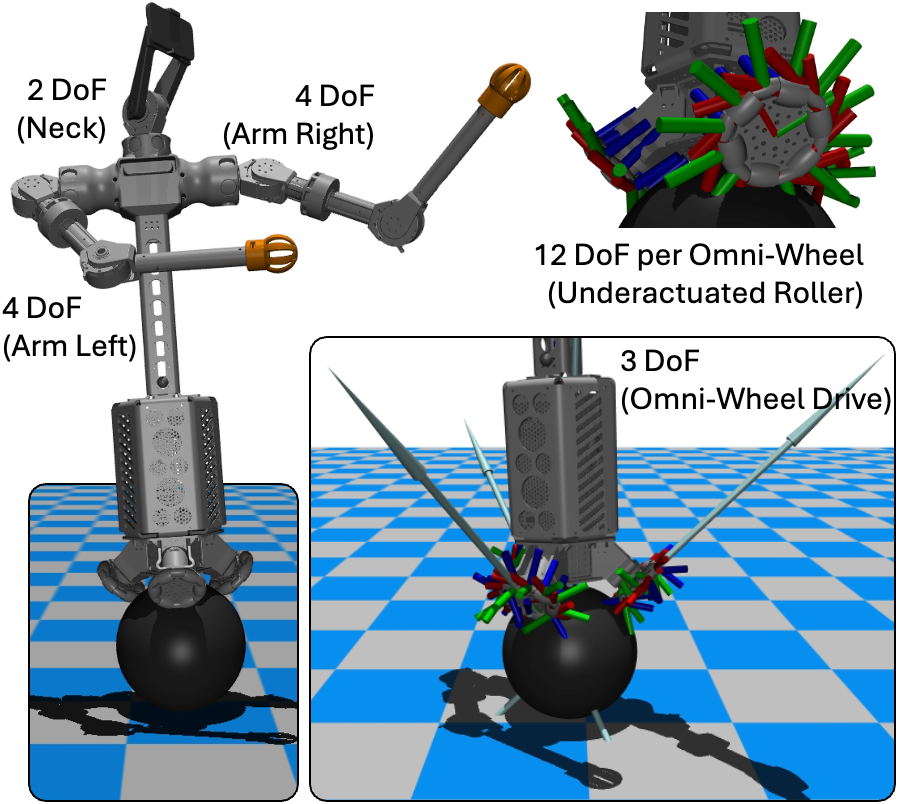
asRoBallet_mujoco is a MuJoCo-based reinforcement learning project for a humanoid ballbot with an omni-wheel drive mechanism. The repository contains the robot model, mesh assets, two Gymnasium environments, and a shared PPO training entry point.
The canonical robot model is defined in robots/mjcf/asRoBallet.xml. It includes the main body, upper-body links, a ball, three omni-wheel actuators, onboard sensor sites, and STL mesh assets under robots/meshes/. Training, evaluation, and playback use robots/mjcf/scene.xml, which includes the robot and adds the floor, ball-floor contact pair, light, and viewer camera. The previous robot model is retained under robots/.archive/.


This work adopts asMagic, a mobile app that transforms iOS devices into high-performing perception stack for real-time perception, communication, simulation, and interaction with advanced robotics. Feel free to download the app for a 3D inspection of asRoBallet's design, which is reconfigured from the original design of asOverDog. Each asRoBallet only requires a single iPhone Pro series to achieve full-stack perception, which can be wirelessly interacted using another iPhone. Please refer to the documentation for further details on using asMagic for your project.


envs/velocity_tracking.py trains the robot to follow commanded planar velocity and yaw-rate targets.
- Action space: 3 continuous wheel commands.
- Observation size: 16.
- Default episode length: 1000 environment steps.
- Default training horizon: 4,000,000 PPO timesteps.
- Reward terms include velocity tracking, angular-velocity penalty, action energy, and action-rate penalty.
envs/station_keeping.py trains the robot to remain near its initial position and heading.
- Action space: 3 continuous wheel commands.
- Observation size: 17.
- Default episode length: 2000 environment steps.
- Default training horizon: 4,000,000 PPO timesteps.
- Reward terms include position/yaw retention, roll-pitch penalty, angular-velocity penalty, action energy, and action-rate penalty.
The repository is tested with Python 3.11 and PyTorch 2.12.0 in the asroballet Conda environment.
Create the environment first:
conda create -n asroballet python=3.11
conda activate asroballet
Install the PyTorch build for the target machine. Choose one of the following commands:
# NVIDIA GPU with a compatible CUDA 13.0 driver
pip install torch==2.12.0 --index-url https://download.pytorch.org/whl/cu130

# CPU only
pip install torch==2.12.0 --index-url https://download.pytorch.org/whl/cpu
For other supported CUDA versions, use the command from the official PyTorch installation selector.
Then install the remaining runtime, training, and logging dependencies:
pip install -r requirements.txtscripts/train.py is the shared PPO entry point for both tasks:
python scripts/train.py velocity_tracking
python scripts/train.py station_keeping
Only one full training job should normally use a single GPU at a time. On a machine without a CUDA-capable PyTorch installation, select the CPU explicitly:
python scripts/train.py velocity_tracking --device cpuCommon overrides can be combined in one command:
python scripts/train.py velocity_tracking \
  --n-envs 4 \
  --total-timesteps 1000000 \
  --checkpoint-freq 50000 \
  --seed 3407 \
  --device cuda
--checkpoint-freq is measured in global transitions across all parallel environments. The
trainer accounts for --n-envs when configuring the Stable-Baselines3 checkpoint callback.
GUI training is intended for debugging, not throughput. It requires exactly one environment:
python scripts/train.py station_keeping --gui --n-envs 1Each invocation creates an isolated timestamped run:
logs/<task>/<YYYY-MM-DD_HH-MM-SS>/
├── config.json
├── tensorboard/
│   └── events.out.tfevents.*
├── monitor/
│   ├── 0.monitor.csv
│   └── ...
└── checkpoints/
    ├── model_<timesteps>_steps.zip
    ├── best_model.zip
    └── final_model.zip
model_<timesteps>_steps.zipis a retained periodic checkpoint.best_model.zipis overwritten when the rolling mean episodic return improves within that run.final_model.zipis written only after training finishes normally.
All three are native Stable-Baselines3 archives and can be loaded with PPO.load(). Monitor CSV
files contain episode returns and lengths for each parallel environment.
scripts/evaluate.py performs repeatable headless policy evaluation. It defaults to five deterministic
episodes on the CPU and reports:
- reward, length, and termination status for every episode
- mean, standard deviation, minimum, and maximum reward and length
- per-episode sums and summary statistics for every value in
info["reward_parts"]
Evaluate the newest best checkpoint for either task:
python scripts/evaluate.py velocity_tracking
python scripts/evaluate.py station_keeping
When --model-path is omitted, the evaluator searches timestamped runs from newest to oldest and
loads the newest existing checkpoints/best_model.zip. It retains a fallback for logs generated
by the former best_by_eprew/ layout.
Use an explicit path to evaluate a periodic, best, or final checkpoint:
python scripts/evaluate.py station_keeping \
  --model-path logs/station_keeping/2026-08-12_15-30-45/checkpoints/final_model.zip \
  --episodes 10 \
  --max-steps 2000 \
  --device cpu
Deterministic actions are the default. Use --stochastic only when policy sampling is part of the
evaluation:
python scripts/evaluate.py velocity_tracking --stochasticpython scripts/play.py velocity_tracking
python scripts/play.py station_keepingvelocity_tracking controls:
R: resetW/S: increase / decrease forward velocityvxA/D: increase / decrease lateral velocityvyQ/E: increase / decrease yaw rateSpace: zero all commandsEsc: quit
station_keeping uses R to reset and Esc to quit. Playback runs continuously and loads the
newest best_model.zip by default. The camera follows the robot from the front.
Use a specific checkpoint with --model-path:
python scripts/play.py velocity_tracking \
--model-path logs/velocity_tracking/2026-08-12_15-30-45/checkpoints/final_model.zipMuJoCo uses different friction layouts for geom defaults and explicit contact pair definitions.
The ball-floor contact is defined in robots/mjcf/scene.xml by the named contact pair:
<pair name="ball_link_floor" geom1="ball_link_geom" geom2="floor"
      condim="6" friction="1.0 1.0 0.01"
      solimp="0.85 0.99 0.003" />
The friction vector is:
friction="mu_slide_1 mu_slide_2 mu_torsion mu_roll_1 mu_roll_2"
mu_slide_1,mu_slide_2: tangential Coulomb friction coefficients for the two sliding directions.mu_torsion: resistance to spinning about the contact normal. Withcondim="6", this term is enabled and affects yaw-like spin at the contact patch.mu_roll_1,mu_roll_2: rolling-friction coefficients for the two rolling directions.
condim="6" enables sliding, torsional, and rolling friction at the ball-floor contact. The default XML values are:
mu_slide_1 = 1.0
mu_slide_2 = 1.0
mu_torsion = 0.01
mu_roll_1  = inherited/default value
mu_roll_2  = inherited/default value
The robot-side rubber contact default is defined in robots/mjcf/asRoBallet.xml by the geom
<default class="rubber">
    <geom rgba="0.2 0.2 0.2 1" condim="3" friction="1 0.005 0.0001" priority="1" solimp="0.85 0.99 0.003"/>
</default>
The friction vector is:
friction="mu_slide mu_torsion mu_roll"
During training, both environments resolve and randomize the named ball_link_floor contact pair
in rand_dynamics():
sliding_friction = self.rng.uniform(low=0.6, high=1.2)
self.model.pair_friction[self.ball_floor_pair_id, 0:2] = sliding_friction
The wheel joint dry-friction losses are also randomized:
self.model.dof_frictionloss[self.controlled_dof_indices] = self.rng.uniform(
    low=0.08,
    high=0.12,
    size=self.controlled_dof_indices.shape,
)
controlled_dof_indices is resolved from the named wheel actuators and their joint transmissions,
so the mapping remains valid if actuator or joint ordering changes in the MJCF. This randomizes
drivetrain resistance for the three omni-wheel joints.
- The MuJoCo timestep in
robots/mjcf/asRoBallet.xmlis0.002seconds. robots/mjcf/scene.xmlis the default training/evaluation/playback entry point because it adds the floor and contact pair around the pure robot XML.- The environments use
frame_skip=5, so one policy step advances0.01seconds of simulation time. - Both tasks control the three named omni-wheel motor actuators.
- head_link and arm joints are position-controlled by the XML actuators and randomized during some resets.
@inproceedings{Wan2026asRoBallet,
  title={\href{https://arxiv.org/abs/2604.24916}
    {asRoBallet: Closing the Sim2Real Gap via Friction-Aware Reinforcement Learning for Underactuated Spherical Dynamics}},
  author={Fang Wan and Guangyi Huang and Tianyu Wu and Zishang Zhang and Bangchao Huang and Haoran Sun and Mingdong Chen and Chaoyang Song},
  booktitle={Robotics: Science and Systems (RSS)},
  year={2026}
}