
I'm a Linux User! So, the main platform for FlexPacket are Linux based Systems and not Windows. But I really do my best to support Windows.
All the special BBS features, I can only test with OpenBCM and LinBPQ.
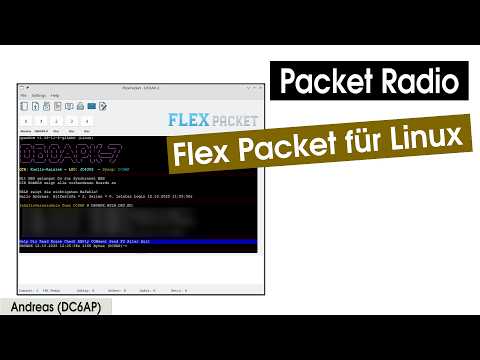
- Support for Hostmode TNC's (with TF2.x Firmware)
- Support for KISS via TFKISS (external Software)
- Support for KISS via Bluetooth (external Software)
- TFKISS KISS type selection for Standard KISS, RMNC-KISS, TNC2/TheFirmware and AEA PAKRATT/PK-232
- Support for the AGW Protocol (Direwolf)
- Multichannel (only in Hostmode/TFKISS)
- Addressbook for quick connections and BayCom password
- 7Plus generator
- 7Plus FileUp/Download (only in Hostmode)
- Common ANSI color codes (in testing)
- APRS Map (external Software).
- Choose Terminal Font
- Autostore Mails for later reading (Details under How To Use).
- Multiline Message Editor
- Internal
//commands with help, round-trip-time measurement, and remote messages - Automatic RF welcome message with FlexPacket version and station callsign
- Convers support in seperate window. Format and Colorizing support only for LinBPQ. For others, please send me User Joined, Left, and Chat messages as Screenshot. :-) Thanks.
- You will find the current and all last releases for Windows and Linux here
- The newest builds created by the master branch, you will find here. Open the last successfull build and scroll down to the artifacts.
- Windows Users need the sqlite3.dll.
- libqt6pas.so/dll
- Under
assets/font/437.ttfyou will find a font that is perfect for Terminal Windows. If you like, you can import it into your OperatingSystem and choose it in FlexPacket underTerminalsettings.
- Install Lazarus 4.5
- Install TRichMemo, LazSerial, LazRGBGraphics, BGRABitmap, BGRAControls
- Get git submodules:
git submodule update --init --recursiveIf you already have submodules, then change to the newest commit:
git submodule update --remote --mergeIn the command and message field (CMF), hit the <ESC> key to enter the command mode.
You will get visual feedback via a red line above CMF. Then type
c <DESTINATION_CALL> and then hit the Enter/Return key. At the same time,
you will exit the command mode.

After another station connects to FlexPacket via RF, FlexPacket automatically sends:
*** Flexpacket <version> <station callsign> //HELP ***
To use the Baycom password functionality, add your baycom password into the Addressbook (be aware that it will be stored in playtext right now).
If you connect to a BBS with enabled password, you will get a couple of numbers.

Now click at the  icon in the toolbar.

The BayCom password string will be copied into the CMF. Press enter/return to send it.
If you want to change the size of the CMF, grab the gab with your Mouse. The size will be stored in the configuration file.

FlexPacket does not support KISS directly. TFKISS must be used for this. To use TFKISS, enable and configure it in the menu (Setting). For Linux you can find TFKISS here. Windows Users can use FlexNet.
The TFKISS settings form provides a KISS Type selection. The selected type sets the required TFKISS command-line parameters automatically:
| KISS type | TFKISS parameters |
|---|---|
| Standard KISS | no additional flag |
| RMNC-KISS | -k 1 |
| TNC2 / TheFirmware | -x |
| AEA PAKRATT / PK-232 | --pakratt232, serial, 9600 baud |
The selection is stored in the FlexPacket configuration and is restored when the settings form is opened again. Selecting AEA PAKRATT / PK-232 switches the transport to Serial and the baud rate to 9600 automatically. The existing TFKISS Unix-socket connection to FlexPacket remains unchanged.
Before someone ask! No I do not plan to implement KISS into FlexPacket. From the development perspective KISS and specialy AX25 is very complicated. But FlexPacket should not be huge and complicated. I want to keep it as simple as possible for other Ham's to read, understand and Maintain the code.
FlexPacket provides internal commands that start with //. Enter local
commands in the command and message field and press Enter. Internal commands
are handled by FlexPacket and are not sent directly to the connected station.
-
//HELPshows the available internal commands. -
//RTTmeasures the round-trip time to the connected station. FlexPacket sends a generated RTT probe containing a channel-specific token and displays the result in seconds when the response arrives. -
//MESSAGE <text>lets a remote RF station leave a message for the station operator. The message is stored as a mail and appears in the FlexPacket mail list (ulistmails). For example://MESSAGE Please call me back after the net.The sender callsign, local callsign, subject, date/time, and message text are stored with the mail. If the mail list is already open, it is refreshed immediately.
-
//E //RT $TOKENis the internal RTT echo protocol. When this request is received from another FlexPacket station, only the validated//RT $TOKENresponse is returned. Arbitrary echo text and malformed tokens are ignored.
RTT requests are tracked independently for every channel. Stations that do not support the RTT echo protocol may answer with an invalid-command response; FlexPacket uses that immediate response as a compatibility fallback for the measurement.
Some Mails are quite long and it needs time to download them through PacketRadio. Flexpacket will save every Mail you opened automaticly therefore you can read it whenever you want. Just open the Mail window in FlexPacket and you will find all these mails. I test it with OpenBCM and I have no idea if it's working for PBBS systems. Please gave me feedback.

ALT+0 to 9Show Monitor or Channel 1 to 9ALT+AOpen AddressbookALT+CIn the Addressbook, execute QuickCall at the current choosen CallsignALT+PIn the Addressbook, get the calculated BayCom password stringALT+DIn the Addressbook, delete the current choosen CallsignCTRL+SHIFT+PCopy the extracted BayCom Password into the message window
QT6 hat issues with Window positioning under Wayland. The workaround would be to the the following environment variable:
QT_QPA_PLATFORM=xcb

