Releases: Breakthrough/DVR-Scan
DVR-Scan v1.8.1

Release Notes
Fixes issue with application not loading config files saved with v1.8.
Changelog
- [general] Add
--ignore-user-configflag to bothdvr-scananddvr-scan-appcommands to allow the application to run even if the user config file is corrupted - [general] Add new
scan-onlyconfig option to match the UI checkbox and the--scan-onlyCLI flag - [bugfix] Fix crash on startup when trying to load user config saved with v1.8 #240
- This was caused by the
scan-onlyUI option being emitted but the config file did not support it in v1.8 - Users who are running into this issue will be able to start DVR-Scan after updating to v1.8.1
- If you can't update, manually remove the
scan-onlyline from the saved config file before starting the application
- This was caused by the
DVR-Scan v1.8
Release Notes
DVR-Scan 1.8 includes several UI additions and enhancements, and fixes a long-standing issue with Python packaging dependencies.
Changelog
- [general] The Python distribution now correctly requires
opencv-python#204- There is a separate
dvr-scan-headlesspackage available for servers which requiresopencv-python-headlessand only includes CLI functionality
- There is a separate
- [bugfix] Fix bounding box overlay stuck on when using the OpenCV output mode #218
- [feature] UI additions and enhancements:
- [feature] Add
max-area,max-width, andmax-heightoptions to help suppress improbable motion events, such as those caused by rain or fog #224 (thanks @elvis-epx) - [bugfix] Log files no longer append to the same file, and now have randomized suffixes to support multiple instances #227
- Config option changes: logs are no longer appended to the same file, so
max-log-sizeis no longer required, andmax-log-fileshas been raised from 4 to 15
- Config option changes: logs are no longer appended to the same file, so
- [bugfix] Use
pathlib.Patheverywhere for path handling to mitigate issues with ffmpeg output mode on Windows #220 - [bugfix] Fix inaccurate progress bar when using
-st/--start-time#191 - [bugfix] Fix missing log message when processing next video #213
- [improvement] Update default ffmpeg stream mapping to more gracefully handle audio/subtitles #219
- [dist] Update ffmpeg from 7.1 -> 8.0 in binary distributions
New Contributors
- @elvis-epx made their first contribution in #224
- @google-labs-jules[bot] made their first contribution in #233
Full Changelog: v1.7.0.1-release...v1.8-release
Contributors


Assets 8
DVR-Scan v1.7
Release Notes
DVR-Scan 1.7 ships with a completely new UI, and supports faster video decoders (up to 50% better scanning performance):
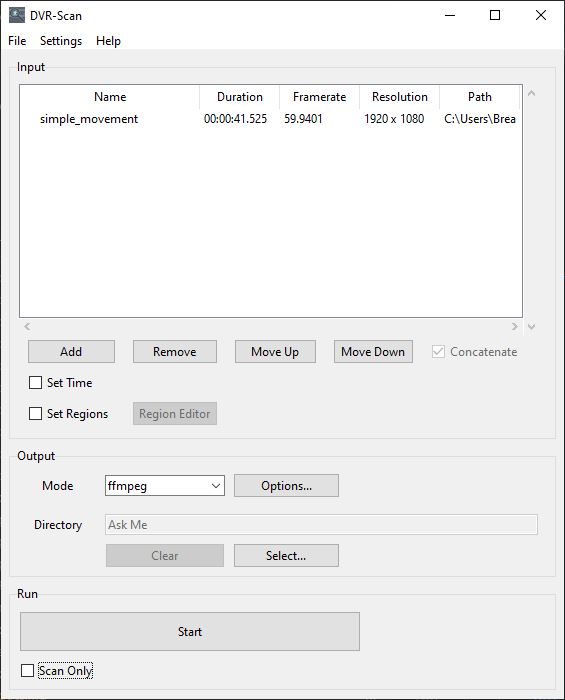
The UI can be started by running dvr-scan-app, and is installed alongside the existing command line interface dvr-scan. Config settings and region files can be shared seamlessly between both. Feedback on the new UI is welcome.
1.7.0.1 (March 11, 2025)
Re-release of Windows distribution that fixes program hanging when starting scan (#209). This was caused due to the way the program was built. There are no code changes, so the Python distribution has not been re-released.
1.7.1 (February 28, 2025)
- [feature] New GUI now available across all platforms, can be launched via
dvr-scan-app- Has UI elements for all settings, supports editing motion regions
- Shows scan progress in real-time
- [feature] Add ability to control video decoder via
input-modeconfig option (opencv,pyav,moviepy)- Allows switching between
OpenCV(default),PyAV, andMoviePyfor video decoding - Certain backends provide substantial performance benefits, up to 50% in some cases (let us know which one works best!)
- Allows switching between
- [bugfix] Fix crash on headless systems that don't have
pillowinstalled - [general] The region editor no longer prompts for a save path if one was already specified via the
-s/--save-regionsoption - [general] A size-limited logfile is now kept locally, useful for filing bug reports
- Can be controlled with config file options
save-log(default: yes),max-log-size(default: 20 kB),max-log-files(default: 4) - Path can be found under help entry for
--logfileby runningdvr-scan --helpordvr-scan-app --help
- Can be controlled with config file options
- [general] Minimum supported Python version is now 3.9
DVR-Scan v1.7 Beta 2
Release Notes
DVR-Scan 1.7 Beta 2 includes some bugfixes for the original beta release and improves error handling. To run the new GUI, launch dvr-scan-app instead of dvr-scan. The application fully integrates with the region editor, and supports loading/saving existing config files. Saved config/region files are compatible with the CLI.
Windows Download
Installer (MSI) or Portable (ZIP)
The installer will create a shortcut to the new app if requested. If you use the portable distribution, the GUI is called dvr-scan-app.exe. Both versions are compatible with existing DVR-Scan versions and can upgrade installations in-place.
Python Package (All Platforms)
Python Wheel (.whl) or Source Distribution (.tar.gz)
Install either Python distribution with pipx or pip as usual.
Changelog
- [bugfix] Fix "too many values to unpack" exception when scanning video
- [bugfix] Fix incorrect calculation of total frames when showing progress
- [bugfix] Fix drag-and-drop shortcut not working due to not parsing input paths from command line
- [general] Show alert on any errors during motion scanning
Bug Reports & Feedback
See #198 to provide feedback or submit bug reports.
Screenshots
Linux (xfce):

Windows:

DVR-Scan v1.7 Beta 1
Release Notes
DVR-Scan 1.7 Beta 1 includes a completely new GUI frontend for DVR-Scan. To run it, launch dvr-scan-app instead of dvr-scan. The application fully integrates with the region editor, and supports loading/saving existing config files. Saved config/region files are compatible with the CLI.
Windows Download
Installer (MSI) or Portable (ZIP)
If you use the portable distribution, the GUI is called dvr-scan-app.exe.
Python Package (All Platforms)
Python Wheel (.whl) or Source Distribution (.tar.gz)
Install either Python distribution with pipx or pip as usual.
Bug Reports & Feedback
See #198 to provide feedback or submit bug reports.
Screenshots
Linux (xfce):
Windows:
DVR-Scan v1.6.2
Release Notes
DVR-Scan 1.6.2 includes a completely reworked region editor that should provide a much more consistent UI experience across all platforms.

Changelog
- [feature] Vastly improved region editor UI:
- Reimplemented entire UI with Tcl/Tk to provide much more consistent experience across platforms
- All options now have dedicated UI controls in addition to keyboard shortcuts
- System-specific shortcuts like undo/redo now work as expected
- Various performance and usability improvements including zoom/pan and shape selection
- [feature] Add new
variance-thresholdconfig option to control how MOG2 controls which pixels are described by the current background model #163 - [feature] Add new
--thumbnailsoption to extract images from each event, use--thumbnails highscoreto save frame with highest motion score #159 - [feature] Add
--use-ptsoption to allow using presentation time instead of frame number for timestamps #170 - [bugfix] Fix incorrect framerate detection in Windows builds #174
- [general] Updates to Windows distributions:
- Python 3.9 -> Python 3.12
- OpenCV 4.10.0.82 -> 4.10.0.84
- Ffmpeg 6.0 -> 7.1
- [general] Built HTML documentation is now included with all distributions
DVR-Scan v1.6.1
Release Notes
DVR-Scan 1.6.1 includes some important fixes and improvements for the region editor. Minimum supported Python version is now 3.8.
Changelog
- [bugfix] Corrupt frames are no longer encoded and are skipped when encoding #151
- [bugfix] Fix
region-editorconfig file option having no effect #154 - [bugfix] The region editor now always prompts on any unsaved changes #161
- [general] The region editor no longer prompts for a save path if
-s/--save-regionwas specified - [general] Regions added via command line are now be merged with those loaded from the
load-regionconfig option - [general] Add new
learning-rateconfig option to control how fast the background model is updated #158 (thanks @felixscheffer)- Value between
0.0and1.0controls how much weight is placed on next frame, or-1for auto 0.0implies no update to the model,1.0will re-initialize it completely on each frame- Default value of
-1is for automatic, which is unchanged from previous releases
- Value between
Contributors

Assets 6
DVR-Scan v1.6
DVR-Scan 1.6 greatly improves masking capabilities with the new region editor (user guide):
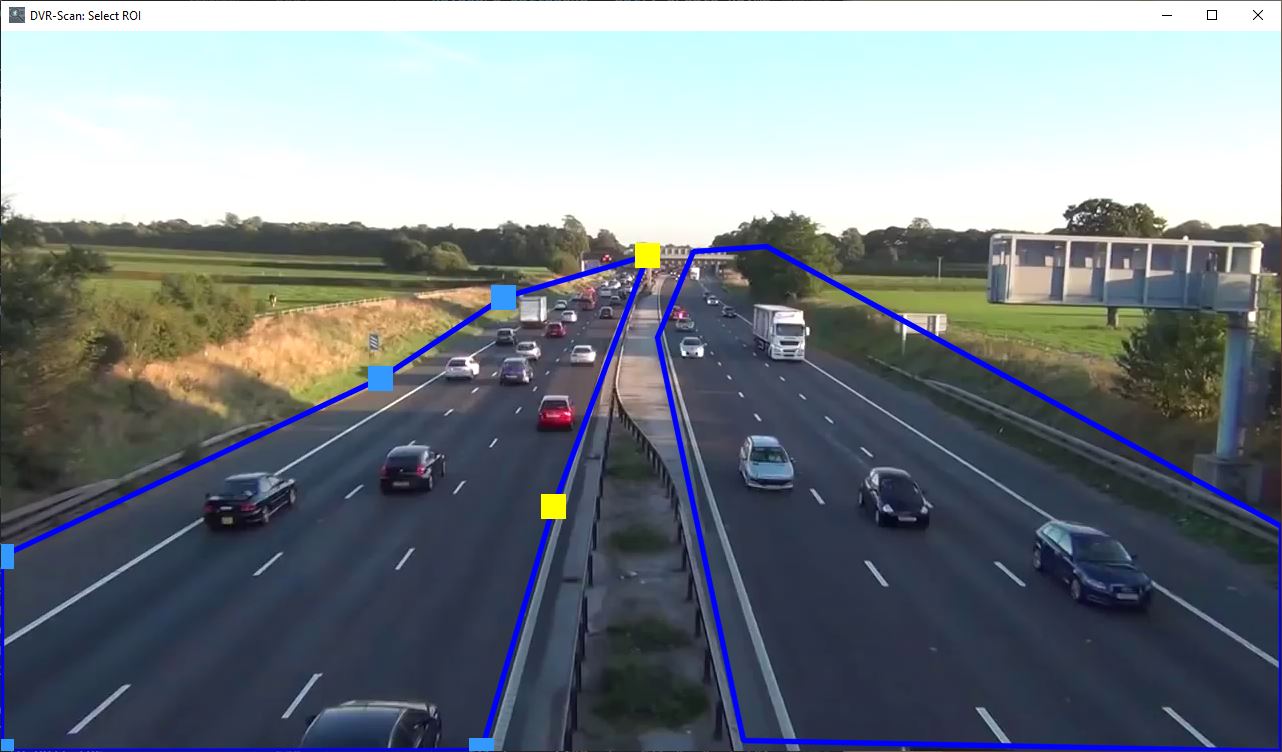
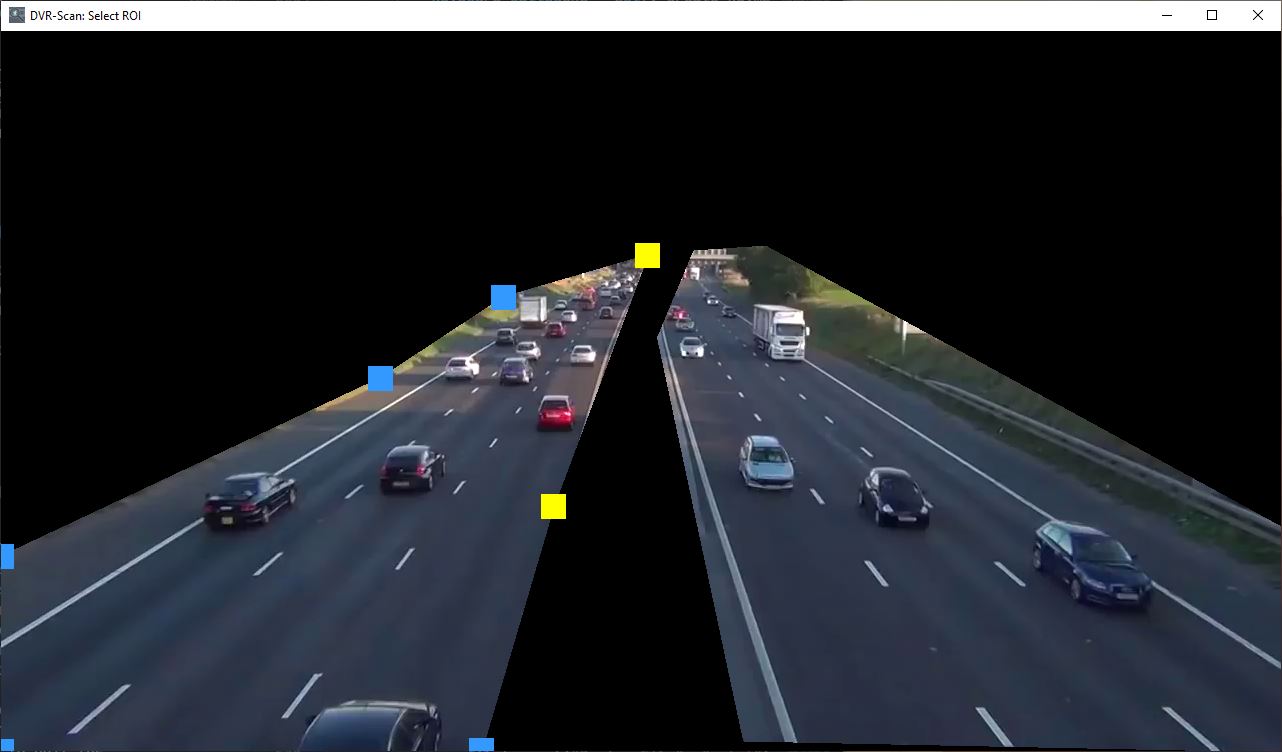
Multiple regions can now be defined with any shape, size, and complexity. Region data can be saved to a file and loaded again. Regions can also be specified by command line.
There are also several other bugfixes and improvements, such as improved seeking performance.
Changelog
- [feature] New region editor
-r/--region-editorallows creation of multiple regions without shape restrictions, replaces-roi/--region-of-interest - [feature] Multiple regions of interest (rectangular or polygonal) can now be created:
- Using the new region editor by adding the
-r/--region-editorflag:dvr-scan -i video.mp4 -r - New
-a/--add-regionreplaces-roi/--region-of-interestoption:dvr-scan -i video.mp4 -a 5 5 20 5 20 20 5 20 - Regions can now be saved to a file: press S in the region editor or use
-s/--save-region - Regions can now be loaded from a file: press O in the region editor or use
-R/--load-region - Config files can specify a region file to use by default with the
load-regionoption, replaces theregion-of-interestsetting
- Using the new region editor by adding the
- [feature] New
-fm/--frame-metricsoption draws motion score on each frame to help tune detection parameters - [cli] Short flag
-vis now used for--verbosity, replaced by-Vfor--version - [cli]
-roi/--region-of-interestis now deprecated, replaced by region editor and add/save/load region flags- Specifying this option will display the ROI in the new region format allowing you to update usages more easily
- [general] Improved seeking performance, using
-st/--start-timeis now much faster (#92)
-detection-parameters) - [general] Noise reduction kernel can now be disabled by setting
-k/--kernel-sizeto0(#123) - [general] Include stack traces in logfiles when setting
--verbosity debug - [bugfix] Add
max-scoreoption to config file to fix CNT mode always treating first few frame as motion, default is 255.0 #119 - [bugfix] Fix timecode format
HH:MM:SS[.nnn]being rejected for start/end time (#141) - [bugfix] Fix incorrect RGB mapping for config file (values were treated as BGR instead)
- [other] Config option
timecodehas been renamed totime-codeto match the command-line option - [other] Config options that started with
timecode-have been renamed to start withtext-, and are now shared between thetime-codeandframe-metricsoverlays:time-code-marginis nowtext-margintime-code-font-scaleis nowtext-font-scaletime-code-font-thicknessis nowtext-font-thicknesstime-code-font-coloris nowtext-font-colortime-code-bg-coloris nowtext-bg-color
Known Issues
- Some prebuilt archives include documentation which references the
load-regionconfig option with the incorrect name (region-file) #153
DVR-Scan v1.5.1
Minor re-release of v1.5 to fix crash when opening multiple videos.
Changelog
- [bugfix] Fix crash when opening multiple input videos (#95)
- [bugfix] Fix incorrect warning regarding frame decode failures at end of video
DVR-Scan v1.5
Release Notes
- Significant performance improvements on multicore systems
- Support wildcards/globs as inputs for scanning entire folders (
-i folder/*.mp4) - Allow use of ffmpeg for better output quality (
-m ffmpeg) or codec-copying mode (-m copy) - Configuration files are now supported, see documentation for details
- Can specify config file path with
-c/--config, or create advr-scan.cfgfile in your user config folder
- Can specify config file path with
- Windows binaries are now signed, thanks SignPath.io (certificate by SignPath Foundation)
- Experimental Nvidia CUDA® support has been added (set
-b MOG2_CUDA)- If installing via
pip, requires manual installation of OpenCV compiled with CUDA support - If downloading Windows version, make sure to download the GPU-enabled build (
dvr-scan-1.5-win64-cuda.zip) - CUDA-enabled builds only support GTX 900-series and above GPUs, do not include the
CNTmethod, and are not yet code signed
- If installing via
- Minimum supported Python version is now 3.7
- Minimum supported OpenCV version is now 3.x
Command-Line Changes
- New options:
-c/--config- set path to config file-d/--output-dir- set directory to write output files (default is working directory)-m/--output-mode- set output mode (one of:opencv,ffmpeg,copy)-mo/--mask-output- path to write motion mask for analysis--verbosity,--logfile- control output verbosity, path to save log output
-i/--inputnow supports globs/wildcards to scan entire folders, e.g.-i folder/*.mp4- Change default value for
-l/--min-event-lengthto 0.1 seconds, previously was 2 frames - Long form of
-roihas been renamed to--region-of-interest(previously was--rectangle-of-interest) -cis now used for--config, previously was for--codec- Add experimental
MOG2_CUDAoption for-b/--bg-subtractor - Rename existing
MOGoption toMOG2 --codechas been removed, the value should now be set using config file optionopencv-fourcc
Changelog
- [feature] Configuration file support and new
-c/--configargument to specify path to config files (#77)- Breaks existing behavior of
-c(was previously the shortform of--codec)
- Breaks existing behavior of
- [feature] Add support for multiple output modes via
-m/--output-modeargument (#27, #42) - [feature] Experimental support for GPU-based CUDA MOG2 filter (#12)
- [feature] Video encoding and decoding are now done in parallel with the scanning logic leading to improved performance on most systems (#52)
- [feature] Add support for exporting motion masks via
-mo/--mask-outputargument- Useful for detailed analysis or tuning of detection parameters
- ffmpeg can be used to generate output videos by specifying
-m ffmpeg - Codec-copy mode, using ffmpeg, can be used by specifying
-m copy
- [feature] Add
--verbosityand--logfilearguments to provide more control over program output - [feature] Allow scanning entire folders using wildcards with
-i/--input(#5)- Glob expansion is also performed on each input path directly, so quoted globs also function correctly
- [bugfix] Fix incorrect results when
-st/--start-timeis set - [bugfix] Event start times are now correctly calculated when using
-fs/--frame-skip(#68, #70)- Note that all skipped frames within the event window are included in motion event, thus the calculated start time may be slightly earlier
- [bugfix] Only get screen resolution when required (was causing issues on headless machines)
- [bugfix] Fix output messages conflicting with progress bar shown during scanning
- [bugfix] Output events now start from 1 to align with the event list
- [bugfix] Event end times now include the presentation duration of the last frame
- [bugfix] Small values for
-l/--min-event-lengthare now handled correctly, previously would cause an error - [enhancement] Progress bar now indicates how many events have been detected so far
- [enhancement] Change default value for
min_event_lento 0.1 seconds, previously was 2 frames (#91)
Known Issues
- Attempting to open multiple input videos will cause DVR-Scan to crash, fixed in v1.5.1 (#95)
- Variable framerate videos (VFR) are not fully supported, and will yield incorrect timestamps (#20)
- Video output when using frame skip and
-m opencv(default output mode) will result in frames missing from the exported videos (#81)- Use
-m ffmpegor-m copyas a workaround
- Use
- Multiple input videos are not supported with
-m ffmpegor-m copy(#86)- Use ffmpeg to concatenate/merge input videos before processing as a workaround
- CUDA builds do not include the
CNToption for-b/--bg-subtractor