Foundation is a work-in-progress cross-platform rendering framework/renderer.
Foundation includes two bespoke renderers - The Path Tracer PT based on Physically Based Rendering:From Theory To Implementation, and a Continuous LOD Meshlet (Nanite-like) Rasterizer RASTER.
Please note that the Path Tracer is not a faithful recreation of PBRT - however heavily referenced against, with outputs extensively verified against results from Blender Cycles et al. PT outputs can be considered reference in this context.
Canonical glTF format scenes are supported, alongside ones with private extensions made for Foundation itself. https://github.com/mos9527/Foundation-Blender-IO is used for scene interchange between Blender and Foundation.
Sample scene and resources can be found at https://github.com/mos9527/Foundation-Resources
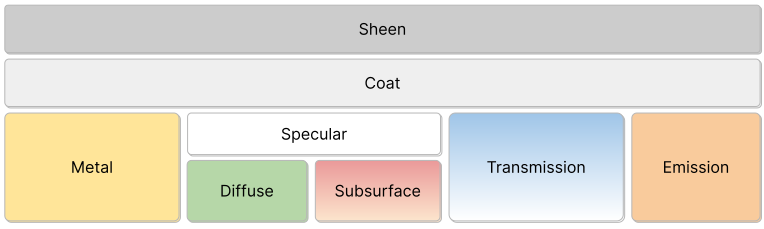
Layered PBR material interface based on the OpenPBR model (as seen in Blender's Principled BSDF), offering full support with the exception of 3.8 Thin-film iridescence
Principled Hair BSDF's Chiang single-scattering model implementation. Many bounces may be required to derive accurate hair scattering phenomena.
- OCIO-based SDR & HDR color pipeline
- Linear BT.709 scene space (D65), converted to D60 via Bradford CAT and encoded as AP1
- ACEScct log-space encoding for grading and display transforms
- LUT-based output transforms for SDR/HDR — ACES 1.3, ACES 2.0, AgX, Standard (sRGB and PQ)
- 1-to-1 match with Blender OCIO output
- Full Foundation Material support
- Unidirectional megakernel integrator
- Energy conserving BSDFs with Cycles output parity
- Sobol & PCG samplers
- Path-traced Subsurface scattering
- Path-traced Chiang Hair/fur shading
- Curve rendering for hair/fur, etc
- Importance sampled environment maps
- Anamorphic physical lens
- Area, point, spot, and directional lights
- Context-dependent Light BVH sampling for analytical lights
- GPU-driven mesh shader pipeline with hierarchical continuous LOD
- Two-phase meshlet occlusion culling
- Optional RT Shadows
- Extended glTF support & Blender data exchange via https://github.com/mos9527/Foundation-Blender-IO/tree/main
- Custom binary scene format
FSCNwith excellent serialization/loading (memory-mapped) performance - Animation (Skinning, BlendShapes, Articulated rigid bodies)
Smaller examples, using the framework as a library (therefore excluding the renderers) are provided for reference and testing purposes.
These be found in The Examples directory.
TODO SCREENSHOTS
cmake is required for builds. A C++20 compliant compiler is also required.
All third-party dependencies are included as FetchContent declarations. See @ref Thirdparty for a comprehensive list.
Slang is required for building shaders for all backends, and should be available in your PATH.
Vulkan SDK is required for building the @ref VulkanApplication backend.
You can build, and debug the app with Visual Studio's CMake intergration. Or with any alternative CMake workflow of your choice.
The Vulkan SDK installer should take care of most, if not all the setup for you.
CI Builds are provided for this platform. You can get them from nightly
Refer to https://docs.vulkan.org/tutorial/latest/02_Development_environment.html#_linux_2 for setting up the Vulkan SDK on Linux.
- Arch Linux
# Enable [extra-testing] in /etc/pacman.conf for the latest validation layers et al
sudo pacman -S vulkan-validation-layers vulkan-tools vulkan-radeon vulkan-headersInstall the official Vulkan SDK PKG, and expect things to just build through CMake as usual.
Open Android/ as a project in Android Studio and suffer - that should (hopefully) be enough.
Notes on example selection - for CI and Android only select examples are built. These are populated by:
python Scripts/GenerateExamples.pyBinary artifacts will be located in build/bin/.
mkdir build
cd build
cmake ..
cmake --build . -j8The following CMake options are available:
| Option | Description | Default |
|---|---|---|
| FOUNDATION_WITH_ASAN | Build with Address Sanitizer enabled | OFF |
| FOUNDATION_WITH_TSAN | Build with Thread Sanitizer enabled | OFF |
| FOUNDATION_WITH_PROFILING | Build with profiler (Tracy) enabled | ON |
| FOUNDATION_RHIVULKAN_VALIDATION_LAYER | Build with Vulkan Validation Layer enabled | ON |
| FOUNDATION_WITH_EXAMPLES | Build examples | ON |
| FOUNDATION_WITH_TESTS | Build tests | ON |
Toggle these options with -D<OPTION>=ON/OFF when running cmake .., e.g. cmake -DFOUNDATION_WITH_SANITIZERS=ON ..
CMake Unity Builds are supported, and can be enabled with -DCMAKE_UNITY_BUILD=ON when running cmake ...
- https://github.com/microsoft/mimalloc.git
- https://github.com/fmtlib/fmt.git
- https://github.com/gabime/spdlog.git
- https://github.com/wolfpld/tracy.git
- https://github.com/nothings/stb.git
- https://github.com/thisistherk/fast_obj
- https://github.com/zeux/meshoptimizer.git
- VVL Timeline resource tracking has been an issue - though should be resolved by now. Always update the SDK to the latest version.
- RenderDoc is generally enough for most debugging tasks.
- Though some esoteric issues would eventually require HW specific tools for accurate timing and performance metrics.
- NSight™ Graphics for NVIDIA GPUs
- Radeon™ Developer Tool Suite
We use Vulkan exclusively, so portability wise:
- Desktop (Windows & Linux) is probably the only platform we truly care about
- RT & Mesh Shader usage practically means anything DirectX 12 Ultimate Certified will Just Work(tm)
- TODO Fallback path for Raster to invoke MDI when running without Mesh Shader support?
- [-] Android
- Inline Ray Tracing is surprisingly solid & widely supported on mobile Androids nowadays
- As ridiculous as it sounds - GPUScene Examples can run on those devices. Turns out you can do HW accelerated Path Tracing on mobile...
- Mesh Shaders are mostly amiss. Newer (8Gen3) Adrenos offer support - not sure about other chips.
- [-] Metal (iDevices and Macs)
- MoltenVK, KosmickKrisp
- Neither supports RT nor Mesh Shaders.
- Other examples work on both. That, and Mesa
llvmpipe(headless)...
- Lavapipe
- https://www.vulkan.org/user/pages/09.events/vulkanised-2025/T5-Lucas-Fryzek-Igalia.pdf
- Get your own build.
- Windows: https://github.com/pal1000/mesa-dist-win/releases
- macOS: Try https://github.com/rerun-io/lavapipe-build script to build from source
- Linux: https://docs.mesa3d.org/install.html
- Set
VK_DRIVER_FILESenviron.- Powershell:
$env:VK_DRIVER_FILES="C:\Users\komahuang\Downloads\mesa3d-26.1.3-release-msvc\x64\lvp_icd.x86_64.json"- note the full path, change this to your own. - Bash et al:
export VK_DRIVER_FILES="/path/to/lvp_icd.x86_64.json"
- Powershell:
- Run stuff from the same shell.
-
Correct SDR&HDR Color Pipeline
- Linear BT709 Scene Space (D65), converted to D60 via Bradford CAT and encoded as AP1
- Transform then encodes as ACEScct
- Rest of the transform handled by LUTs in ACEScct log space, incl. to display EOTF. See
Scripts/OCIOBakeLUTs.py - Blender OCIO Config used to generated LUTs for SDR/HDR ACES1.3/2.0/AgX/Standard (sRGB. v. PQ) transforms
- See also https://docs.blender.org/manual/en/latest/render/color_management/
- Obtains 1-to-1 matching output :)
-
Coroutines in place of...whatever this is. Good to have, not necessary.
-
Scene Graph, instead of AoS to represent instances. Done
-
Animation (Skinning, BlendShapes, Articulated rigid bodies, camera & lights. Contribution by Claude)
Sorted by priority (high to low), also w/ future blog post series update on:
- Emissive triangles in NEE, ReSTIR DI/PT
- Tracing from surfaces (for baking lightmaps, probe generation, etc)
Done, awaiting Blog Update:
- Adaptive Sampling (https://jo.dreggn.org/home/2009_stopping.pdf)
- Per-pixel then dialated with a box filter. Same as Cycles.
- Kills the warps to skip converged pixels, not regenerating paths as discussed in Megakernels Considered Harmful: Wavefront Path Tracing on GPUs
- TODO? Perhaps unnecessary if we'd actually move to wavefronts...
- Hair Shading
- Curve (hair, fur) rendering
- #15
- Blender
POLYsplines as standard glTFLINES+_RADIUS+TEXCOORD_0(via https://github.com/mos9527/Foundation-Blender-IO) - Import bakes Disjoint Orthogonal Triangle Strips (DOTS)
- See also Path-Traced Hair Rendering in Indiana Jones and the Great Circle
- https://github.com/NVIDIA-RTX/RTXCR is used as a reference implementation
- TODO Possiblity to bind strands to mesh - therefore texturing it?
- TODO Support NV LSS?
- Path Traced Skin BSSRDF
- Disney BSSRDF from PBRTv3
- Uniformly selects exitance point on scattered path via AnyHit + reservoir sampling
- Transparent shadows from Area Lights
- Environment lights and emissive objects naturally cast caustics.
- Area lights are also added as procedural geometry into TLAS, allowing them to be hit by BSDF rays and evaluated with MIS w/ NEE.
- Needs a large energy/firefly clamp.
- Not done for analytical lights (Point/Directional) as they are delta distributions and cannot be hit by BSDF rays.
- Conversion to small disk lights is feasible, or another O(N) loop to evaluate all of those inline w/o going through scene BVH
- Not worth it nonetheless. This is merely brute-forcing.
- Light BVH sampling for scene lights
- #14
- https://fileadmin.cs.lth.se/graphics/research/papers/2019/dyn_manylight/MPC19_presentation.pdf, implementation referencing https://github.com/NVIDIAGameWorks/Falcor
- Also PBRTv4's implementation in https://www.pbr-book.org/4ed/Light_Sources/Light_Sampling
- Importance sampling Infinite Image Lights
Done:
- Revisiting Physically Based Shading at Imageworks - Kulla & Conty 2017
- Complete Multiscatter Energy Compensation
- See also
Scripts/LUTPrecomputeGGX.ipynb - Dielectrics Reflection
- Approximate aniso materials with the same LUT
- Dielectrics Transmission
- Implies another dimension on IOR
- Darkening still noticeable at medium roughness.
- Cycles suffer from the same issue. Try out https://github.com/mos9527/Foundation-Resources/tree/master/white-furnace
- The slides, curiously, does not demonstrate white furnace for glass compensation
- More bounces can somewhat remedy the issue
- TODO Implement Heitz Random Walk ab initio?
- See also
- Complete Multiscatter Energy Compensation
- Texture sampling rate via ray differentials for primary rays
- Easy for camera rays, not so much for ones bouncing off BSDFs
- Coat BSDF
- Sheen BSDF/SGGX approx.
- LTC Sheen "Practical Multiple-Scattering Sheen Using Linearly Transformed Cosines" https://github.com/tizian/ltc-sheen
https://blog.selfshadow.com/publications/s2017-shading-course/imageworks/s2017_pbs_imageworks_sheen.pdf
- PCG (Independent), Sobol Samplers
Unfortunately not the favourite child. Maybe one day.
- IBL
- Screen Space Ambient Occlusion
- GTAO
- Dollar store version. Doesn't even bother with denoising. Taken from Unity HDRP.
- GTAO
- Screen Space Reflections
- Screen Space Diffuse GI
- Light Probe Volumes
- Really Speed up meshlet continuous LOD selection.
- We're O(N). Nanite does it O (log N) via BVH