

CCRelay is a VS Code extension — with optional Electron and Tauri desktop apps — that bundles a local API proxy so you can seamlessly switch between AI providers (Anthropic, OpenAI, Gemini, etc.) without losing conversation context. Designed for Claude Code, Claude Cowork, and OpenAI Codex.
Website: https://ccrelay.inflab.org
- Core Features
- Verified upstreams (by host)
- Requirements
- Installation
- Desktop App (Electron)
- Desktop App (Tauri)
- Quick Start
- Client Integrations
- Usage Guide
- External web search
- Configuration
- API Endpoints
- Commands
- Development
- File Locations
- License
Proxy & Routing
- Built-in HTTP proxy (default
http://127.0.0.1:7575) with path-based routing — forward to a provider, block with a custom response, or return 404 - Multi-protocol: accepts Anthropic, OpenAI Chat Completions, and OpenAI Responses API (
/v1/responses) on the same port - Automatic cross-protocol conversion when client and upstream wire formats differ
- URL prefixes
/openai/...and/anthropic/v1/...let different clients target the right protocol explicitly
Client Integrations
- First-class support for Claude Code (
ANTHROPIC_BASE_URL), Claude Cowork, and OpenAI Codex (~/.codex/config.toml) - Web dashboard Client configuration tab writes the right env vars for you
Operations
- Multi-instance coordination (Leader/Follower) across VS Code windows and the desktop app
- Config hot-reload — edits to
config.yamlare picked up automatically - Optional request/response logging (SQLite or PostgreSQL) with a built-in log viewer, token tracking, and performance metrics (TTFB, output TPS, P50/P90 latency)
- Concurrency control with per-route queue limits
Desktop & UI
- Optional Electron or Tauri desktop app — run CCRelay without VS Code
- Web dashboard with provider management, settings, and i18n (English + Chinese)
- Provider import/export as JSON
External web search
- Optional local handling of Anthropic-style web search tool traffic for provider IDs you allowlist, using Tavily or GLM (Z.ai) as the retrieval backend; configure in
config.yamlor the dashboard Capabilities tab
Relaying uses the provider baseUrl hostname. The rows below are upstream endpoints we have validated when you add them as a provider. Vendors may offer Anthropic APIs, OpenAI-compatible APIs, or both — but your client protocol and the upstream protocol are often not the same. When they differ, CCRelay applies generic protocol conversion first, then hostname-specific alignment where we maintain it. When the wire looks the same on both sides, tooling still differs by vendor (for example Web Search Server Tools, strict Chat schemas, or Responses-only tools).
Hosts not listed get generic conversion only (no extra platform layer). Listed hosts get generic conversion plus platform rules for tools, messages, responses, and request URL/body quirks. The last column is where Web Search Server Tools are supported for that vendor; it does not depend on how you reach the relay.
Example — Azure OpenAI: Upstream Web Search Server Tools exist only on the Responses API (hence “Responses API only” in the Web Search Server Tools column). You can still point clients at CCRelay using the OpenAI Chat Completions surface. After you set Azure OpenAI as the provider baseUrl, Chat-shaped calls that include Web Search Server Tools are rewritten in the conversion layer into upstream Responses requests so search keeps working—you do not need the client to call /v1/responses itself.
| Provider (target host) | Anthropic /v1/messages |
OpenAI /chat/completions |
OpenAI /v1/responses |
Web Search Server Tools |
|---|---|---|---|---|
Z.ai GLM (api.z.ai, open.bigmodel.cn) |
Supported | Supported | Not supported | Supported |
Xiaomi MiMo (api.xiaomimimo.com) |
Supported | Supported | Not supported | Chat only |
MiniMax (api.minimax.io, api.minimaxi.com) |
Supported | Supported | Not supported | Not supported |
Google Gemini (OpenAI-compatible, generativelanguage.googleapis.com) |
Not supported | Supported | Not supported | Not supported |
Azure OpenAI (*.cognitiveservices.azure.com) |
Not supported | Supported | Supported | Responses API only |
| Other hosts | Varies | Varies | Varies | Generic conversion only |
Screenshots (Claude Code through CCRelay)
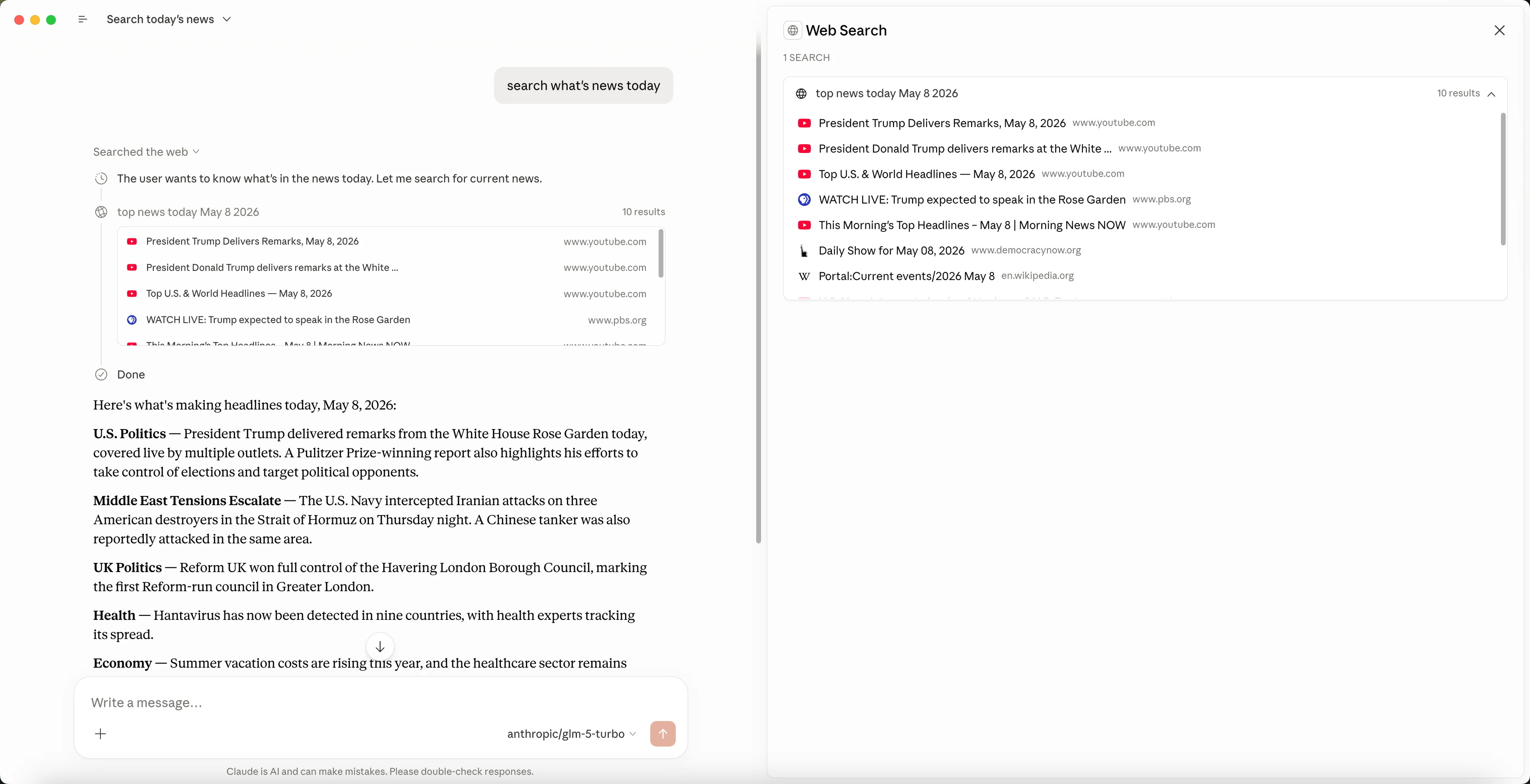
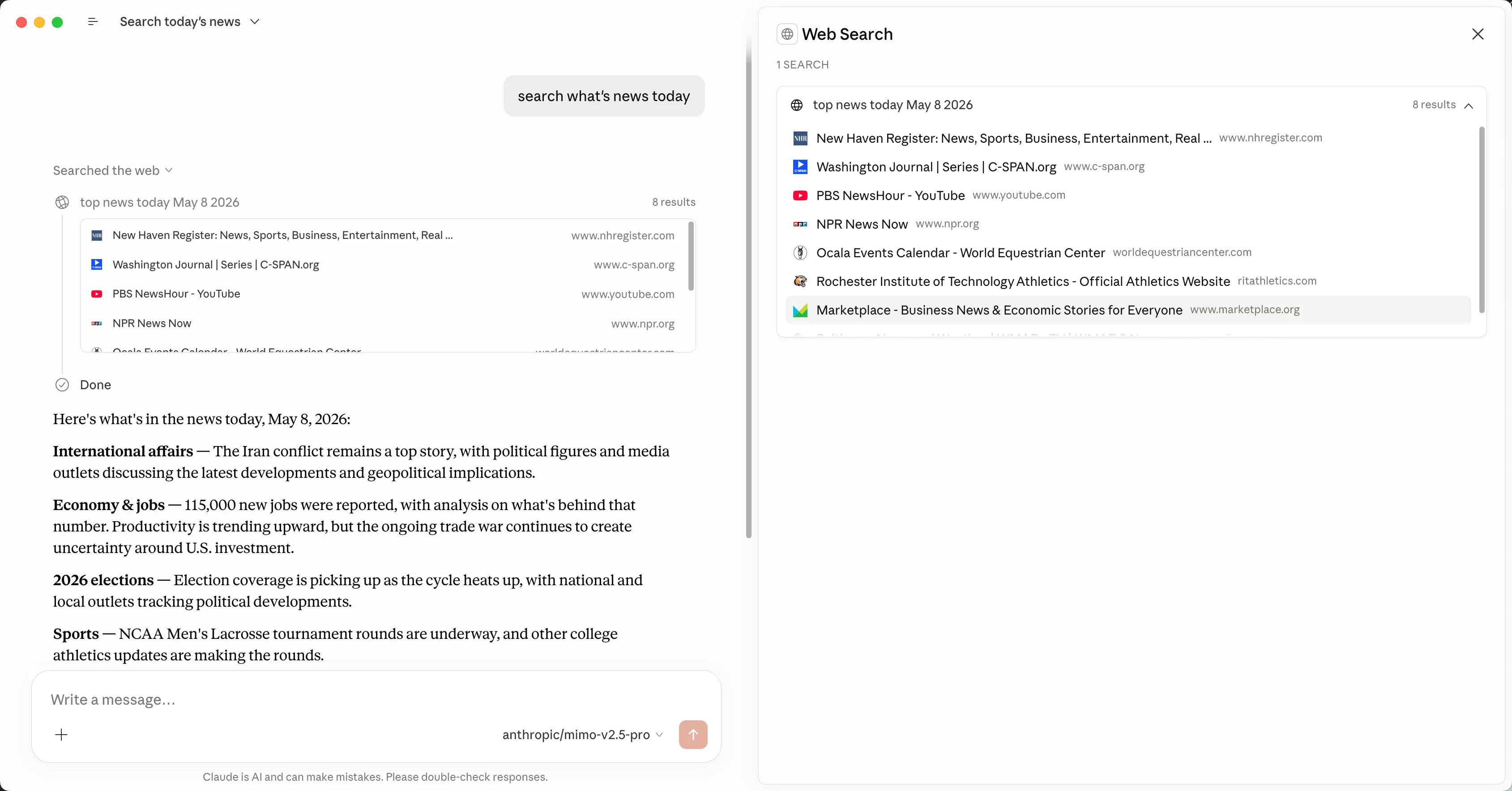
- VS Code 1.80.0 or higher
- Node.js (for development)
- Download the latest
.vsixfrom Releases - In VS Code:
Cmd+Shift+P(macOS) orCtrl+Shift+P→Extensions: Install from VSIX... - Select the downloaded file
git clone https://github.com/inflaborg/ccrelay.git
cd ccrelay
npm install
npm run build
npm run package # produces dists/ccrelay-vscode-*.vsixnpm install
npm run compile # or npm run watch
# Press F5 in VS Code to launch Extension Development HostAn optional Electron desktop app (packages/desktop) runs the same core as the VS Code extension:
- Shares
~/.ccrelay/config, state, and Leader election with the extension - Stores request logs with in-process SQLite (no system
sqlite3binary required for the default desktop build) - Tray menu → Open Dashboard loads the web UI in an app window; Open Logs Folder opens runtime diagnostics under
~/.ccrelay/logs/ - Download from GitHub Releases:
- macOS:
CCRelay-<version>-darwin-arm64.dmgor-darwin-x64.dmg - Windows:
CCRelay-<version>-win32-x64.exeor-win32-arm64.exe
- macOS:
A lightweight Tauri desktop app (packages/desktop-tauri) runs the same core as the VS Code extension and Electron app:
- Shares
~/.ccrelay/config, state, and Leader election with all other instances - Sidecar layout: the Rust shell starts a bundled Node.js runtime shipped inside the installer (server scripts and native SQLite support live in app resources). End users do not install Node separately.
- Same in-process SQLite request logging as the Electron desktop app
- Tray menu with Start/Stop Server, Open Dashboard, and Open Logs Folder
- Download from GitHub Releases:
- Installer names follow the Electron desktop pattern (
CCRelay-<version>-<platform>-<arch>.<ext>) withtauriadded after the version (for exampleCCRelay-0.2.4-tauri-darwin-arm64.dmg,CCRelay-0.2.4-tauri-win32-x64.exe). Windows ships NSIS.exeonly (no MSI).
- Installer names follow the Electron desktop pattern (
npm install
npm run tauri:dev         # Builds web UI + Node sidecar, then runs Tauri dev
npm run tauri:pack:mac    # Production macOS installer
npm run tauri:pack:win    # Production Windows installer
npm run tauri:build (run automatically before pack/dev) bundles the sidecar JavaScript, copies the native SQLite module, and places a Node binary next to the Tauri external sidecar slot. Use Node.js 22 when building from source (matches CI).
Edit ~/.ccrelay/config.yaml (auto-created on first launch):
providers:
  glm:
    name: "Z.AI-GLM-5"
    baseUrl: "https://api.z.ai/api/anthropic"
    mode: "inject"
    apiKey: "${GLM_API_KEY}"
    modelMap:
      - pattern: "claude-opus-*"
        model: "glm-5"
      - pattern: "claude-sonnet-*"
        model: "glm-5"
      - pattern: "claude-haiku-*"
        model: "glm-4.7"
    enabled: true

defaultProvider: "glm"Add to ~/.claude/settings.json:
{
  "env": {
    "ANTHROPIC_AUTH_TOKEN": "ccrelay_apikey_placehold_do_not_need_to_setup_here",
    "ANTHROPIC_BASE_URL": "http://localhost:7575/anthropic",
    "API_TIMEOUT_MS": "3000000",
    "CLAUDE_CODE_DISABLE_NONESSENTIAL_TRAFFIC": 1
  }
}
Optional per-tier model names — only needed if you want to override Claude Code's defaults:
{
  "env": {
    "ANTHROPIC_AUTH_TOKEN": "ccrelay_apikey_placehold_do_not_need_to_setup_here",
    "ANTHROPIC_BASE_URL": "http://localhost:7575/anthropic",
    "API_TIMEOUT_MS": "3000000",
    "CLAUDE_CODE_DISABLE_NONESSENTIAL_TRAFFIC": 1,
    "ANTHROPIC_DEFAULT_OPUS_MODEL": "claude-opus-4-7",
    "ANTHROPIC_DEFAULT_SONNET_MODEL": "claude-sonnet-4-6",
    "ANTHROPIC_DEFAULT_HAIKU_MODEL": "claude-haiku-4-5"
  }
}
You can also set these from the Web dashboard: Client configuration tab.
- Click the CCRelay icon in the VS Code status bar
- Or Command Palette:
CCRelay: Switch Provider
CCRelay exposes both Anthropic and OpenAI compatible routes on the same port (default 7575). Use URL prefixes to pick the right protocol:
| Client | Protocol | Base URL |
|---|---|---|
| Claude Code | Anthropic | http://127.0.0.1:7575/anthropic |
| Claude Cowork | Anthropic | http://127.0.0.1:7575/anthropic |
| Codex | OpenAI | http://127.0.0.1:7575/openai |
Legacy /v1/... paths still work when pointed at http://127.0.0.1:7575 directly.
See Quick Start for the recommended ~/.claude/settings.json config.
Quick test (current shell only):
export ANTHROPIC_BASE_URL=http://127.0.0.1:7575/anthropic
claudeSet the app's Anthropic Base URL to http://127.0.0.1:7575/anthropic. Switch providers via the CCRelay extension or config.yaml.
Create or edit ~/.codex/config.toml:
model = "gpt-5.4-mini"
model_provider = "ccrelay"

[model_providers.ccrelay]
name = "CCRelay"
base_url = "http://localhost:7575/openai"
Adjust model to one your CCRelay provider can route (via modelMap).
When multiple VS Code windows are open:
- One instance becomes the Leader and runs the HTTP server; others are Followers
- Leader broadcasts provider changes to Followers via WebSocket
- If the Leader exits, a Follower takes over automatically
- Status bar shows role:
$(broadcast)= Leader,$(radio-tower)= Follower
Logging: request logs are persisted only by the Leader. Followers proxy log API calls to the Leader; if the Leader is unreachable, those calls return 503.
IPC lock (~/.ccrelay/ccrelay-lock.sock on Unix/macOS, named pipe on Windows) coordinates Leader election across VS Code and the desktop app.
| Mode | Auth behavior | Use case |
|---|---|---|
passthrough |
Preserves original auth headers | Official Claude API with OAuth |
inject |
Replaces auth with provider API key | Third-party providers (GLM, OpenRouter, etc.) |
Map Claude model names to provider-specific models with wildcard support:
modelMap:
  - pattern: "claude-opus-*"
    model: "glm-5"
  - pattern: "claude-sonnet-*"
    model: "glm-4.7"
Vision model mapping — separate mapping for multimodal requests:
vlModelMap:
  - pattern: "claude-*"
    model: "vision-model"
modelMap applies only to request bodies (model field). GET /models responses are not rewritten.
Starting from Claude Desktop 1.7196.0, the client rejects model IDs that contain third-party keywords such as qwen, glm, kimi, deepseek, etc. If you use third-party upstream models, map them to claude- prefixed aliases for Cowork only.
The alias must be claude- followed by a single token without additional hyphens (e.g. claude-a1, not claude-my-model), because multi-hyphen names are parsed as Anthropic model versions.
Custom model list (customModelsList): each line is realModelId;displayName;alias (or realModelId;;alias when display equals the real id). The real id is what upstream expects; alias is the Cowork-safe id.
Cowork: In Claude Desktop, add a custom request header x-ccrelay-model-alias with any value (for example 1). With this header, GET /models and GET /models/{id} return alias as the wire id. Without the header, the same list returns real model ids (for other clients).
Model mapping (modelMap): map each alias to the real upstream model id. Place specific rules before wildcard claude-* / gpt-* catch-alls.
Example -- two GLM models; Cowork uses aliases via the header above:
glm:
  name: "GLM"
  baseUrl: "https://api.z.ai/api/paas/v4"
  providerType: "openai_chat"
  mode: "inject"
  apiKey: "${GLM_API_KEY}"
  useCustomModelsList: true
  customModelsList:
    - "glm-5.1;GLM 5.1;claude-a1"
    - "glm-4.7;GLM 4.7;claude-a2"
  modelMap:
    - { pattern: "claude-a1", model: "glm-5.1" }
    - { pattern: "claude-a2", model: "glm-4.7" }
    - { pattern: "claude-*", model: "glm-5.1" }
    - { pattern: "gpt-*", model: "glm-5.1" }
With this configuration:
- Without
x-ccrelay-model-alias:GET /modelsreturnsglm-5.1andglm-4.7(with display names when they differ from the id). - With
x-ccrelay-model-alias:GET /modelsreturnsclaude-a1/claude-a2as ids; Cowork selects those; CCRelay maps them to real upstream ids viamodelMap. - The
claude-*andgpt-*wildcards catch any other model names the client may send and route them to the first model.
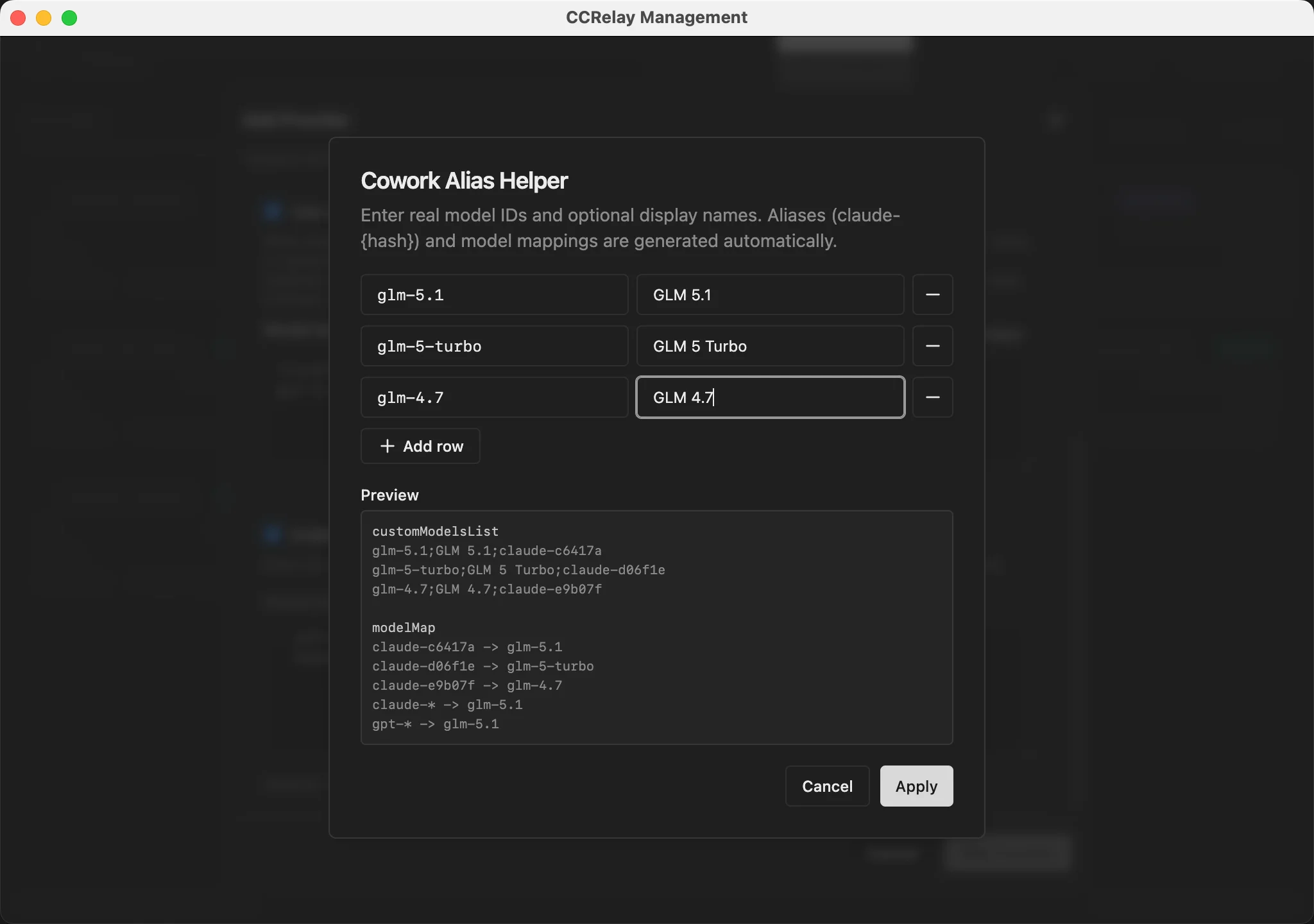
The built-in wizard writes realId;displayName;claude-{hash} lines and matching modelMap entries. Add x-ccrelay-model-alias in Claude Desktop for Cowork; omit it elsewhere.
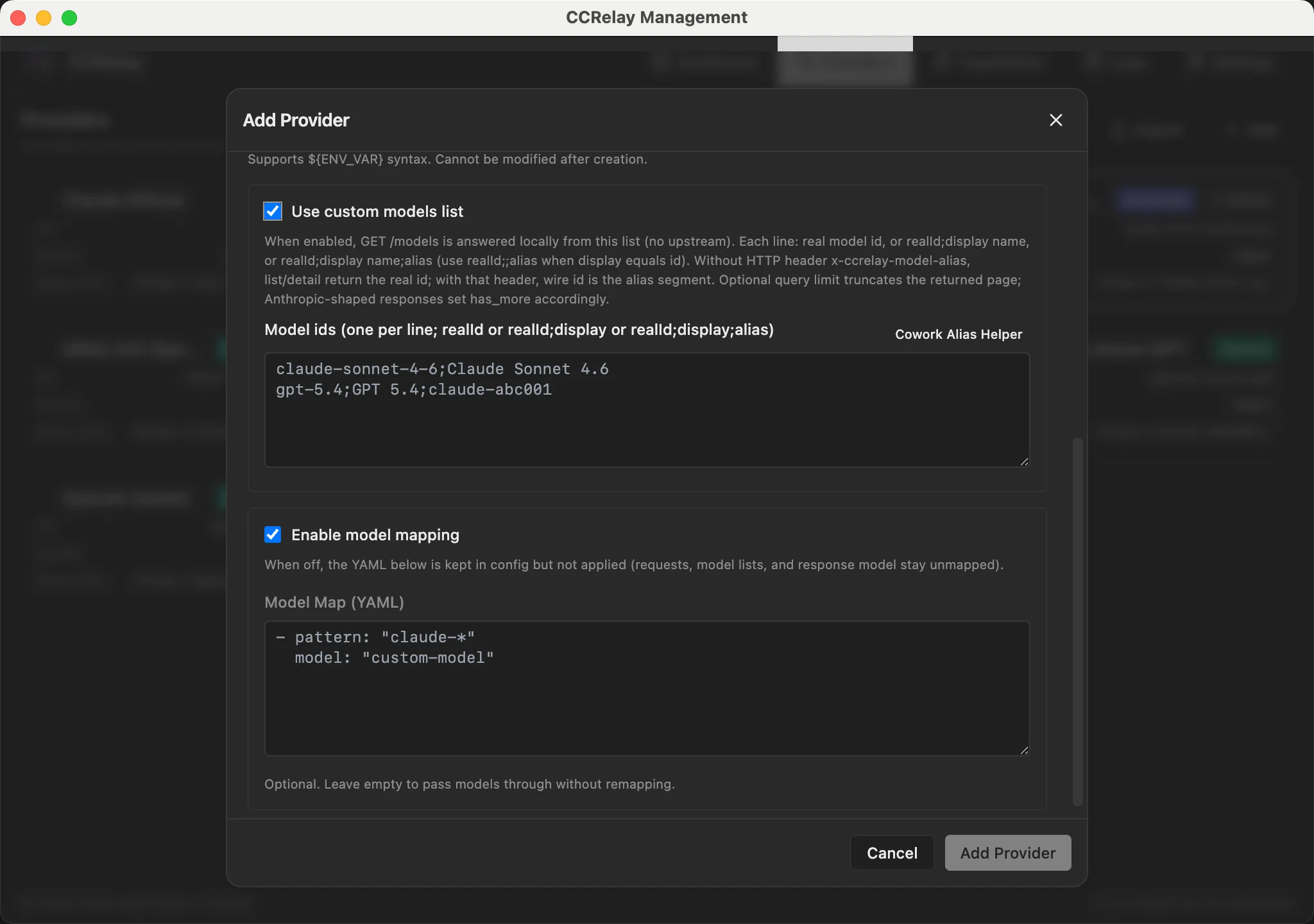
Use Quick fill custom models to enter upstream model IDs and display names in a structured form; the custom model list and model map are generated automatically.
In Claude Desktop's Configure third-party inference panel, add x-ccrelay-model-alias to Gateway extra headers so that the model list returns aliases instead of real IDs.
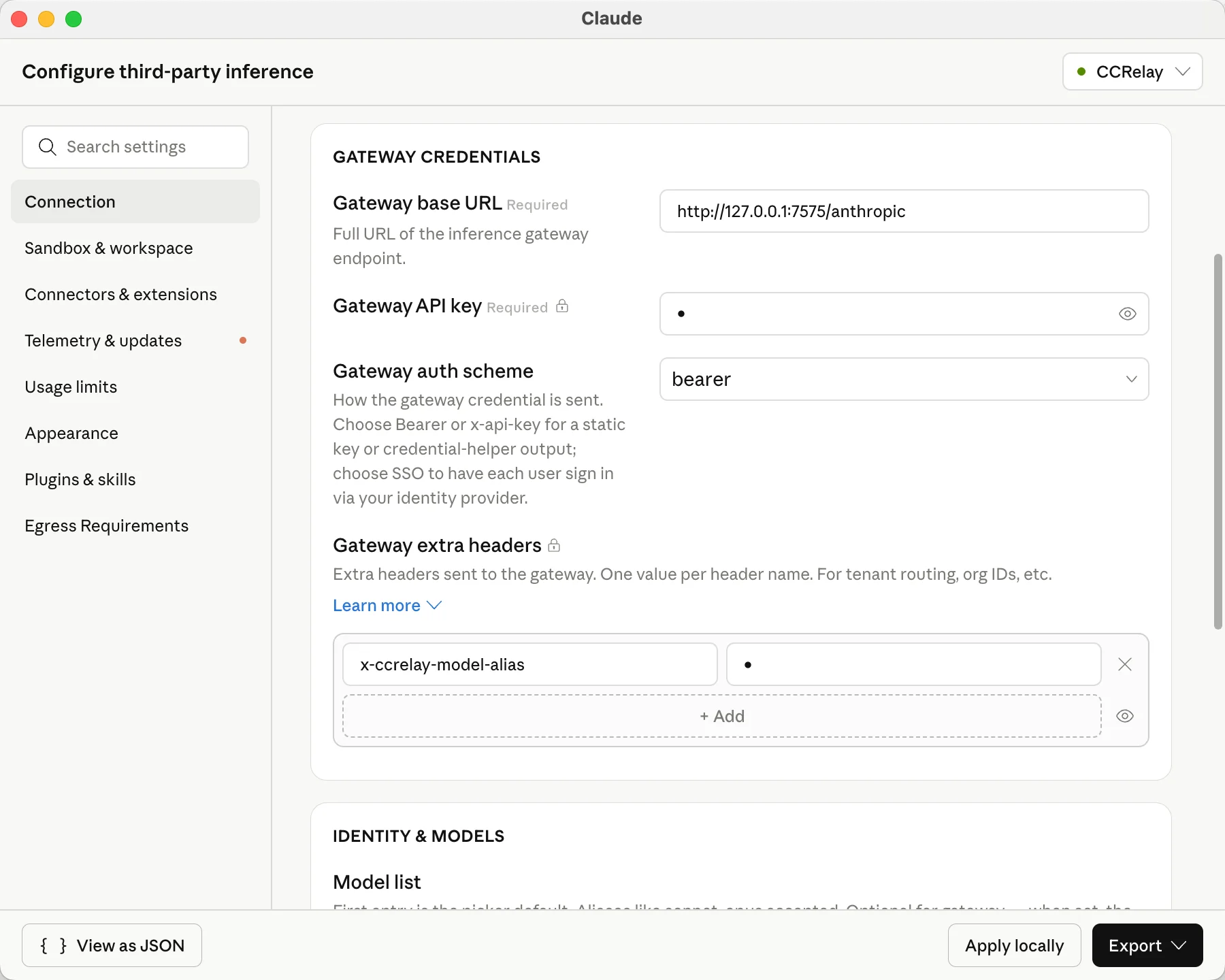
CCRelay accepts three inbound protocols and converts when the upstream provider speaks a different wire:
| Inbound path | Client protocol |
|---|---|
/v1/messages, /anthropic/v1/messages |
Anthropic Messages |
/v1/chat/completions, /openai/chat/completions |
OpenAI Chat Completions |
/v1/responses |
OpenAI Responses API |
/v1/models, /openai/models |
OpenAI models list |
/anthropic/v1/models |
Anthropic models list |
Conversion rules:
- Same family on both sides (e.g. Chat +
openaiprovider) → passthrough (model mapping and auth still apply) - Cross-family → request/response body conversion via Chat Completions hub
GET /models→ list format converted when entry path andproviderTypedisagree; upstream errors forwarded as-is
Streaming limitations:
- Cross-protocol paths force
stream: falsefor conversion. If the client sendsstream: true, CCRelay synthesizes a minimal SSE envelope so the client SDK can finish; model output arrives in the final payload, not token-by-token. - Same-family streaming passes through normally.
Example: OpenAI-compatible provider (Gemini)
gemini:
  name: "Gemini"
  baseUrl: "https://generativelanguage.googleapis.com/v1beta/openai"
  providerType: "openai"
  mode: "inject"
  apiKey: "${GEMINI_API_KEY}"
  modelMap:
    - pattern: "claude-*"
model: "gemini-2.5-pro"Built-in web dashboard accessible via Command Palette → CCRelay: Open Dashboard (VS Code) or tray menu → Open Dashboard (desktop app).
- Dashboard — server status, current provider, token usage, performance metrics (TTFB, P50/P90 latency, output TPS) with time range selector
- Providers — view, switch, duplicate, import/export providers
- Capabilities — optional web search backends (Tavily and/or GLM (Z.ai)): API keys, GLM endpoint and protocol, default backend, and which providers answer web search locally
- Logs — request/response log viewer with token columns, TTFB, output TPS, and model mapping display (hidden when logging is disabled)
- Settings — manage YAML config in the UI; routing and concurrency hot-reload on save, server and logging changes require a restart
- Client configuration — write Claude Code env vars and Codex config from the UI
Note: The dashboard is not accessible by directly opening
http://127.0.0.1:7575/ccrelay/in a browser. Access is restricted to requests originating from within the VS Code extension or the desktop app, which include an internal header. Open the dashboard via the extension command or the desktop tray menu instead.
Web UI
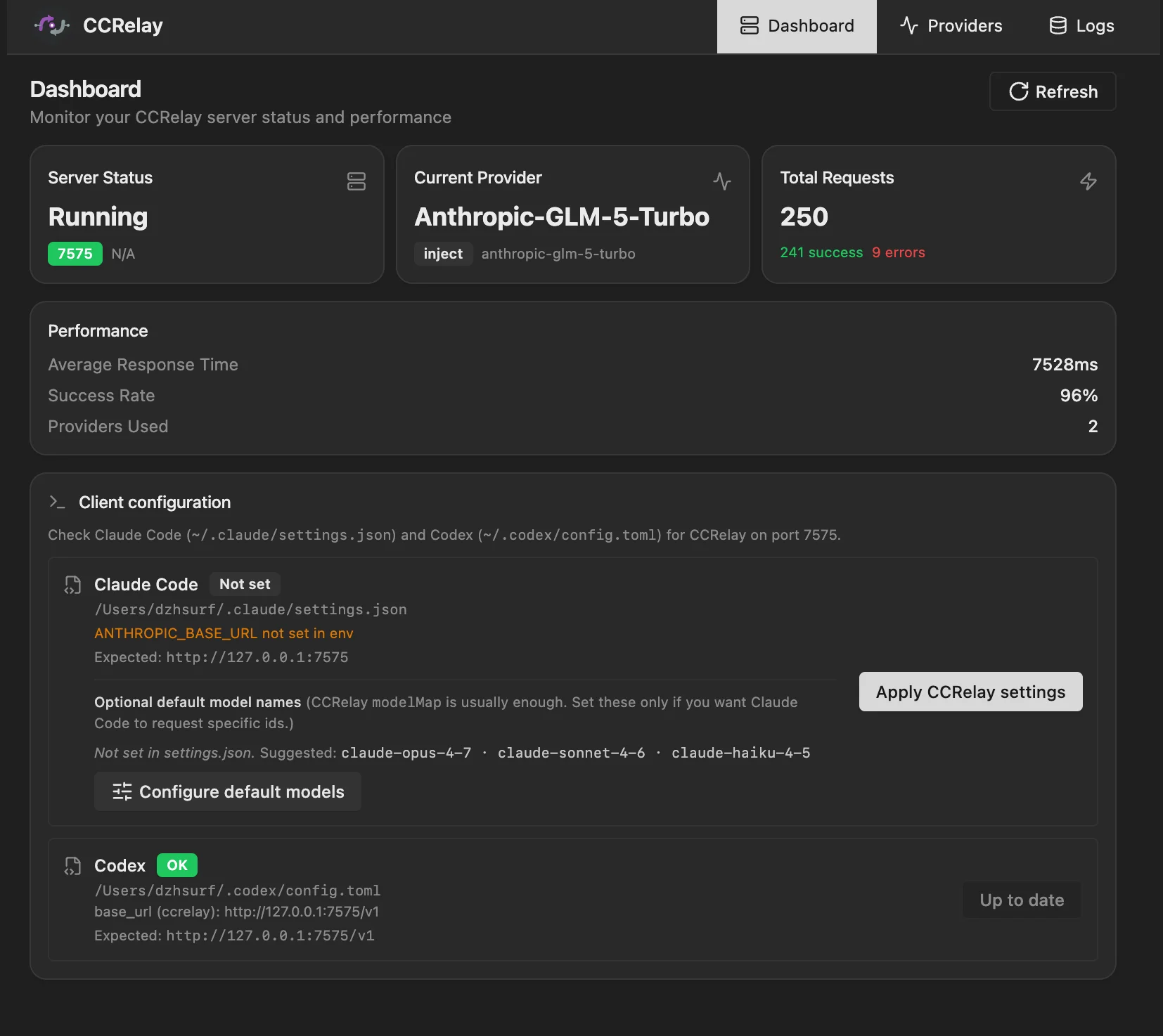
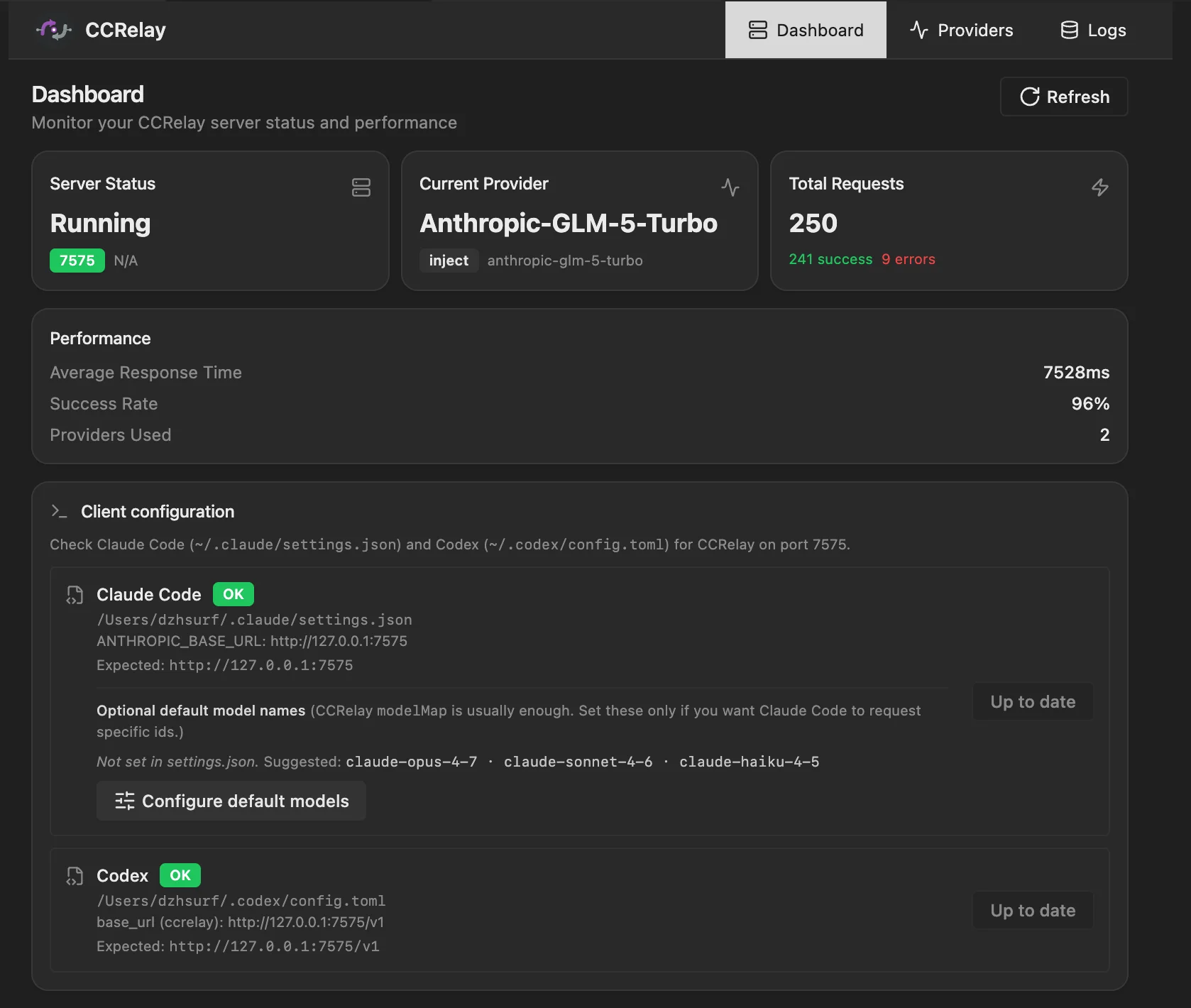
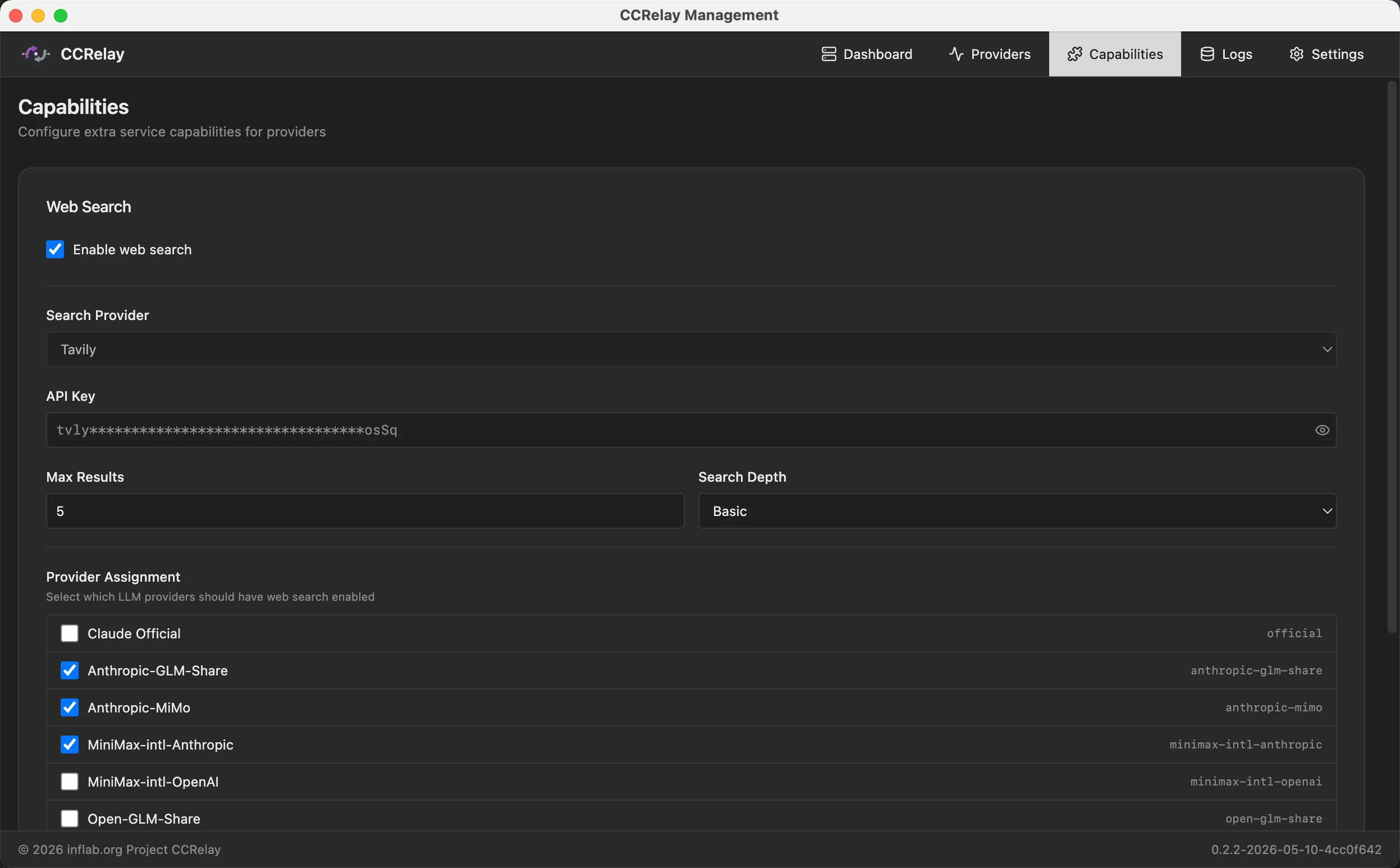
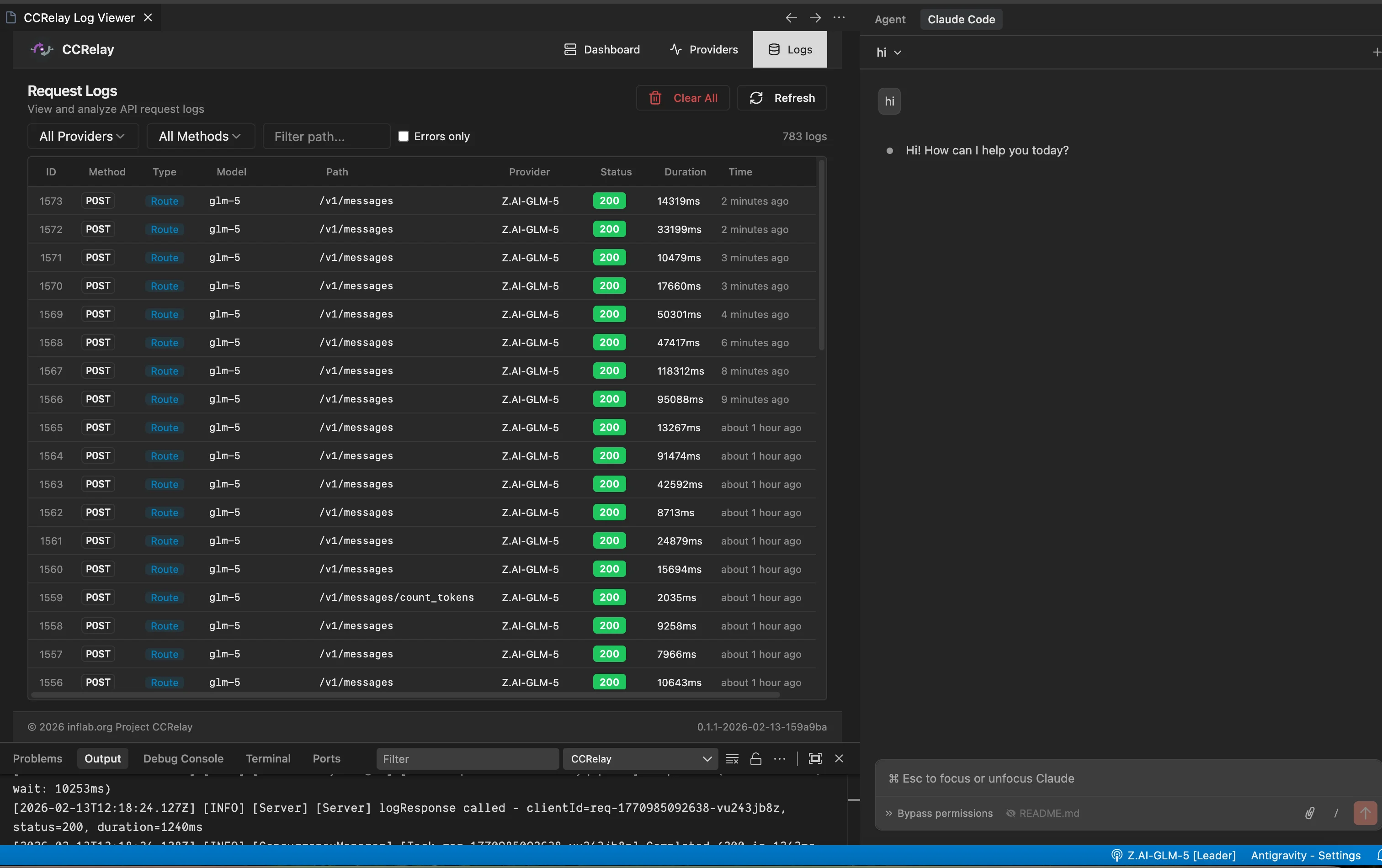
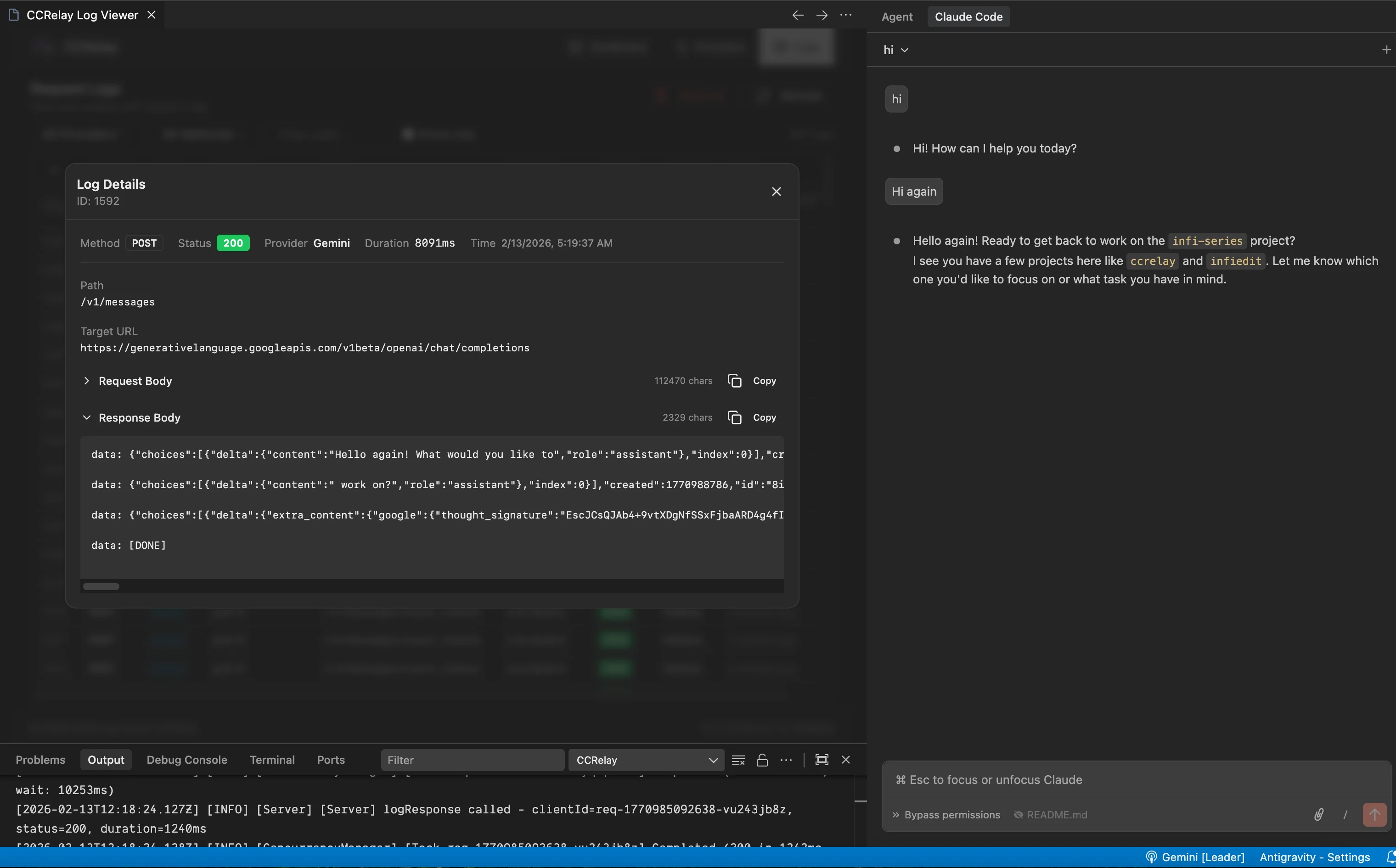
Desktop app
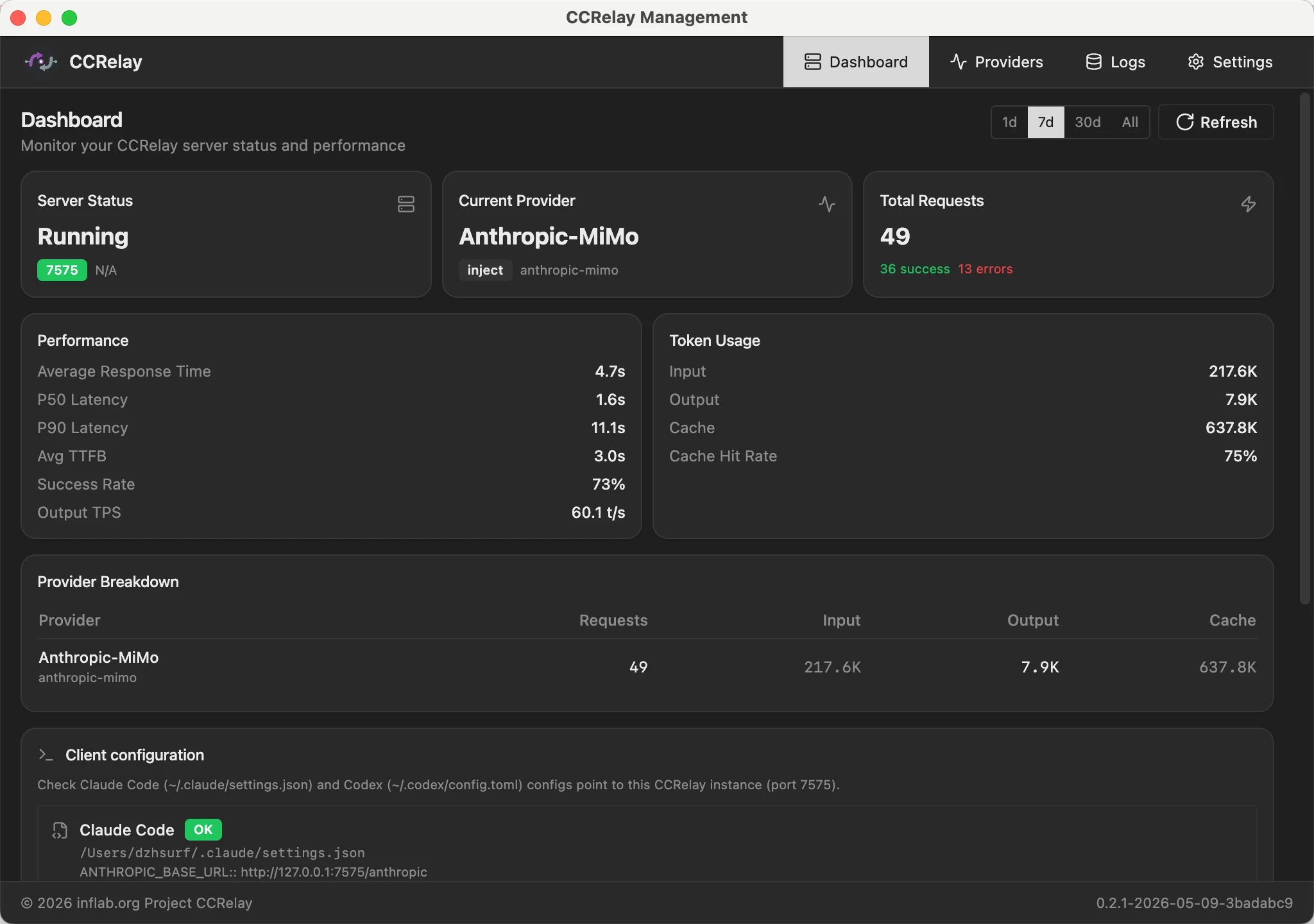
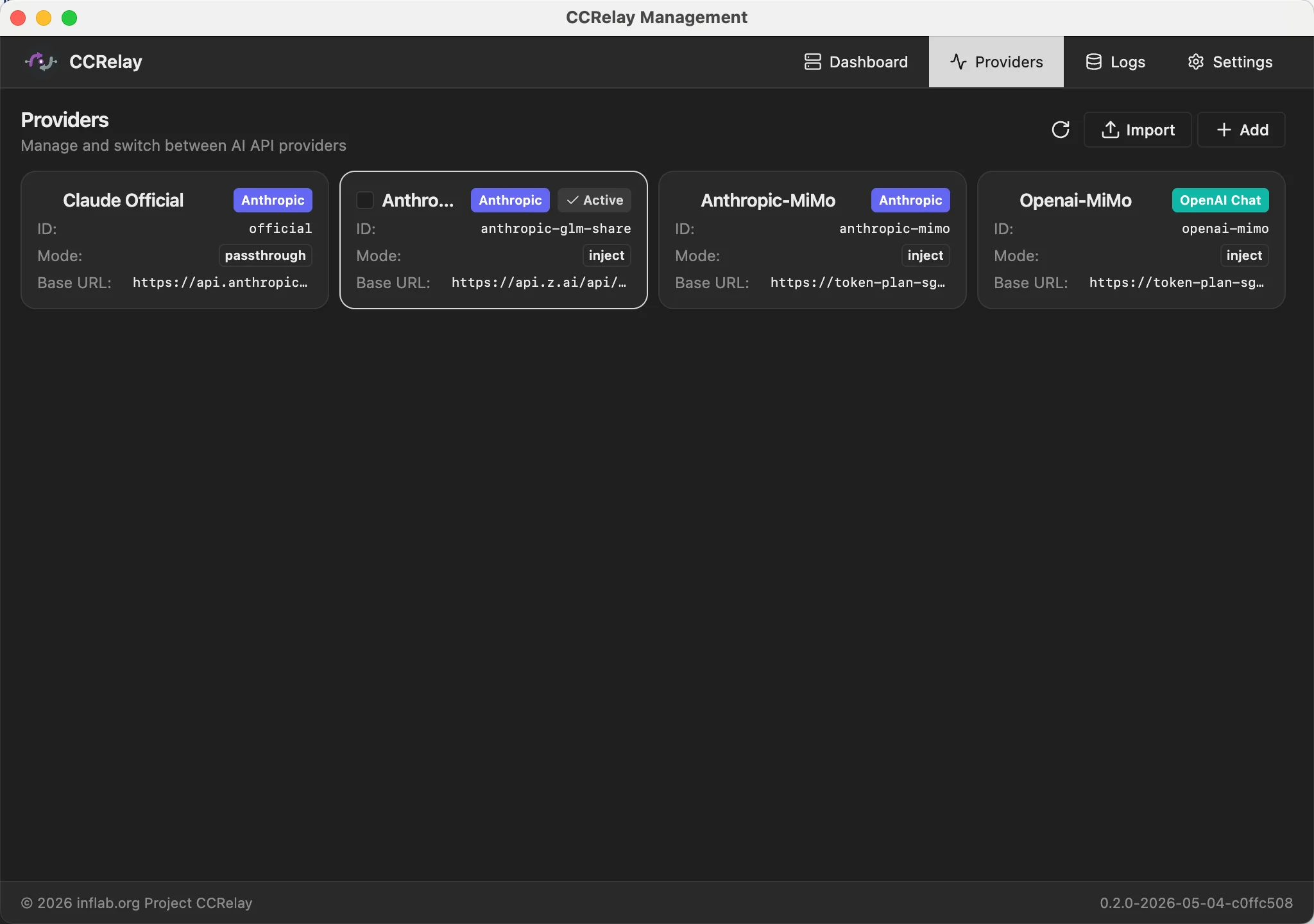
CCRelay uses ~/.ccrelay/config.yaml (auto-created on first launch). On startup the bundled defaults are merged with your file — your values always win, missing keys are filled from defaults. List sections (routing.forward, routing.block, concurrency.routes) merge by identity key, with your rows first and new defaults appended. Omit a list to inherit full defaults; set [] for intentionally empty.
YAML config supports both
camelCaseandsnake_casekeys.
| Setting | Default | Description |
|---|---|---|
server.port |
7575 |
Proxy server port |
server.host |
127.0.0.1 |
Bind address |
server.autoStart |
true |
Auto-start server on extension load |
server.locale |
"" |
Web UI language ("en" or "zh"). First visit shows a picker if unset. |
| Setting | Default | Description |
|---|---|---|
defaultProvider |
official |
Default provider ID |
providers |
{...} |
Provider map (see below) |
Each provider supports:
| Field | Default | Description |
|---|---|---|
name |
— | Display name |
baseUrl |
— | API base URL |
mode |
"passthrough" |
passthrough (keep auth) or inject (replace auth) |
providerType |
"anthropic" |
"anthropic", "openai" (full passthrough), or "openai_chat" (Chat Completions only) |
apiKey |
— | API key for inject mode. Supports ${ENV_VAR}. |
authHeader |
"authorization" |
Auth header name |
modelMap |
— | Model name mappings ([{pattern, model}], wildcards supported) |
vlModelMap |
— | Vision model mappings (for multimodal requests) |
headers |
— | Custom request headers |
enabled |
true |
Enable/disable |
| Setting | Default | Description |
|---|---|---|
configVersion |
"0.2.0" |
Config schema version. Legacy configs auto-migrated. |
routing.forward |
[{path, provider}] |
Forward rules — first match wins. provider: "auto" = current provider. Unmatched → 404. |
routing.block |
[{path, response, code, condition?}] |
Block rules — return custom response. Optional condition.providers (allowlist) and condition.providerNot (exclusion list). |
| Setting | Default | Description |
|---|---|---|
concurrency.enabled |
true |
Enable request queue |
concurrency.maxWorkers |
3 |
Max concurrent requests |
concurrency.maxQueueSize |
100 |
Max queued requests (0 = unlimited) |
concurrency.requestTimeout |
60 |
Queue timeout in seconds (0 = unlimited) |
concurrency.routes |
[] |
Per-route queue config (by pattern) |
| Setting | Default | Description |
|---|---|---|
logging.enabled |
false |
Enable request logging |
logging.database.type |
"sqlite" |
"sqlite" or "postgres" |
SQLite:
| Setting | Default | Description |
|---|---|---|
logging.database.path |
"" |
DB file path (empty = ~/.ccrelay/logs.db) |
logging.database.sqlite3_executable |
"" |
Path to sqlite3 binary (empty = resolve from PATH) |
If sqlite3 cannot be resolved, the proxy runs without log persistence (warning in logs).
PostgreSQL:
| Setting | Default | Description |
|---|---|---|
logging.database.host |
localhost |
Server host |
logging.database.port |
5432 |
Server port |
logging.database.name |
ccrelay |
Database name |
logging.database.user |
"" |
Username |
logging.database.password |
"" |
Password (supports ${ENV_VAR}) |
logging.database.ssl |
false |
Enable SSL |
Optional local handling of Anthropic-style web search (server tool) requests for selected providers. CCRelay can run live retrieval through Tavily or through a GLM (Z.ai) search-capable model endpoint, then return a synthesized assistant response for that turn so the upstream chat model does not need to implement the tool itself.
| Setting | Description |
|---|---|
webSearch.enabled |
Master switch (true / false). When omitted, non-empty providers means on. |
webSearch.providers |
Provider IDs (keys under providers:) assigned to web search (kept when disabled). |
webSearch.defaultSearchBackend |
Optional: tavily or glm (defaults when not inferred per request). |
| Setting | Description |
|---|---|
webSearch.tavily.apiKey |
Tavily API key. Supports ${ENV_VAR}. |
webSearch.tavily.searchDepth |
basic or advanced (optional). |
webSearch.tavily.maxResults |
Number of results, 1–10 (optional). |
| Setting | Description |
|---|---|
webSearch.glm.apiKey |
Z.ai API key. Supports ${ENV_VAR}. |
webSearch.glm.endpoint |
Optional override; otherwise derived from protocol, region, and coding. |
webSearch.glm.protocol |
openai (Chat Completions) or anthropic (Messages). |
webSearch.glm.region |
intl or cn. |
webSearch.glm.coding |
Optional: prefer coding-oriented GLM host when the default endpoint is used. |
webSearch.glm.model |
Optional model id (defaults apply when omitted). |
You may use the top-level key web_search instead of webSearch (same nested shape).
webSearch:
  tavily:
    apiKey: "${TAVILY_API_KEY}"
    searchDepth: basic
    maxResults: 5
  glm:
    apiKey: "${GLM_API_KEY}"
    protocol: openai
    region: intl
  defaultSearchBackend: tavily
  enabled: true
  providers:
    - glm
Set enabled: false to turn off web search without clearing the providers preset list.
Edit the same fields from the dashboard Capabilities tab.
configVersion: "0.2.0"

server:
  port: 7575
  host: "127.0.0.1"
  autoStart: true

providers:
  official:
    name: "Claude Official"
    baseUrl: "https://api.anthropic.com"
    mode: "passthrough"
    providerType: "anthropic"
    enabled: true

  glm:
    name: "Z.AI-GLM-5"
    baseUrl: "https://api.z.ai/api/anthropic"
    mode: "inject"
    apiKey: "${GLM_API_KEY}"
    modelMap:
      - pattern: "claude-opus-*"
        model: "glm-5"
      - pattern: "claude-sonnet-*"
        model: "glm-5"
      - pattern: "claude-haiku-*"
        model: "glm-4.7"
    enabled: true

  gemini:
    name: "Gemini"
    baseUrl: "https://generativelanguage.googleapis.com/v1beta/openai"
    providerType: "openai"
    mode: "inject"
    apiKey: "${GEMINI_API_KEY}"
    modelMap:
      - pattern: "claude-*"
        model: "gemini-2.5-pro"
    enabled: true

defaultProvider: "official"

routing:
  forward:
    - path: "/v1/messages"
      provider: "auto"
    - path: "/v1/chat/completions"
      provider: "auto"
    - path: "/v1/responses"
      provider: "auto"
    - path: "/v1/models"
      provider: "auto"
    - path: "/v1/messages/count_tokens"
      provider: "auto"
  block:
    - path: "/api/event_logging/*"
      response: ""
      code: 200
    - path: "/v1/messages/count_tokens"
      response: '{"input_tokens": 0}'
      code: 200

concurrency:
  enabled: true
  maxWorkers: 3
  maxQueueSize: 100
  requestTimeout: 60

logging:
  enabled: true
  database:
    type: "sqlite"
path: ""Management endpoints at /ccrelay/:
| Endpoint | Method | Description |
|---|---|---|
/ccrelay/api/status |
GET | Proxy status |
/ccrelay/api/providers |
GET | List providers |
/ccrelay/api/switch/{id} |
GET | Switch to provider |
/ccrelay/api/switch |
POST | Switch provider (JSON body) |
/ccrelay/api/providers/export |
POST | Export providers by ID |
/ccrelay/api/providers/import |
POST | Import providers (merge by ID) |
/ccrelay/api/queue |
GET | Queue statistics |
/ccrelay/api/logs |
GET | Request logs |
/ccrelay/api/config |
GET, PATCH | Read/write config sections |
/ccrelay/ws |
WebSocket | Follower sync |
/ccrelay/ |
GET | Web UI dashboard |
All other requests are proxied to the current provider.
| Command | ID | Description |
|---|---|---|
| CCRelay: Show Menu | ccrelay.showMenu |
Show main menu |
| CCRelay: Switch Provider | ccrelay.switchProvider |
Provider picker |
| CCRelay: Start Server | ccrelay.startServer |
Start server |
| CCRelay: Stop Server | ccrelay.stopServer |
Stop server |
| CCRelay: Open Settings | ccrelay.openSettings |
Extension settings |
| CCRelay: Show Logs | ccrelay.showLogs |
Output logs |
| CCRelay: Clear Logs | ccrelay.clearLogs |
Clear output logs |
| CCRelay: Open Dashboard | ccrelay.openWebUI |
Web dashboard |
npm run compile        # Type-check
npm run watch          # Watch & recompile
npm run lint           # Lint
npm run format         # Format
npm run test           # Unit tests
npm run test:integration
npm run test:all
npm run test:coverage
npm run package        # Build VSIX
npm run build:dev      # Dev build
npm run build:prod     # Prod build

# Electron desktop app
npm run desktop:start
npm run desktop:pack:mac
npm run desktop:pack:win

# Tauri desktop app
npm run tauri:dev
npm run tauri:pack:mac
npm run tauri:pack:winccrelay/
├── packages/
│ ├── core/ # Shared runtime (proxy, config, converters)
│ ├── vscode/ # VS Code extension
│ ├── desktop/ # Electron desktop app
│ └── desktop-tauri/ # Tauri desktop app
├── web/ # Web UI (React + Vite)
├── tests/ # Vitest unit + integration
├── scripts/ # Build & packaging helpers
└── dists/ # Packaged .vsix
| File | Location | Description |
|---|---|---|
| Config | ~/.ccrelay/config.yaml |
Main config (auto-created) |
| State | ~/.ccrelay/state.json |
Active provider ID |
| IPC lock | ~/.ccrelay/ccrelay-lock.sock (Unix) / named pipe (Win) |
Leader election |
| Log DB | ~/.ccrelay/logs.db |
Request logs (Leader only) |
Issues and Pull Requests are welcome!
This project is 100% AI-generated code. Special thanks to:
- Cursor and Claude Code — AI coding assistants
- GLM and Xiaomi MiMo — model APIs used as development backends
Copyright (c) 2026 inflab.org