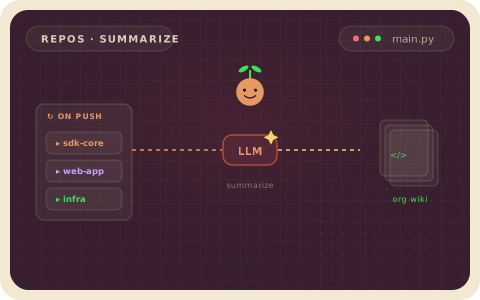
An LLM reads each Python file, extracts its public classes, functions, and CocoIndex call graphs, and aggregates them into a one-pager Markdown wiki per project — in plain async Python.
Edit a file, re-run, and only that file is re-analyzed; the wiki stays fresh without going out of date.
Star us ❤️ →






Your code is the source of truth, but a hand-written wiki drifts the moment someone merges a PR. This pipeline builds your own deep wiki — a one-pager per project that's always fresh, because it's regenerated by incremental processing instead of by hand. You declare the transformation in native Python — target_state = transformation(source_state) — and the Rust engine reprocesses the minimum: switch the model or edit one file, and only what changed is re-analyzed, keeping the wikis current in production.
Each top-level subdirectory is treated as a project. The pipeline extracts a structured CodebaseInfo per file with an LLM, aggregates files into a project summary, and writes Markdown with Mermaid diagrams. Read it in main.py:
@coco.fn(memo=True)   # per file — structured LLM extraction, cached by content
async def extract_file_info(file: FileLike) -> CodebaseInfo:
    result = await _instructor_client.chat.completions.create(
        model=LLM_MODEL, response_model=CodebaseInfo,
        messages=[{"role": "user", "content": prompt}],
    )
    return CodebaseInfo.model_validate(result.model_dump())

@coco.fn(memo=True)   # per project — extract every file, aggregate, write one Markdown page
async def process_project(project_name: str, files, output_dir: pathlib.Path) -> None:
    file_infos = await coco.map(extract_file_info, files)         # concurrent extraction
    project_info = await aggregate_project_info(project_name, file_infos)
    markdown = generate_markdown(project_name, project_info, file_infos)
    localfs.declare_file(output_dir / f"{project_name}.md", markdown, create_parent_dirs=True)

@coco.fn
async def app_main(root_dir: pathlib.Path, output_dir: pathlib.Path) -> None:
    for entry in root_dir.resolve().iterdir():
        if not entry.is_dir() or entry.name.startswith("."):
            continue
        files = [f async for f in localfs.walk_dir(entry, recursive=True,
                 path_matcher=PatternFilePathMatcher(included_patterns=["**/*.py"],
                                                     excluded_patterns=["**/.*", "**/__pycache__"]))]
        if files:
            await coco.mount(coco.component_subpath("project", entry.name),
                             process_project, entry.name, files, output_dir)
Extraction is instructor over LiteLLM with the Pydantic models in models.py; the LLM emits Mermaid graph syntax directly (bold for @coco.fn functions, thick ==> arrows for mount/use_mount calls). Each project mounts as its own processing component, so projects run in parallel and one finishing doesn't wait on the rest.
📘 Full Tutorial →
Step-by-step walkthrough with the data models, per-project granularity, concurrent extraction, and the Markdown + Mermaid output.
- Always fresh, never by hand. The wiki is a target state regenerated from the code — edit a file and the one-pager updates itself; the docs can't drift from the source.
- Incremental by default.
@coco.fn(memo=True)caches each file's extraction by content, so re-running only re-analyzes changed files. Add a project and only that project is processed. - Concurrent by construction.
coco.map(extract_file_info, files)fans every file out at once while staying visible to the pipeline — far faster than sequential LLM calls. - You pick the granularity. Here it's one wiki page per project directory, but the same shape works per file, per page, or per semantic unit.
- Structured outputs, your stack. One
CodebaseInfoPydantic model drives both file- and project-level extraction; swapLLM_MODELfor any LiteLLM provider.
1. Configure & install — the default model is gemini/gemini-2.5-flash:
cp .env.example .env     # set GEMINI_API_KEY (or LLM_MODEL=<provider/model> with its matching key)
pip install -e .
2. Generate the wiki — root_dir defaults to ../, so out of the box it documents the CocoIndex examples/ folder itself, writing one page per example into ./output:
cocoindex update main.pyTo document your own code, point root_dir in main.py at a folder of project subdirectories and re-run.
3. Read the output:
ls output/
cat output/code_embedding.md
Each page has an Overview, a Components list (★ marks @coco.fn functions), a CocoIndex Pipeline Mermaid diagram where applicable, and per-file summaries for multi-file projects. Edit a .py file and re-run — only that file is re-analyzed, every other file served from the memo cache.
If this kept your codebase docs fresh, give CocoIndex a star ⭐ — it helps a lot.
Docs · Walkthrough · Discord · See all examples →
